To enhance your OpenStack cloud deployment, you can consider adding a variety of services that extend its functionality beyond the core services. Below is a comprehensive list of additional OpenStack services that you might find useful:
These are the foundational services that every OpenStack deployment typically includes:
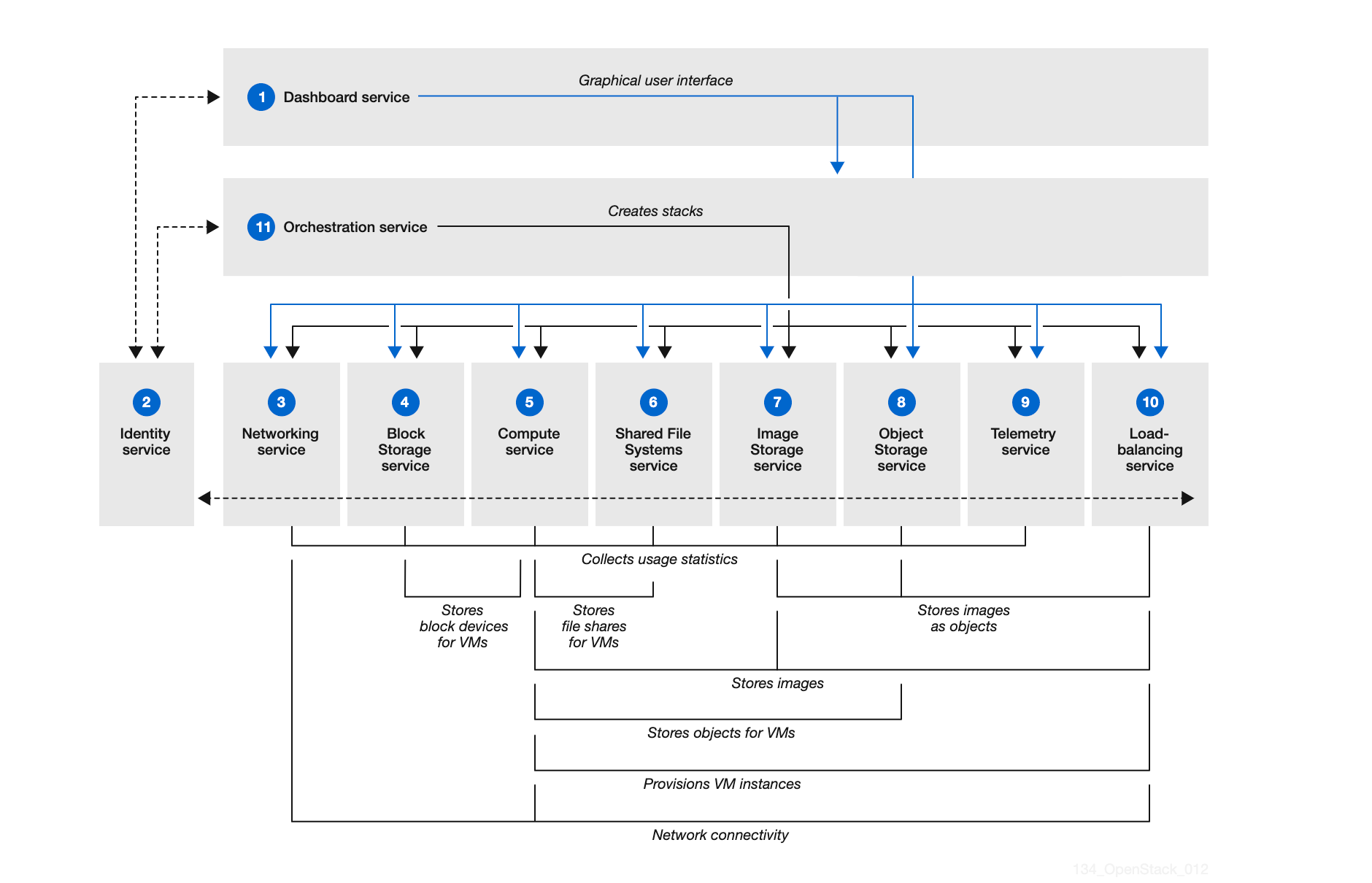
- Nova: Compute service for managing virtual machines.
- Neutron: Networking service for connecting networks and managing IP addresses.
- Swift: Object storage service for storing unstructured data.
- Cinder: Block storage service for persistent storage.
- Keystone: Identity service for authentication and authorization.
- Glance: Image service for managing virtual machine images.
- Horizon: Dashboard for managing OpenStack services through a web interface.
These services can be added to provide more advanced features and capabilities:
- Ceilometer: Telemetry service for monitoring and metering usage of resources.
- Aodh: Alarming service that generates alarms based on Ceilometer metrics.
- Heat: Orchestration service for managing infrastructure as code using templates.
- Ironic: Bare Metal provisioning service for managing physical servers.
- Octavia: Load balancing service to manage application traffic.
- Murano: Application catalog service for deploying cloud-ready applications.
- Trove: Database as a Service (DaaS) for managing databases in the cloud.
- Magnum: Service for managing container orchestration engines like Kubernetes.
- Sahara: Big Data processing framework provisioning service.
- Freezer: Backup and disaster recovery service.
- Barbican: Key management service to manage secrets and encryption keys.
- Cyborg: Lifecycle management of hardware accelerators (like GPUs).
- Zun: Containers service to manage containerized applications.
- Senlin: Clustering service for managing groups of resources as a single entity.
- Ministral: Workflow service for defining workflows in OpenStack.
By integrating these additional services, you can customize your OpenStack environment to better suit your specific needs, whether it’s enhancing security, improving monitoring, or providing advanced orchestration capabilities[1][2][4][5][6]. Make sure to review the documentation related to each service to understand its requirements and configuration options before deployment.
Citations: [1] https://www.redhat.com/en/topics/openstack [2] https://www.geeksforgeeks.org/introduction-to-openstack/ [3] https://docs.oracle.com/cd/E64747_01/E64749/html/osusg-openstack-services.html [4] https://openmetal.io/resources/blog/what-are-the-projects-that-make-up-openstack/ [5] https://openmetal.io/docs/glossary/what-are-openstack-services/ [6] https://computingforgeeks.com/wp-content/uploads/2021/01/openstack-core-services.png?sa=X&ved=2ahUKEwjIgZaDt46LAxXzl-4BHZ7RLFkQ_B16BAgAEAI [7] https://www.openstack.org/software/project-navigator/openstack-components [8] https://docs.openstack.org/ocata/admin-guide/common/get-started-openstack-services.html.
OpenStack-এ নতুন সার্ভিস ইনস্টল করতে, আপনি সাধারণত Packstack বা OpenStack-Ansible ব্যবহার করেন। এখানে Packstack ব্যবহার করে একটি সার্ভিস ইনস্টল করার জন্য সাধারণ পদক্ষেপ এবং কমান্ড দেওয়া হলো:
প্রথমে, একটি উত্তর ফাইল তৈরি করুন যা আপনার কনফিগারেশন সেটিংস ধারণ করবে। উদাহরণস্বরূপ:
packstack --gen-answer-file=/root/answers.txtউত্তর ফাইলটি সম্পাদনা করুন এবং যে সার্ভিসটি আপনি ইনস্টল করতে চান সেটির জন্য কনফিগারেশন যুক্ত করুন। উদাহরণস্বরূপ, যদি আপনি Trove (ডেটাবেস অ্যাজ এ সার্ভিস) ইনস্টল করতে চান, তাহলে নিম্নলিখিত লাইনগুলি যুক্ত করুন:
CONFIG_TROVE_INSTALL=y
আপনার কনফিগারেশন অনুযায়ী Packstack কমান্ড চালান:
packstack --answer-file=/root/answers.txtনিচে কিছু নির্দিষ্ট সার্ভিসের জন্য কমান্ড দেওয়া হলো:
packstack --os-trove-install=y --answer-file=/root/answers.txtpackstack --os-ironic-install=y --answer-file=/root/answers.txtpackstack --os-octavia-install=y --answer-file=/root/answers.txtpackstack --os-manila-install=y --answer-file=/root/answers.txtপ্রতিটি সার্ভিসের জন্য কিছু নির্দিষ্ট কনফিগারেশন থাকতে পারে, তাই নিশ্চিত করুন যে আপনি তাদের ডকুমেন্টেশন পর্যালোচনা করেছেন এবং প্রয়োজনীয় সেটিংস যুক্ত করেছেন।
এই পদক্ষেপগুলি অনুসরণ করে, আপনি OpenStack-এ যে কোনো সার্ভিস সহজেই ইনস্টল করতে পারবেন। সবসময় নিশ্চিত হন যে আপনার পরিবেশ প্রস্তুত এবং সমস্ত নির্ভরতা পূরণ হয়েছে।