Integration of Doctrine ORM for Nette Framework.
- Installation
- Configuration
- Static analyses
- Troubleshooting
- Examples
Install package using composer.
composer require nettrine/ormRegister prepared compiler extension in your config.neon file.
extensions:
  nettrine.orm: Nettrine\ORM\DI\OrmExtension
Note
This is just ORM, for DBAL please use nettrine/dbal.
nettrine.orm:
  managers:
    default:
      connection: default
      mapping:
        App:
          directories: [%appDir%/Database]
namespace: App\DatabaseHere is the list of all available options with their types.
nettrine.orm:
 managers:
   <name>:
     connection: <string>
     entityManagerDecoratorClass: <class>
     configurationClass: <class>

     lazyNativeObjects: <bool>
     proxyDir: <path>
     autoGenerateProxyClasses: <boolean>
     proxyNamespace: <string>
     metadataDriverImpl: <service>
     entityNamespaces: <mixed[]>
     resolveTargetEntities: <mixed[]>
     customStringFunctions: <mixed[]>
     customNumericFunctions: <mixed[]>
     customDatetimeFunctions: <mixed[]>
     customHydrationModes: <string[]>
     classMetadataFactoryName: <string>
     defaultRepositoryClassName: <string>
     namingStrategy: <class-string>
     quoteStrategy: <class-string>
     entityListenerResolver: <class-string>
     repositoryFactory: <class-string>
     defaultQueryHints: <mixed[]>
     filters:
       <name>:
         class: <string>
         enabled: <boolean>

     mapping:
       <name>:
         type: <attributes|xml>
         directories: <string[]>
         namespace: <string>
         options:
           fileExtension: <string>
           xsdValidation: <boolean>

     defaultCache: <class-string|service>
     queryCache: <class-string|service>
     resultCache: <class-string|service>
     hydrationCache: <class-string|service>
     metadataCache: <class-string|service>

     secondLevelCache:
       enabled: <boolean>
       cache: <class-string|service>
       logger: <class-string|service>
       regions:
         <name>:
           lifetime: <int>
           lockLifetime: <int>
For example:
# See more in nettrine/dbal
nettrine.dbal:
  debug:
    panel: %debugMode%

  connections:
    default:
      driver: pdo_pgsql
      host: localhost
      port: 5432
      user: root
      password: root
      dbname: nettrine

nettrine.orm:
  managers:
    default:
      connection: default
      mapping:
        App:
          directories: [%appDir%/Database]
          namespace: App\Database
Tip
Take a look at real Nettrine ORM configuration example at contributte/doctrine-project.
By default, this extension will try to autoconfigure itself.
- proxyDir:
%tempDir%/cache/doctrine/orm/proxies, if%tempDir%is not defined, you have to define it manually. - autoGenerateProxyClasses:
%debugMode%, if%debugMode%is not defined, you have to define it manually.0means that the proxy classes must be generated manually.1means that the proxy classes are generated automatically.2means that the proxy classes are generated automatically when the proxy file does not exist.3means that the proxy classes are generated automatically usingeval()(useful for debugging).4means that the proxy classes are generated automatically when the proxy file does not exist or when the proxied file changed.
Warning
Requires PHP >= 8.4 and doctrine/orm >= 3.4.0
This setting will override any of the proxy settings and doctrine will use native lazy objects that were added to PHP in version 8.4. No proxies are generated and stored on the disk. This also works with new property hooks.
This will be required by default in version 4.0.0.
Tip
Take a look at more information in official Doctrine documentation:
EntityManager is a central access point to ORM functionality. It is a wrapper around ObjectManager and holds the metadata and configuration of the ORM.
EntityManagerDecorator
You can use entityManagerDecoratorClass to decorate EntityManager.
nettrine.orm:
  managers:
    default:
      connection: default
      entityManagerDecoratorClass: App\MyEntityManagerDecorator
Close & Reset
If you hit The EntityManager is closed. exception, you can use reset method to reopen it.
$managerRegistry = $container->getByType(Doctrine\Persistence\ManagerRegistry::class);
$managerRegistry->resetManager(); // default
$managerRegistry->resetManager('second');
Warning
Resetting the manager is a dangerous operation. It is also black magic, because you cannot just create a new EntityManager instance,
you have to reset the current one using internal methods (reflection & binding).
Class responsible for this operation is Nettrine\ORM\ManagerRegistry.
Reopen (Static Method)
If you need to reopen an EntityManager without resetting it (keeping the same instance), you can use the static reopen method directly.
This is useful when you have a reference to a closed EntityManager and want to reopen it without going through the registry.
use Nettrine\ORM\ManagerRegistry;

// Reopen a closed EntityManager directly
ManagerRegistry::reopen($entityManager);

// Also works with EntityManagerDecorator
ManagerRegistry::reopen($decoratedEntityManager);
This method uses internal binding to access the private $closed property of the EntityManager and sets it to false.
It's particularly useful in testing scenarios or when you need to recover from an exception that closed the EntityManager.
Tip
Take a look at more information in official Doctrine documentation:
A Doctrine ORM can automatically cache query results and metadata. The feature is optional though, and by default, no cache is configured.
You can enable the result cache by setting the defaultCache configuration option to an instance of a cache driver or metadataCache, queryCache, resultCache, hydrationCache separately.
Warning
Cache adapter must implement Psr\Cache\CacheItemPoolInterface interface.
Use any PSR-6 + PSR-16 compatible cache library like symfony/cache or nette/caching.
In the simplest case, you can define only defaultCache for all caches.
nettrine.orm:
  managers:
    default:
      # Create cache manually
      defaultCache: App\CacheService(%tempDir%/cache/doctrine/orm)

      # Use registered cache service
      defaultCache: @cacheService
Or you can define each cache separately.
nettrine.orm:
  managers:
    default:
      queryCache: App\CacheService(%tempDir%/cache/doctrine/orm/query)
      resultCache: App\CacheService(%tempDir%/cache/doctrine/orm/result)
      hydrationCache: App\CacheService(%tempDir%/cache/doctrine/orm/hydration)
      metadataCache: App\CacheService(%tempDir%/cache/doctrine/orm/metadata)
Second level cache is a bit different. Be sure you know what you are doing, learn more in official Doctrine documentation.
nettrine.orm:
  managers:
    default:
      secondLevelCache:
        enabled: true
        cache: App\CacheService(%tempDir%/cache/doctrine/orm/slc)
        logger: App\LoggerService()
        regions:
          region1:
            lifetime: 3600
            lockLifetime: 60
          region2:
            lifetime: 86000
            lockLifetime: 60
If you like symfony/cache you can use it as well.
nettrine.orm:
    managers:
      default:
        # Use default cache
        defaultCache: Symfony\Component\Cache\Adapter\FilesystemAdapter(namespace: orm, defaultLifetime: 0, directory: %tempDir%/cache/doctrine/orm)

        # Or use separate caches
        queryCache: Symfony\Component\Cache\Adapter\FilesystemAdapter(namespace: orm-query, defaultLifetime: 0, directory: %tempDir%/cache/doctrine/orm/query)
        resultCache: Symfony\Component\Cache\Adapter\FilesystemAdapter(namespace: orm-result, defaultLifetime: 0, directory: %tempDir%/cache/doctrine/orm/result)
        hydrationCache: Symfony\Component\Cache\Adapter\FilesystemAdapter(namespace: orm-hydration, defaultLifetime: 0, directory: %tempDir%/cache/doctrine/orm/hydration)
        metadataCache: Symfony\Component\Cache\Adapter\FilesystemAdapter(namespace: orm-metadata, defaultLifetime: 0, directory: %tempDir%/cache/doctrine/orm/metadata)
If you like nette/caching you can use it as well. Be aware that nette/caching is not PSR-6 + PSR-16 compatible, you need contributte/psr16-caching.
nettrine.orm:
    managers:
      default:
        defaultCache: Contributte\Psr6\CachePool(
          Nette\Caching\Cache(
            Nette\Caching\Storages\FileStorage(%tempDir%/cache)
            doctrine/orm
          )
        )
Important
You should always use cache for production environment. It can significantly improve performance of your application. Pick the right cache adapter for your needs. For example from symfony/cache:
FilesystemAdapter- if you want to cache data on diskArrayAdapter- if you want to cache data in memoryApcuAdapter- if you want to cache data in memory and share it between requestsRedisAdapter- if you want to cache data in memory and share it between requests and serversChainAdapter- if you want to cache data in multiple storages
There are several ways how to map entities to Doctrine ORM. This library supports attributes and xml out of the box.
Since PHP 8.0, we can use #[attributes] for entity mapping.
<?php declare(strict_types=1);

namespace App\Database;

use Doctrine\ORM\Mapping as ORM;

#[ORM\Entity]
#[ORM\Table(name: 'customer')]
class Customer
{

    #[ORM\Column(length: 32, unique: true, nullable: false)]
    protected string $username;

    #[ORM\Column(columnDefinition: 'CHAR(2) NOT NULL')]
    protected string $country;

}
Configuration for attribute mapping looks like this:
nettrine.orm:
  managers:
    default:
      connection: default
      mapping:
        App:
          directories: [%appDir%/Database]
namespace: App\DatabaseThe XML mapping driver enables you to provide the ORM metadata in form of XML documents. It requires the dom extension in order to be able to validate your mapping documents against its XML Schema.
Tip
Take a look at more information in official Doctrine documentation:
<doctrine-mapping
  xmlns="http://doctrine-project.org/schemas/orm/doctrine-mapping"
  xmlns:xsi="https://www.w3.org/2001/XMLSchema-instance"
  xsi:schemaLocation="
    http://doctrine-project.org/schemas/orm/doctrine-mapping
    https://www.doctrine-project.org/schemas/orm/doctrine-mapping.xsd
">

  ...

</doctrine-mapping>
Configuration for XML mapping looks like this:
nettrine.orm:
  managers:
    default:
      connection: default
      mapping:
        App:
          type: xml
          directories: [%appDir%/Database]
          namespace: App\Database
          options:
            fileExtension: .orm.xml
            xsdValidation: true
Setting xsdValidation to false will allow using custom XML elements in mapping files, as used by some behavior extensions (e.g. gedmo:sortable-position).
You can use MappingHelper to add multiple mappings at once. This is useful when you have multiple modules with entities.
Create your own compiler extension and use MappingHelper to add mappings.
It's a good practice if you have separated modules in your applications.
<?php declare(strict_types=1);

namespace App\Model\DI;

use Nette\DI\CompilerExtension;
use Nettrine\ORM\DI\Helpers\MappingHelper;

class DoctrineMappingExtension extends CompilerExtension
{

  public function beforeCompile(): void
  {
    MappingHelper::of($this)
        ->addAttribute($connection = 'default', $namespace = 'App\Model\Database', $path = __DIR__ . '/../app/Model/Database')
        ->addAttribute('default', 'Forum\Modules\Database', __DIR__ . '/../../modules/Forum/Database')
        ->addXml('default', 'Gallery1\Modules\Database', __DIR__ . '/../../modules/Gallery1/Database')
        ->addXml('default', 'Gallery2\Modules\Database', __DIR__ . '/../../modules/Gallery2/Database')
  }

}
Do not forget to register your extension in config.neon.
extensions:
category: App\Model\DI\DoctrineMappingExtensionThe resolveTargetEntities configuration allows you to map interfaces or abstract classes to concrete entity implementations.
This is useful for creating reusable modules that depend on entity interfaces rather than concrete implementations.
Tip
Take a look at more information in official Doctrine documentation:
nettrine.orm:
  managers:
    default:
      connection: default
      resolveTargetEntities:
        App\Model\UserInterface: App\Database\Entity\User
        App\Model\OrderInterface: App\Database\Entity\Order
      mapping:
        App:
          directories: [%appDir%/Database]
          namespace: App\Database
Example usage in entity:
<?php declare(strict_types=1);

namespace App\Database\Entity;

use App\Model\UserInterface;
use Doctrine\ORM\Mapping as ORM;

#[ORM\Entity]
class Comment
{
    #[ORM\ManyToOne(targetEntity: UserInterface::class)]
    private UserInterface $author;
}You can register custom DQL functions for string, numeric, and datetime operations. These functions extend Doctrine Query Language with custom SQL functions.
Tip
Take a look at more information in official Doctrine documentation:
nettrine.orm:
  managers:
    default:
      connection: default
      customStringFunctions:
        SOUNDEX: App\Doctrine\Functions\SoundexFunction
        GROUP_CONCAT: App\Doctrine\Functions\GroupConcatFunction
      customNumericFunctions:
        FLOOR: App\Doctrine\Functions\FloorFunction
        ROUND: App\Doctrine\Functions\RoundFunction
      customDatetimeFunctions:
        DATE_FORMAT: App\Doctrine\Functions\DateFormatFunction
        DATEDIFF: App\Doctrine\Functions\DateDiffFunction
      mapping:
        App:
          directories: [%appDir%/Database]
          namespace: App\Database
Example custom function implementation:
<?php declare(strict_types=1);

namespace App\Doctrine\Functions;

use Doctrine\ORM\Query\AST\Functions\FunctionNode;
use Doctrine\ORM\Query\Parser;
use Doctrine\ORM\Query\SqlWalker;
use Doctrine\ORM\Query\TokenType;

class SoundexFunction extends FunctionNode
{
    private $stringExpression;

    public function getSql(SqlWalker $sqlWalker): string
    {
        return 'SOUNDEX(' . $this->stringExpression->dispatch($sqlWalker) . ')';
    }

    public function parse(Parser $parser): void
    {
        $parser->match(TokenType::T_IDENTIFIER);
        $parser->match(TokenType::T_OPEN_PARENTHESIS);
        $this->stringExpression = $parser->StringPrimary();
        $parser->match(TokenType::T_CLOSE_PARENTHESIS);
    }
}
Custom hydration modes allow you to define how query results are transformed into PHP objects or arrays.
Tip
Take a look at more information in official Doctrine documentation:
nettrine.orm:
  managers:
    default:
      connection: default
      customHydrationModes:
        CustomArrayMode: App\Doctrine\Hydrators\CustomArrayHydrator
      mapping:
        App:
          directories: [%appDir%/Database]
          namespace: App\Database
Example custom hydrator:
<?php declare(strict_types=1);

namespace App\Doctrine\Hydrators;

use Doctrine\ORM\Internal\Hydration\AbstractHydrator;

class CustomArrayHydrator extends AbstractHydrator
{
    protected function hydrateAllData(): array
    {
        $result = [];
        while ($row = $this->statement()->fetchAssociative()) {
            $result[] = $this->processRow($row);
        }
        return $result;
    }

    private function processRow(array $row): array
    {
        // Custom transformation logic
        return $row;
    }
}
Usage:
$query = $entityManager->createQuery('SELECT u FROM App\Entity\User u');
$results = $query->getResult('CustomArrayMode');
Filters provide a way to add SQL conditions to all queries for specific entities. This is useful for implementing soft deletes, multi-tenancy, or other global query constraints.
Tip
Take a look at more information in official Doctrine documentation:
nettrine.orm:
  managers:
    default:
      connection: default
      filters:
        softDelete:
          class: App\Doctrine\Filters\SoftDeleteFilter
          enabled: true
        tenant:
          class: App\Doctrine\Filters\TenantFilter
          enabled: false
      mapping:
        App:
          directories: [%appDir%/Database]
namespace: App\Databaseclass- The filter class that extendsDoctrine\ORM\Query\Filter\SQLFilterenabled- Whether the filter is enabled by default (optional, defaults tofalse)
Example filter implementation:
<?php declare(strict_types=1);

namespace App\Doctrine\Filters;

use Doctrine\ORM\Mapping\ClassMetadata;
use Doctrine\ORM\Query\Filter\SQLFilter;

class SoftDeleteFilter extends SQLFilter
{
    public function addFilterConstraint(ClassMetadata $targetEntity, string $targetTableAlias): string
    {
        // Check if the entity has a deletedAt column
        if (!$targetEntity->hasField('deletedAt')) {
            return '';
        }

        return sprintf('%s.deleted_at IS NULL', $targetTableAlias);
    }
}
Managing filters at runtime:
$filters = $entityManager->getFilters();

// Enable a filter
$filters->enable('tenant');
$filter = $filters->getFilter('tenant');
$filter->setParameter('tenantId', $currentTenantId);

// Disable a filter
$filters->disable('softDelete');

// Check if filter is enabled
$isEnabled = $filters->isEnabled('softDelete');Doctrine ORM provides an event system that allows you to hook into the persistence lifecycle. Event subscribers are automatically discovered and registered from the DI container.
Tip
Take a look at more information in official Doctrine documentation:
Event Subscribers
Simply register a service implementing Doctrine\Common\EventSubscriber and it will be automatically discovered:
services:
  - App\Doctrine\Subscribers\TimestampSubscriber
  - App\Doctrine\Subscribers\AuditSubscriber
Example event subscriber:
<?php declare(strict_types=1);

namespace App\Doctrine\Subscribers;

use Doctrine\Common\EventSubscriber;
use Doctrine\ORM\Event\PrePersistEventArgs;
use Doctrine\ORM\Event\PreUpdateEventArgs;
use Doctrine\ORM\Events;

class TimestampSubscriber implements EventSubscriber
{
    public function getSubscribedEvents(): array
    {
        return [
            Events::prePersist,
            Events::preUpdate,
        ];
    }

    public function prePersist(PrePersistEventArgs $args): void
    {
        $entity = $args->getObject();

        if (method_exists($entity, 'setCreatedAt')) {
            $entity->setCreatedAt(new \DateTimeImmutable());
        }
    }

    public function preUpdate(PreUpdateEventArgs $args): void
    {
        $entity = $args->getObject();

        if (method_exists($entity, 'setUpdatedAt')) {
            $entity->setUpdatedAt(new \DateTimeImmutable());
        }
    }
}
Lazy Event Loading
The ContainerEventManager supports lazy-loading of event listeners from the DI container.
Listeners are only instantiated when the event is actually dispatched, improving performance.
The naming strategy determines how entity class names and property names are converted to database table and column names.
nettrine.orm:
  managers:
    default:
      connection: default
      namingStrategy: Doctrine\ORM\Mapping\UnderscoreNamingStrategy
      mapping:
        App:
          directories: [%appDir%/Database]
          namespace: App\Database
Available built-in strategies:
Doctrine\ORM\Mapping\DefaultNamingStrategy- Uses entity/property names as-isDoctrine\ORM\Mapping\UnderscoreNamingStrategy- Converts CamelCase to snake_case (default)
You can also use a service reference:
services:
  - App\Doctrine\CustomNamingStrategy

nettrine.orm:
  managers:
    default:
namingStrategy: @App\Doctrine\CustomNamingStrategyThe quote strategy determines how database identifiers (table names, column names) are quoted.
nettrine.orm:
  managers:
    default:
      connection: default
      quoteStrategy: Doctrine\ORM\Mapping\DefaultQuoteStrategy
      mapping:
        App:
          directories: [%appDir%/Database]
namespace: App\DatabaseThe repository factory creates repository instances. You can provide a custom factory to add dependency injection to your repositories.
nettrine.orm:
  managers:
    default:
      connection: default
      repositoryFactory: App\Doctrine\ContainerRepositoryFactory
      mapping:
        App:
          directories: [%appDir%/Database]
          namespace: App\Database
Example custom repository factory with DI container support:
<?php declare(strict_types=1);

namespace App\Doctrine;

use Doctrine\ORM\EntityManagerInterface;
use Doctrine\ORM\Repository\RepositoryFactory;
use Doctrine\Persistence\ObjectRepository;
use Nette\DI\Container;

class ContainerRepositoryFactory implements RepositoryFactory
{
    private Container $container;
    private array $repositoryList = [];

    public function __construct(Container $container)
    {
        $this->container = $container;
    }

    public function getRepository(EntityManagerInterface $entityManager, string $entityName): ObjectRepository
    {
        $repositoryHash = $entityManager->getClassMetadata($entityName)->getName() . spl_object_hash($entityManager);

        if (!isset($this->repositoryList[$repositoryHash])) {
            $this->repositoryList[$repositoryHash] = $this->createRepository($entityManager, $entityName);
        }

        return $this->repositoryList[$repositoryHash];
    }

    private function createRepository(EntityManagerInterface $entityManager, string $entityName): ObjectRepository
    {
        $metadata = $entityManager->getClassMetadata($entityName);
        $repositoryClassName = $metadata->customRepositoryClassName
            ?? $entityManager->getConfiguration()->getDefaultRepositoryClassName();

        // Try to get from container first (for DI support)
        $type = $this->container->getByType($repositoryClassName, false);
        if ($type !== null) {
            return $type;
        }

        return new $repositoryClassName($entityManager, $metadata);
    }
}The entity listener resolver is responsible for instantiating entity listener classes. This is useful when your entity listeners have dependencies that need to be injected.
nettrine.orm:
  managers:
    default:
      connection: default
      entityListenerResolver: App\Doctrine\ContainerEntityListenerResolver
      mapping:
        App:
          directories: [%appDir%/Database]
          namespace: App\Database
Note
By default, Nettrine\ORM\Mapping\ContainerEntityListenerResolver is used, which supports lazy-loading listeners from the DI container.
You can configure default hints that will be applied to all queries.
nettrine.orm:
  managers:
    default:
      connection: default
      defaultQueryHints:
        doctrine.customOutputWalker: App\Doctrine\Walkers\CustomOutputWalker
      mapping:
        App:
          directories: [%appDir%/Database]
namespace: App\DatabaseYou can configure multiple database connections and entity managers for different databases or schemas.
nettrine.dbal:
  connections:
    default:
      driver: pdo_pgsql
      host: localhost
      dbname: main_db
      user: root
      password: secret

    analytics:
      driver: pdo_mysql
      host: analytics.example.com
      dbname: analytics_db
      user: analytics
      password: secret

nettrine.orm:
  managers:
    default:
      connection: default
      mapping:
        App:
          directories: [%appDir%/Database/Main]
          namespace: App\Database\Main

    analytics:
      connection: analytics
      mapping:
        Analytics:
          directories: [%appDir%/Database/Analytics]
          namespace: App\Database\Analytics
Using multiple managers:
// Get the default manager
$defaultManager = $managerRegistry->getManager();
$defaultManager = $managerRegistry->getManager('default');

// Get a specific manager
$analyticsManager = $managerRegistry->getManager('analytics');

// Get a repository from a specific manager
$repository = $managerRegistry->getRepository(AnalyticsEvent::class);

// Get all managers
$managers = $managerRegistry->getManagers();

// Get manager for a specific entity class
$manager = $managerRegistry->getManagerForClass(User::class);Tip
Doctrine ORM needs DBAL. You can use doctrine/dbal or nettrine/dbal.
composer require nettrine/dbalextensions:
nettrine.dbal: Nettrine\DBAL\DI\DbalExtension
nettrine.orm: Nettrine\ORM\DI\OrmExtensionTip
Doctrine ORM console commands need Symfony Console. You can use symfony/console or contributte/console.
composer require contributte/consoleextensions:
console: Contributte\Console\DI\ConsoleExtension(%consoleMode%)
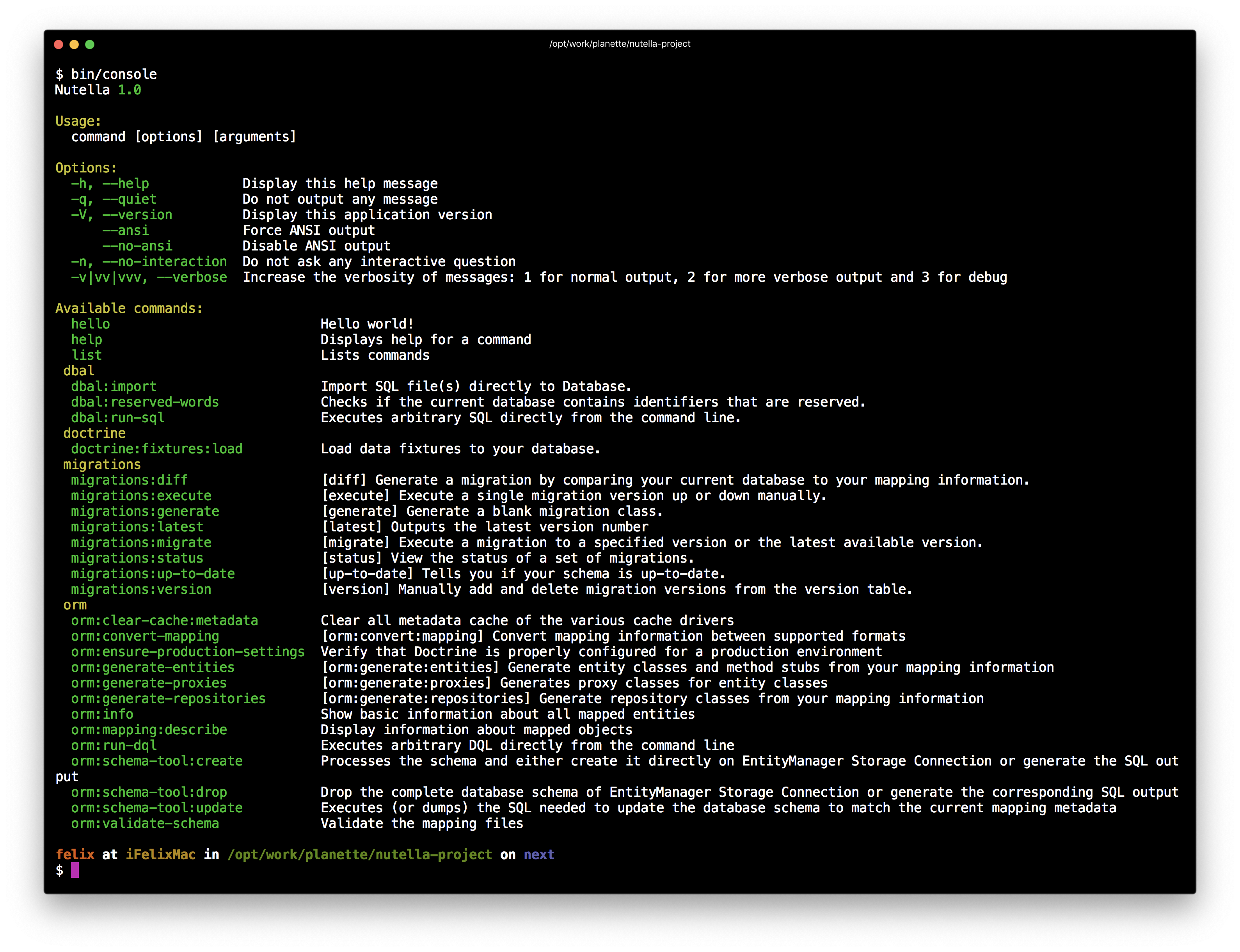
nettrine.orm: Nettrine\ORM\DI\OrmExtensionSince this moment when you type bin/console, there'll be registered commands from Doctrine ORM.
You can use PHPStan to analyze your code.
- Install PHPStan and Doctrine extension.
composer require --dev phpstan/phpstan phpstan/phpstan-doctrine- Create ORM loader for PHPStan, e.q.
phpstan-doctrine.php.
<?php declare(strict_types = 1);

require __DIR__ . '/../vendor/autoload.php';

return App\Bootstrap::boot()
	->createContainer()
->getByType(Doctrine\ORM\EntityManagerInterface::class);- Configure PHPStan in
phpstan.neon.
includes:
	- vendor/phpstan/phpstan-doctrine/extension.neon

parameters:
	level: 9
	phpVersion: 80200

	tmpDir: %currentWorkingDirectory%/var/tmp/phpstan

	fileExtensions:
		- php
		- phpt

	paths:
		- app

	doctrine:
objectManagerLoader: phpstan-doctrine.php- And run PHPStan.
vendor/bin/phpstan analyse -c phpstan.neon-
Are you looking for custom types? You can register custom types in DBAL, see Nettrine DBAL.
-
You have to configure entity mapping (for example attributes), otherwise you will get
It's a requirement to specify a Metadata Drivererror.
Tip
Take a look at more examples in contributte/doctrine.