| title | Azure Policy | |||
|---|---|---|---|---|
| tags |
|
|||
| aliases |
|
|||
| date | 2026-04-16 |
- [[Azure/0_Azure-VM-VMSS]]
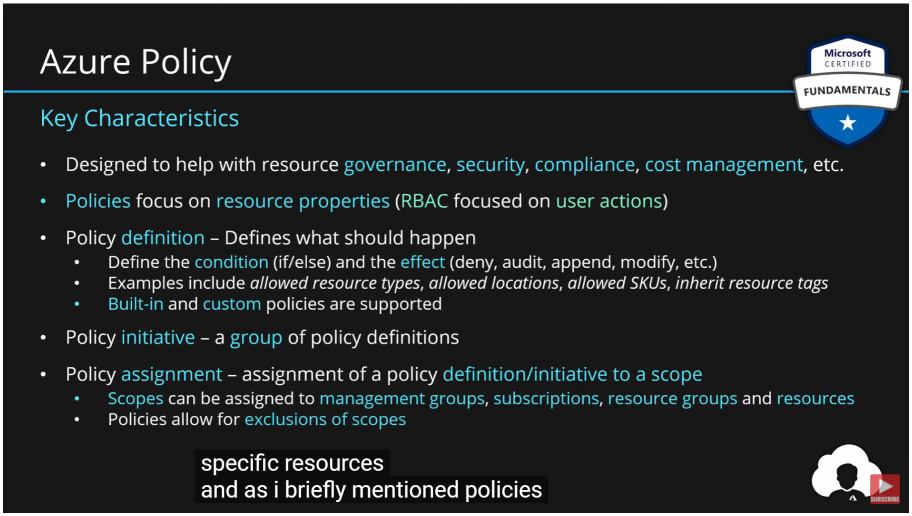
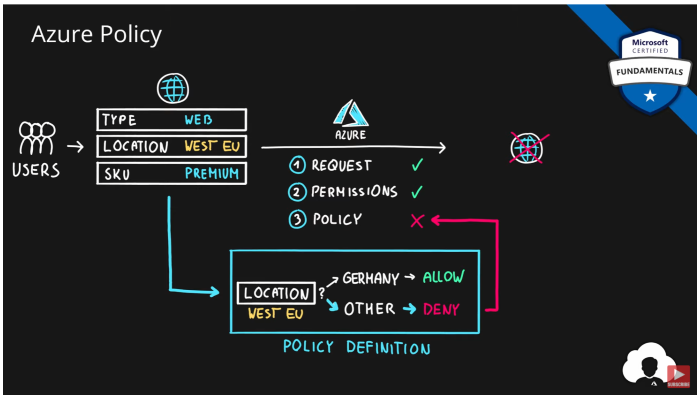
In Azure, Everything is made up of ==resources==, resources are defined in ==resource providers==. Resources have properties and actions, which can be limited by policy. Policy sits on top of ARM and any CRUD will pass through it!
可以在==Root Mgmt Group== - ==Mgmt Group== - ==ResourceGroup== - ==Resource==不同级别设定policy,而且都是继承的。除非在assign的时候设置了exclusion。
Important
explicit deny system:意思是deny操作,凌驾于所有允许操之上,绕不开。所以如果对管理组实行了拒绝的策略,再对下面的child实行更宽松的策略,是行不通的。要先把child排除在外,再给child分配宽松策略。
policy两大目的:
- ==Audit==:仅是为了审计一下,这个策略实行后,有多少资源会符合compliance
- ==Enforcement==
policy的本质:
{
  "if": {
     <condition> | <logical operator>
  },
  "then": {
     "effect": "deny | audit | append | auditIfNotExists | deployIfNotExists | disabled"

  }
}Call flow for Policy:
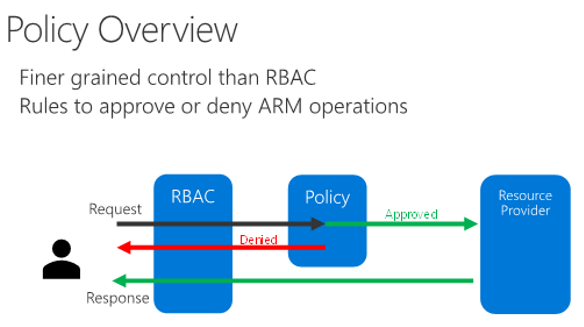
- Incoming PUT/PATCH request comes into ARM and is first evaluated for authz (RBAC)
- Request then goes to Policy engine
- Policy engine evaluates all requests that are in scope (ie. in the subscription or resource group where the policy is assigned)
- Requests that are compliant with policy then continue through the rest of the ARM engine and to the resource provider
- Requests that are not compliant with policy are denied with a 403 Forbidden error returned to the client.
Note
- policy只检查资源定义,不检查用户权限,因为假定用户权限已经在上一步定义了
- policy针对的是==资源定义==;RBAC针对的是==user action==.
- A policy is a set of conditions built on resources attributes + effect.
- policy在两个resource provider中存在相应的权限。有一些role也赋予了操作policy的权限。policy对所有role应该是可见的
- RBAC是默认拒绝,除非RBAC授予允许的操作;而policy是默认允许,除非policy拒绝
策略定义结构的详细信息 - Azure 策略|微软文档 (microsoft.com)
每个definition都有:
-
==Mode== -- 什么样的资源会纳入范围,Mode是与ARM交互,抓ARM里面资源的template,是control plane。(有些service只会跟RP去沟通,不跟ARM沟通)
- all: evaluated resource groups and all resource types
- indexed: evaluate resource types that supports tags and location (只管理具有tag和location的资源)
-
==Parameters== -- These parameters can be used in the logical evaluation and in the effects. It helps in reducing the Code and number of policy definitions.(strong type 提供下拉菜单,给location或者sku等选项,提供多选,减少policy definition)
-
==Policy rule== (Logical evaluation & effect) -- This is the core part of the policy definition which describes what the policy is evaluating using the rule. The rule consists of IF and Then with effects.
- field是取值函数,去定位需要判断那个数值
- Effect
https://docs.microsoft.com/en-us/azure/governance/policy/concepts/effects
https://rjygraham.com/posts/azure-policy-append-as-gentler-deny.html
gentle version of Deny。
- 试想情景:想强制让存储账户开启加密,所以设置了检测加密这个属性,如果不是显式的设置为true,就deny;但是实际应用中,如果一台VM开启了guest diagnostics setting,选择自动帮你建存储账户,这时系统并不会显式的设置为true,这时触犯了policy就会部署失败。
- 解决:
Tip
Append evaluates before the request gets processed by a Resource Provider during the creation or updating of a resource. Append adds fields to the resource when the if condition of the policy rule is met. If the append effect would override a value in the original request with a different value, then it acts as a deny effect and rejects the request.
满足条件的话就把属性加上去;如果属性本来就有,并且冲突了,那才deny掉。
所以,把原来的deny改成,检测加密属性,如果不是显式的false,就append成true。这样就实现了目的。
只做审计,不采取行动。
检测能通过If语句,但是不满足then里面的detail - existence condition的资源
阻止ARM向resource provider发送请求。返回==403 Forbidden==的状态码
AINE and DINE checklist - Overview (azure.com)
- 与appendifnotexist类似,这个针对资源。举例:给敏感资源加Lock。可以设置一个policy,如果某个资源没有lock,就自动加一个。
- 这个选项会触发==template deployment==
- 在then的detail里面要定义具体的资源属性定义好,以备模板部署利用。
- 也需要手动分配一个role id,来执行部署的权限
满足某些条件之后,policy本身会被disable掉。no action is taken
修改属性或者tags
[!info] 这些Effects的操作都会被记在==Activity log==里面
了解效果的工作原理 - Azure 策略|微软文档 (microsoft.com)
- 首先检查"disabled"以确定是否应评估策略规则。
- 然后评估"append"和"modify"。由于任何一项都可能更改请求,因此所做的更改可能会阻止触发审核或拒绝效果。
- 然后评估deny。通过在审核前评估拒绝,可以防止对不需要的资源进行双重日志记录。
- 最后评估audit。
Note
policy去assign之后,可能会有一个==30min==或更长的时间,视policy复杂程度而定。
Get policy compliance data - Azure Policy | Microsoft Docs
compliance status有如下状态:
- ==合规==和==不合规==
- ==免除==:资源在工作分配的范围内,但具有定义的豁免。
- ==冲突==:存在两个或多个策略定义,但规则冲突。例如,两个定义使用不同的值追加相同的标记。
- ==未开始==:策略或资源的评估周期尚未开始。
- ==未注册==:Azure 策略资源提供程序尚未注册,或者登录的帐户没有读取符合性数据的权限。
确定不合规的原因 - Azure 策略|微软文档 (microsoft.com)
Remediate non-compliant resources - Azure Policy | Microsoft Docs
修正不合规的资源 - Azure 策略|微软文档 (microsoft.com)
- 对于==deployIfNotExists== 或者 ==modify==的策略,要通过remediate来把不符合的变成符合的。这些policy会出现在remediation选项里面,可以去看。
- ==remediation tasks==:默认来讲,policy是针对新创建的资源,如果想对已经存在的资源,那么他就会帮你对这些资源实施策略
- 通过==Managed identity==,分配相应的RBAC Role,来实现授权资源操作。(portal会自动来帮你列出来所需权限,某些情况下可能得自己去设,详见文档)
先手动触发一次扫描:
https://docs.azure.cn/zh-cn/governance/policy/how-to/get-compliance-data
az policy state trigger-scan --subscription <sub-id>
az policy state trigger-scan --resource-group "MyRG"
再通过命令来看扫描出来的合规结果:
https://docs.azure.cn/zh-cn/governance/policy/how-to/get-compliance-data#command-line