A document processing and RAG (Retrieval-Augmented Generation) library that transforms unstructured text from documents into rich knowledge graphs and performs entity and relation extraction based on the user's input analysis scope. By using a graph database for enhanced context retrieval, it enables natural conversation with your documents through a chat interface.
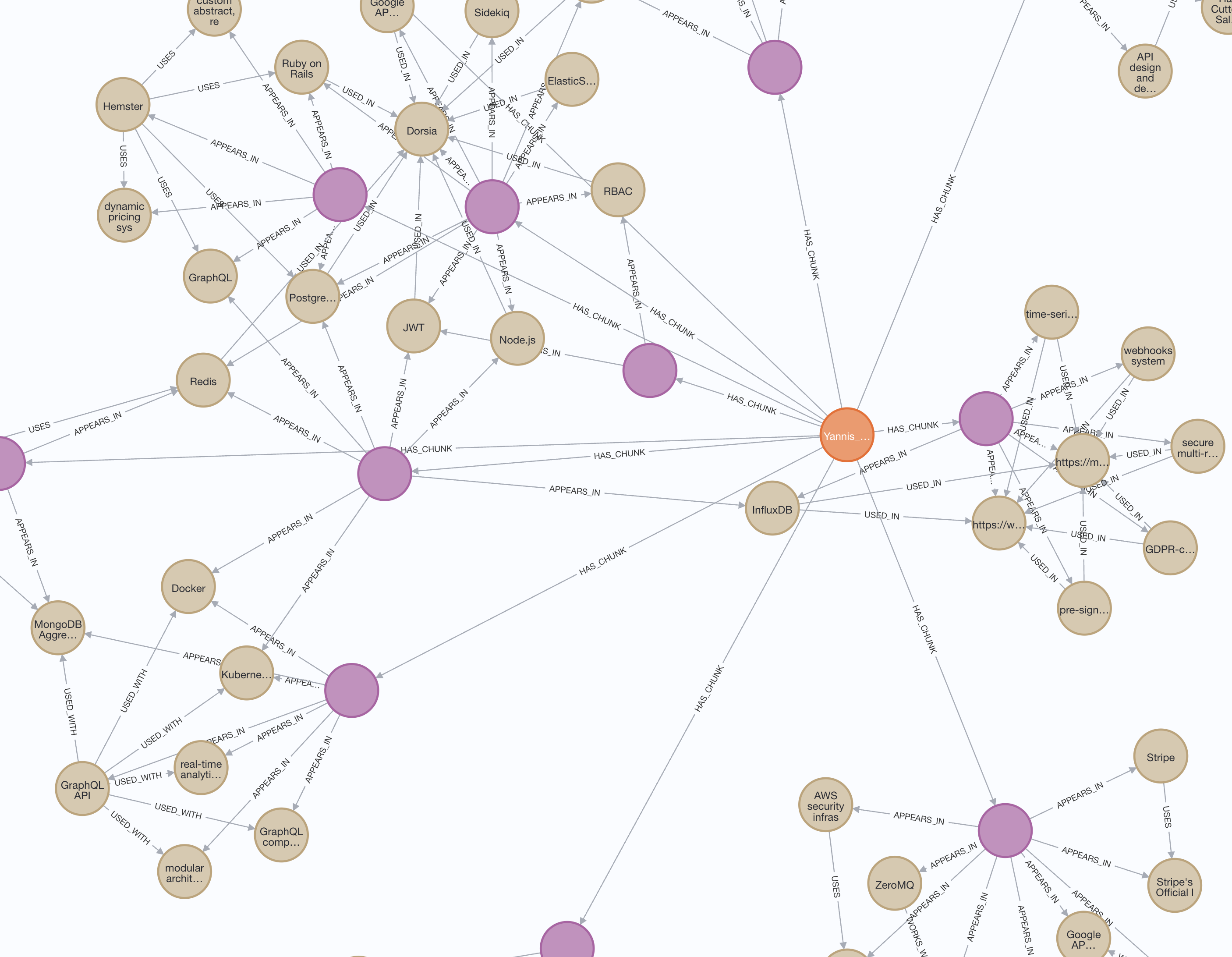
docuGraphRAG.js is the successor of docuRAG.js, representing a significant architectural shift in how we handle document context and relationships:
- Hybrid search combining vector, text, and graph-based approaches
- Entity extraction and relationship modeling based on the user's scope.
- Efficient storage and retrieval using Neo4j
- Streaming responses for real-time chat interactions
- Configurable search strategies and weights
- Splits documents into manageable chunks
- Generates vector embeddings for each chunk
- Stores content in Neo4j for efficient retrieval
- Multiple search strategies working together:
- Vector similarity search (40% weight)
- Full-text search (30% weight)
- Graph-based search (30% weight)
- Intelligent result merging and ranking
- Configurable search options
- Efficient storage and retrieval
- Stores documents as connected chunks
- Uses Neo4j for efficient storage
- Basic document-chunk relationships
- Entity relationship tracking
- Graph traversal capabilities
- Natural language interaction with documents
- Context-aware responses
- Streaming response generation
- Multiple search strategies:
- Vector similarity search
- Full-text search
- Graph-based search
- Configurable search options
- Node.js 18+
- Docker / Neo4j Database
- OpenAI API Key (gpt-4 and text-embedding-3-small)
- Clone the repository:
git clone https://github.com/msroot/docuGraphRAG.js.git
cd docuGraphRAG.js- Install dependencies:
npm install- Start Neo4j (using Docker):
docker-compose up -d neo4jAccess the Neo4j Browser at http://localhost:7474/browser/ to explore your graph database.
Run the example app
- Create environment file:
cd app/
# Create a new .env file
touch .env

# Add the following configuration to your .env file:
NEO4J_URL=bolt://localhost:7687
NEO4J_USER=neo4j
NEO4J_PASSWORD=password
OPENAI_API_KEY=your-openai-key- Run the example app:
npm install
npm start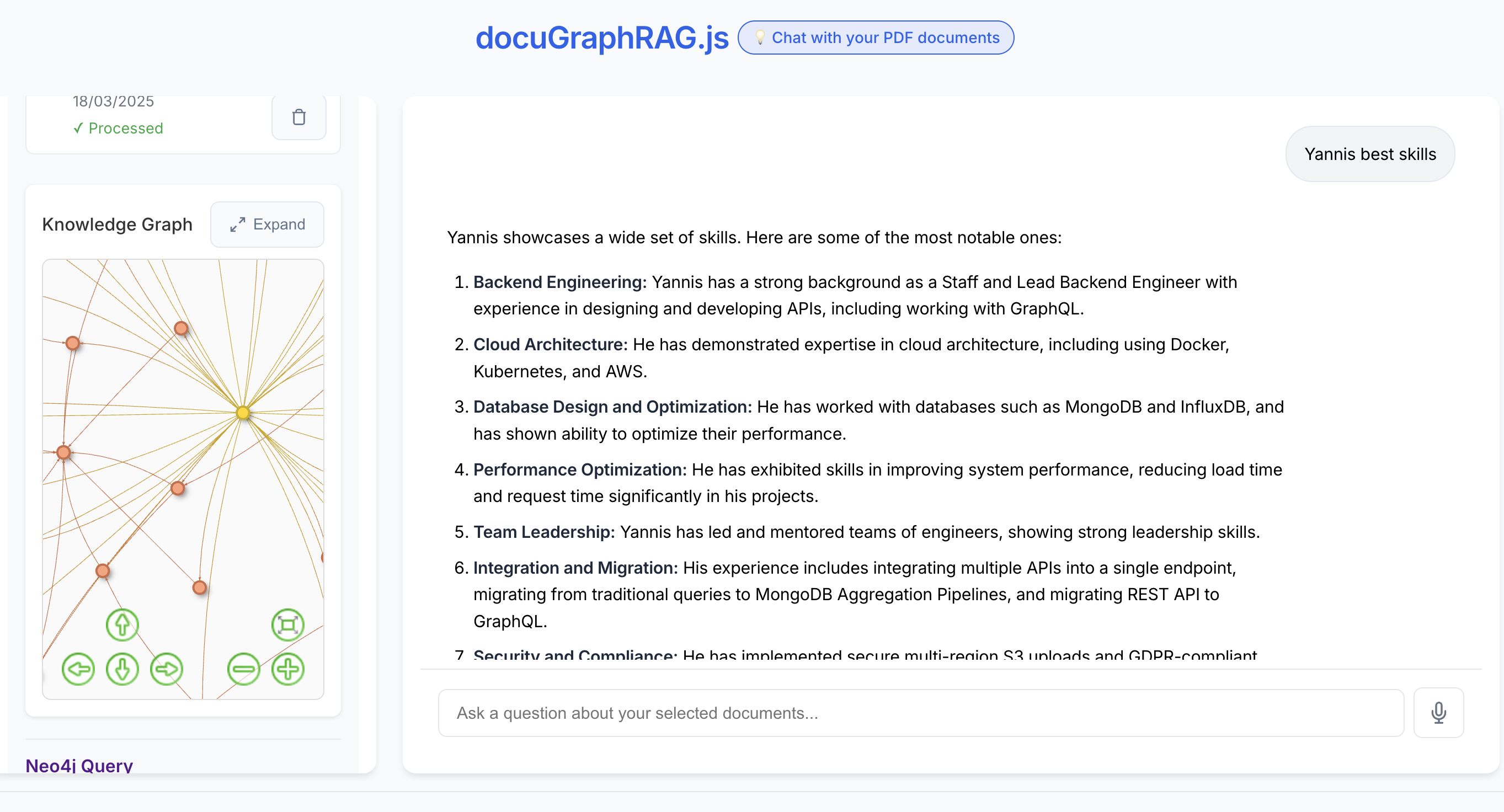
The example app provides a complete web interface featuring:
- Document upload and management
- Interactive chat interface with streaming responses
- Real-time Knowledge Graph visualization
- Visual representation of document relationships
- Entity connections and relationships
- Expandable full-screen view
- Interactive node exploration
- Configurable search strategies:
- Vector similarity search
- Full-text search
- Graph-based search
- Direct access to Neo4j Browser for advanced queries
Visit http://localhost:3000 to explore the interface.
| Parameter | Type | Default | Description |
|---|---|---|---|
| Required Settings | |||
neo4jUrl |
string | - | Neo4j database connection URL |
neo4jUser |
string | - | Neo4j database username |
neo4jPassword |
string | - | Neo4j database password |
openaiApiKey |
string | - | Your OpenAI API key |
| Optional Settings | |||
chunkSize |
number | 1000 | Size of document chunks in characters |
chunkOverlap |
number | 200 | Overlap between consecutive chunks |
similarityThreshold |
number | 0.1 | Minimum similarity score for vector search |
vectorSearchWeight |
number | 0.4 | Weight for vector similarity search (0-1) |
textSearchWeight |
number | 0.3 | Weight for full-text search (0-1) |
graphSearchWeight |
number | 0.3 | Weight for graph-based search (0-1) |
Example configuration in code:
import { DocuGraphRAG } from 'docugraphrag';

const config = {
    neo4jUrl: process.env.NEO4J_URL,
    neo4jUser: process.env.NEO4J_USER,
    neo4jPassword: process.env.NEO4J_PASSWORD,
    openaiApiKey: process.env.OPENAI_API_KEY,
    // Optional settings
    chunkSize: 1000,
    chunkOverlap: 200,
    similarityThreshold: 0.1,
    vectorSearchWeight: 0.4,
    textSearchWeight: 0.3,
    graphSearchWeight: 0.3
};

const rag = new DocuGraphRAG(config);import { DocuGraphRAG } from 'docugraphrag';
// Initialize
const rag = new DocuGraphRAG(config);
await rag.initialize();
// Process a document
const result = await rag.processDocument(text, "Analysis focus description");
// Chat with the document
const answer = await rag.chat("Who is Dr. Sarah Jones?", {
documentIds: ["doc123"],
vectorSearch: true,
textSearch: true,
graphSearch: true
});graph TD
subgraph Document_Processing ["📄 Document Processing"]
DocInput[/"PDF/Text Document"/] --> TextProc["Text Extraction & Cleaning"]
TextProc --> Chunking["Smart Chunking"]
Chunking -->|"Overlapping chunks"| Chunks[(Processed Chunks)]
end
subgraph Knowledge_Graph_Creation ["🧠 Knowledge Graph Creation"]
Chunks --> |"Chunk text"| VectorGen["Vector Embedding Generation"]
Chunks --> |"Content analysis"| EntityExt["Entity Extraction"]
EntityExt --> |"Named entities"| RelEngine["Relationship Engine"]
RelEngine --> |"Entity pairs"| RelCreation["Relationship Creation"]
subgraph Neo4j_Storage ["📊 Neo4j Database"]
GraphDB[("Neo4j Graph DB")]
Indexes["Custom Indexes"]
TextIndex["Full-Text Search Index"]
VectorIndex["Vector Index"]
GraphDB --> |"Indexed by"| Indexes
GraphDB --> |"Text indexing"| TextIndex
GraphDB --> |"Vector indexing"| VectorIndex
end
VectorGen --> |"Store embeddings"| GraphDB
RelCreation --> |"Store relationships"| GraphDB
Chunks --> |"Store chunks"| GraphDB
end
subgraph Query_Processing ["🔍 Query Processing"]
UserQuery[/"User Question"/] --> QueryEmbed["Query Embedding"]
UserQuery --> QueryEntity["Query Entity Recognition"]
UserQuery --> TextSearch["Text Search Processing"]
subgraph Search_System ["Hybrid Search System"]
QueryEmbed --> |"Vector similarity (40%)"| HybridSearch
QueryEntity --> |"Entity matching (30%)"| HybridSearch
TextSearch --> |"Text matching (30%)"| HybridSearch
TextIndex --> |"Full-text results"| TextSearch
VectorIndex --> |"Vector results"| HybridSearch
GraphDB --> |"Graph traversal"| HybridSearch
HybridSearch --> |"Ranked & merged results"| ContextFusion
end
ContextFusion --> |"Combined context"| RespGen["Response Generation"]
RespGen --> Answer[/"Final Answer"/]
end
%% Styling
classDef input fill:#e3f2fd,stroke:#1565c0,stroke-width:2px;
classDef process fill:#e8f5e9,stroke:#2e7d32,stroke-width:2px;
classDef database fill:#fff3e0,stroke:#ef6c00,stroke-width:2px;
classDef search fill:#f3e5f5,stroke:#6a1b9a,stroke-width:2px;
classDef output fill:#fce4ec,stroke:#c2185b,stroke-width:2px;
class DocInput,UserQuery input;
class TextProc,Chunking,VectorGen,EntityExt,RelEngine,RelCreation,QueryEmbed,QueryEntity,TextSearch process;
class GraphDB,Indexes,TextIndex,VectorIndex database;
class HybridSearch,ContextFusion search;
class Answer output;
%% Subgraph styling
style Document_Processing fill:#f8f9fa,stroke:#343a40,stroke-width:2px;
style Knowledge_Graph_Creation fill:#f8f9fa,stroke:#343a40,stroke-width:2px;
style Query_Processing fill:#f8f9fa,stroke:#343a40,stroke-width:2px;
style Neo4j_Storage fill:#fff3e0,stroke:#ef6c00,stroke-width:2px;
style Search_System fill:#f3e5f5,stroke:#6a1b9a,stroke-width:2px;
%% Relationships
linkStyle default stroke:#666,stroke-width:2px;
- Splits documents into manageable chunks
- Generates vector embeddings for each chunk
- Stores content in Neo4j database
When you ask a question:
- Converts question to vector embedding
- Finds relevant document chunks using multiple strategies:
- Vector similarity search
- Full-text search
- Graph-based search
- Merges and ranks results
- Generates comprehensive answer
(Document)-[:HAS_CHUNK]->(DocumentChunk)
(DocumentChunk)-[:HAS_ENTITY]->(Entity)
(Entity)-[:RELATES_TO]->(Entity)We welcome contributions! Please check our contributing guidelines for more information.
RESEARCH PURPOSES ONLY. This project, docuGraphRAG.js, is strictly intended for research and educational exploration. It has not been designed or tested for production environments and may contain limitations, errors, or security vulnerabilities.
MIT License
- Create an issue for bug reports
- Start a discussion for feature requests
- Check our documentation for guides
Built with ❤️ by Yannis Kolovos