




Usage Guide
Examples
Project Doc
Official Doc
Official Resource
English | 简体中文
- This library is encapsulated from the colorful interface library, with rich functions (nearly 2000 API interfaces), easy to use, lightweight, highly DIY customization, and supports one-click skinning.
- The colorful interface library is developed by C/C++ language: the software runs efficiently, does not need the support of third-party libraries, and does not depend on MFC, ATL, WINDOWS standard controls, etc.
- DirectUI design idea: there is no sub-window in the window, the interface elements are all logical areas (no HWND handle, safe, flexible), all UI elements are developed independently (not restricted by the system), more flexible to achieve various Program interface to meet the needs of different users.
- Has a free UI designer tool: rapid development tools, what you see is what you get, a highly customizable system (DIY), making UI development easier.
- Support Direct2D, hardware acceleration, can make full use of hardware features to create high-performance, high-quality 2D graphics.
- Support WebView2, can use front-end technology stack to develop interfaces.
- Usage Guide There are introductory tutorials and common questions in it, you can take a look and avoid detours.
- Other related projects:xcgui-example,xc-elementui
go get -u github.com/twgh/xcguiUsing the UI designer can quickly design the interface and save a lot of code.
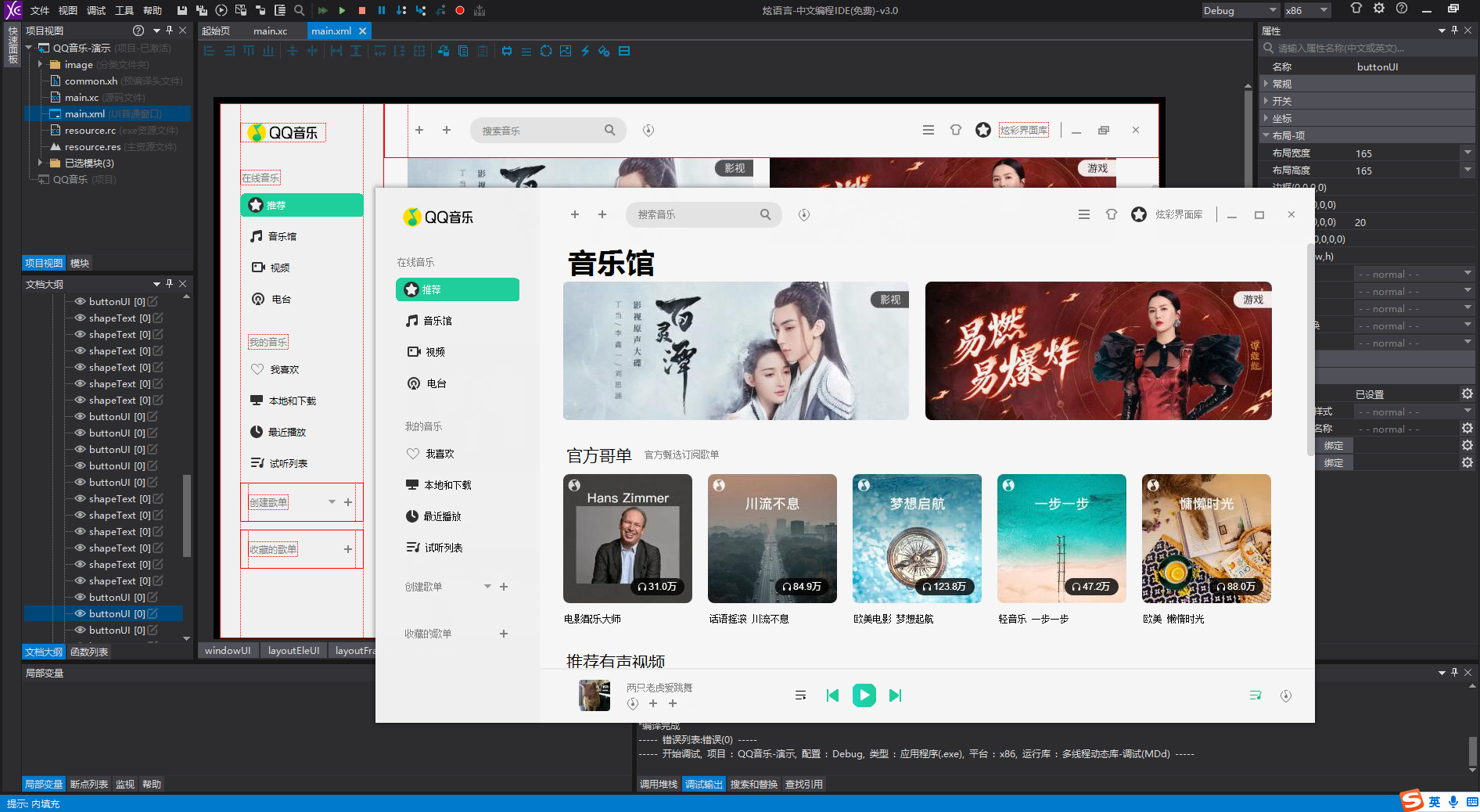
UI Designer usage example, Only so much code:
package main

import (
	_ "embed"
	"github.com/twgh/xcgui/app"
	"github.com/twgh/xcgui/widget"
	"github.com/twgh/xcgui/window"
)

//go:embed res/qqmusic.zip
var qqmusic []byte

func main() {
    app.Init()
	a := app.New(true)
	a.EnableAutoDPI(true).EnableDPI(true)
	// Load resource files from memory zip
	a.LoadResourceZipMem(qqmusic, "resource.res", "")
	// Load layout file from memory zip, Create window object
	w := window.NewByLayoutZipMem(qqmusic, "main.xml", "", 0, 0)

	// SongTitle is the value of the name property set for the song name (shapeText component) in main.xml.
	song := widget.NewShapeTextByName("songTitle")
	println(song.GetText()) // output: 两只老虎爱跳舞

	// Adjust the layout
	w.AdjustLayout()
	// Display window
	w.Show(true)
	a.Run()
	a.Exit()
}The network disk contains Interface Designer and chm help documentation
| NetDisc | Link |
|---|---|
| Lanzou | download |
| BaiduPan | download |
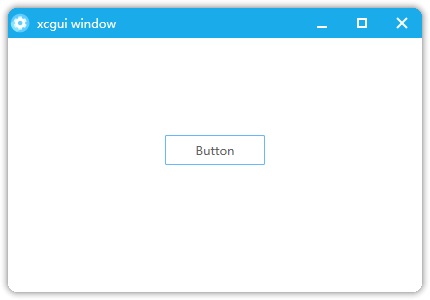
package main

import (
	"github.com/twgh/xcgui/app"
	"github.com/twgh/xcgui/imagex"
	"github.com/twgh/xcgui/widget"
	"github.com/twgh/xcgui/window"
	"github.com/twgh/xcgui/xcc"
)

func main() {
	// 1.Initialize XCGUI
    app.Init()
	a := app.New(true)
	a.EnableAutoDPI(true).EnableDPI(true)
	// 2.Create window
	w := window.New(0, 0, 430, 300, "xcgui window", 0, xcc.Window_Style_Default|xcc.Window_Style_Drag_Window)

	// Set the window border size
	w.SetBorderSize(0, 30, 0, 0)
    // Set window icon
	a.SetWindowIcon(imagex.NewBySvgString(svgIcon).Handle)
	// Set window transparency type
	w.SetTransparentType(xcc.Window_Transparent_Shadow)
	// Set window shadow
	w.SetShadowInfo(8, 255, 10, false, 0)

    // Create a button
	btn := widget.NewButton(165, 135, 100, 30, "Button", w.Handle)
	// Registration button clicked event
	btn.AddEvent_BnClick(func(hEle int, pbHandled *bool) int {
		w.MessageBox("tip", btn.GetText(), xcc.MessageBox_Flag_Ok|xcc.MessageBox_Flag_Icon_Info, xcc.Window_Style_Modal)
		return 0
	})

	// 3.Display window
	w.Show(true)
	// 4.Run the program
	a.Run()
	// 5.Exit the program
	a.Exit()
}

var svgIcon = `<svg t="1669088647057" class="icon" viewBox="0 0 1024 1024" version="1.1" xmlns="http://www.w3.org/2000/svg" p-id="5490" width="22" height="22"><path d="M517.12 512.8704m-432.3328 0a432.3328 432.3328 0 1 0 864.6656 0 432.3328 432.3328 0 1 0-864.6656 0Z" fill="#51C5FF" p-id="5491"></path><path d="M292.1472 418.7136c-85.0432 0-160.4096 41.3696-207.104 105.0624 4.5568 182.7328 122.368 337.3056 285.952 396.032 103.2192-33.28 177.92-130.048 177.92-244.3776 0-141.7216-114.944-256.7168-256.768-256.7168z" fill="#7BE0FF" p-id="5492"></path><path d="M800.2048 571.6992l-101.888-58.8288 101.888-58.8288c16.896-9.728 22.6816-31.3344 12.9536-48.2304l-55.296-95.744c-9.728-16.896-31.3344-22.6816-48.2304-12.9536l-101.888 58.8288V238.336c0-19.5072-15.8208-35.328-35.328-35.328H461.824c-19.5072 0-35.328 15.8208-35.328 35.328v117.6064L324.608 297.1136c-16.896-9.728-38.5024-3.9424-48.2304 12.9536l-55.296 95.744c-9.728 16.896-3.9424 38.5024 12.9536 48.2304l101.888 58.8288-101.888 58.8288c-16.896 9.728-22.6816 31.3344-12.9536 48.2304l55.296 95.744c9.728 16.896 31.3344 22.6816 48.2304 12.9536l101.888-58.8288v117.6064c0 19.5072 15.8208 35.328 35.328 35.328h110.592c19.5072 0 35.328-15.8208 35.328-35.328v-117.6064l101.888 58.8288c16.896 9.728 38.5024 3.9424 48.2304-12.9536l55.296-95.744c9.728-16.896 3.9424-38.5024-12.9536-48.2304z" fill="#CAF8FF" p-id="5493"></path><path d="M517.12 512.8704m-234.24 0a234.24 234.24 0 1 0 468.48 0 234.24 234.24 0 1 0-468.48 0Z" fill="#FFFFFF" p-id="5494"></path><path d="M517.12 512.8704m-103.5776 0a103.5776 103.5776 0 1 0 207.1552 0 103.5776 103.5776 0 1 0-207.1552 0Z" fill="#51C5FF" p-id="5495"></path></svg>`The constants are all in the xcc package and used like this: xcc.Window_Style_Default
The xc package contains all the APIs in xcgui.dll. There are more than a thousand functions that can be used directly. The encapsulated classes are in other packages.
In some cases, it is more convenient to mix the native functions in the xc package with the encapsulated classes.
All the structures of xcgui are also in the xc package.
Goland is recommended for development for the best development experience.
In XCGUI, a single event type can have multiple callback handler functions registered. The execution order is that the last registered callback function is executed first, and the first registered callback function is executed last. If you want to intercept the current event or prevent it from being passed further, simply set the parameter *pbHandled=true in the callback function.
All events in XCGUI are predefined within various classes and come in two forms, distinguished by their prefixes: AddEvent or Event. Generally, using functions of the AddEvent type is sufficient.
The difference is as follows: Since the event callback functions are created using syscall.NewCallBack, this method has a limitation of creating only about 2000 callback functions. Exceeding this limit will cause a panic. When using Event-type functions to register events and the callback function is an anonymous function, a new callback function is created each time. Without proper control, this could exceed the 2000-function limit. In contrast, AddEvent-type functions reuse already created callback functions, allowing you to freely use anonymous functions as event callbacks without worrying about exceeding the 2000-function limit.
Take 1.3.330 as an example, 1 only means that the library is the official version, 3.33 represents the official 3.3.3 version of XCGUI, the last 0 represents the first version based on the 3.33 package, If there is an update based on 3.33, then it will add up.
The xcgui project has always been under the GoLand integrated development environment, based on free JetBrains Open Source license(s) genuine free license, I would like to express my gratitude here.

These classes are encapsulated based on more than a thousand functions in the xc package.
| Package Name | Class Name | Finish | Doc |
|---|---|---|---|
| app | App | √ | Doc |
| window | Window | √ | Doc |
| window | FrameWindow | √ | Doc |
| window | ModalWindow | √ | Doc |
| window | TrayIcon | √ | Doc |
| edge | Edge | √ | Doc |
| edge | WebView | √ | Doc |
| widget | Shape | √ | Doc |
| widget | ShapeEllipse | √ | Doc |
| widget | ShapeGif | √ | Doc |
| widget | ShapeGroupBox | √ | Doc |
| widget | ShapeLine | √ | Doc |
| widget | ShapePicture | √ | Doc |
| widget | ShapeRect | √ | Doc |
| widget | ShapeText | √ | Doc |
| widget | Table | √ | Doc |
| widget | Button | √ | Doc |
| widget | ComboBox | √ | Doc |
| widget | Edit | √ | Doc |
| widget | Editor | √ | Doc |
| widget | Element | √ | Doc |
| widget | List | √ | Doc |
| widget | ListBox | √ | Doc |
| widget | Menu | √ | Doc |
| widget | ProgressBar | √ | Doc |
| widget | TextLink | √ | Doc |
| widget | LayoutEle | √ | Doc |
| widget | LayoutFrame | √ | Doc |
| widget | ListView | √ | Doc |
| widget | MenuBar | √ | Doc |
| widget | Pane | √ | Doc |
| widget | ScrollBar | √ | Doc |
| widget | ScrollView | √ | Doc |
| widget | SliderBar | √ | Doc |
| widget | TabBar | √ | Doc |
| widget | ToolBar | √ | Doc |
| widget | Tree | √ | Doc |
| widget | DateTime | √ | Doc |
| widget | MonthCal | √ | Doc |
| widget | GifPlayer | √ | Doc |
| adapter | AdapterListView | √ | Doc |
| adapter | AdapterMap | √ | Doc |
| adapter | AdapterTable | √ | Doc |
| adapter | AdapterTree | √ | Doc |
| bkmanager | BkManager | √ | Doc |
| bkobj | BkObj | √ | Doc |
| font | Font | √ | Doc |
| imagex | Imagex | √ | Doc |
| svg | Svg | √ | Doc |
| tmpl | ListItemTemplate | √ | Doc |
| tmpl | Node | √ | Doc |
| drawx | Draw | √ | Doc |
| ani | Anima | √ | Doc |
| ani | AnimaGroup | √ | Doc |
| ani | AnimaItem | √ | Doc |
| ani | AnimaRotate | √ | Doc |
| ani | AnimaScale | √ | Doc |
| xc | √ | Doc | |
| xcc | √ | Doc | |
| ease | √ | Doc | |
| res | √ | Doc | |
| wapi | Continually updated | Doc | |
| wapi/wnd | Continually updated | Doc | |
| wapi/wutil | Continually updated | Doc |