- By Sylvain Kalache, co-founder at Holberton School
For this project, students are expected to look at these concepts:
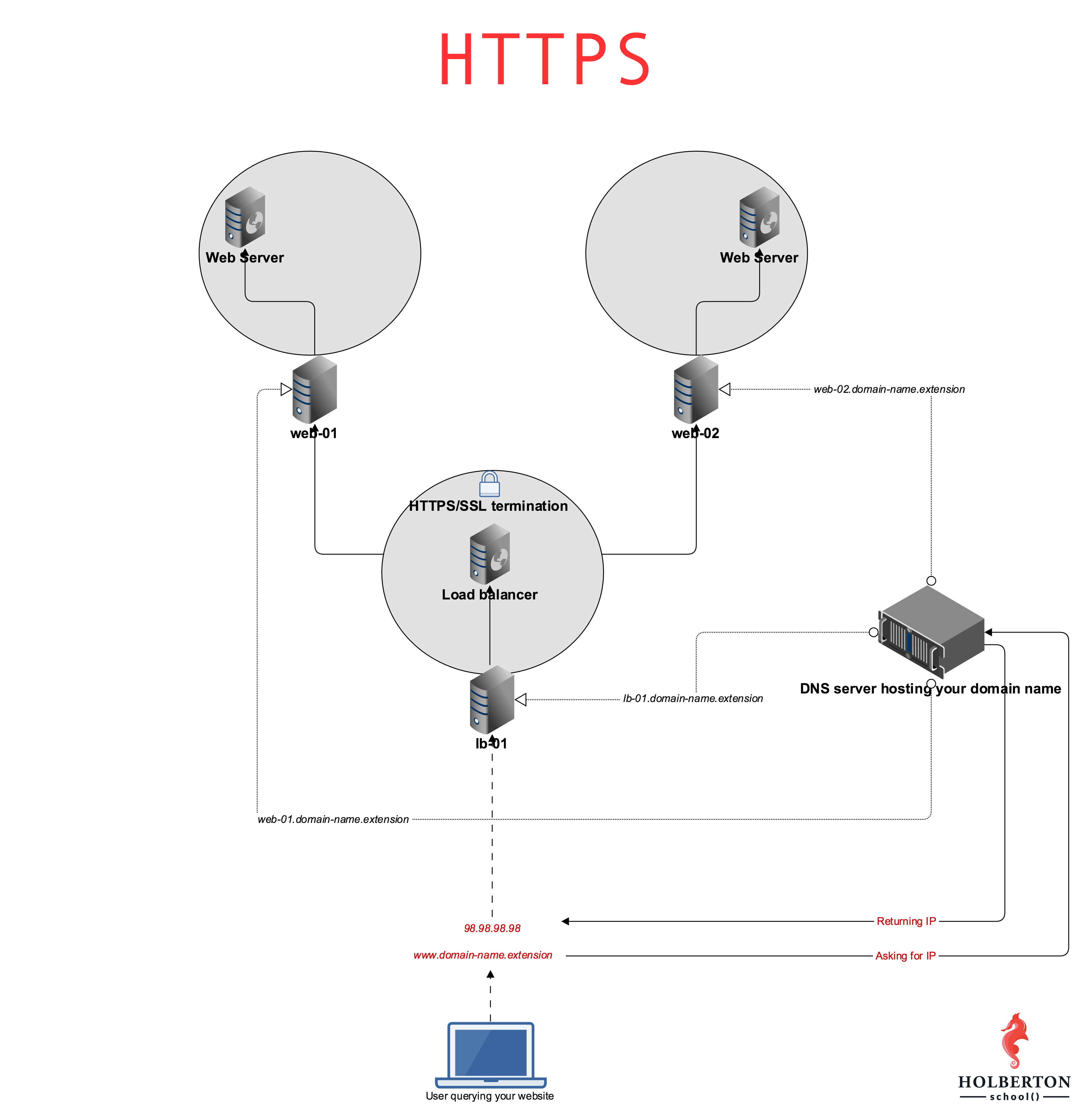

Read or watch:
- What is HTTPS?
- What are the 2 main elements that SSL is providing
- HAProxy SSL termination on Ubuntu16.04
- SSL termination
- Bash function
man or help:
awkdig
At the end of this project, you are expected to be able to explain to anyone, without the help of Google:
- What is HTTPS SSL 2 main roles
- What is the purpose encrypting traffic
- What SSL termination means
- Allowed editors:
vi,vim,emacs - All your files will be interpreted on Ubuntu 16.04 LTS
- All your files should end with a new line
- A
README.mdfile, at the root of the folder of the project, is mandatory - All your Bash script files must be executable
- Your Bash script must pass
Shellcheck(version0.3.7) without any error - The first line of all your Bash scripts should be exactly
#!/usr/bin/env bash - The second line of all your Bash scripts should be a comment explaining what is the script doing
Great! You've completed the quiz successfully! Keep going! (Show quiz)
| Name | Username | IP | State |
|
| --- | --- | --- | --- | --- |
| 1723-web-01 | ubuntu | 100.26.181.86 | running |
|
|
|
| 1723-web-02 | ubuntu | 34.238.192.13 | running |
|
|
|
| 1723-lb-01 | ubuntu | 34.239.164.90 | running |
|
|
|
mandatory
Configure your domain zone so that the subdomain www points to your load-balancer IP (lb-01). Let's also add other subdomains to make our life easier, and write a Bash script that will display information about subdomains.
Requirements:
- Add the subdomain
wwwto your domain, point it to yourlb-01IP (your domain name might be configured with default subdomains, feel free to remove them) - Add the subdomain
lb-01to your domain, point it to yourlb-01IP - Add the subdomain
web-01to your domain, point it to yourweb-01IP - Add the subdomain
web-02to your domain, point it to yourweb-02IP - Your Bash script must accept 2 arguments:
domain:- type: string
- what: domain name to audit
- mandatory: yes
subdomain:- type: string
- what: specific subdomain to audit
- mandatory: no
- Output:
The subdomain [SUB_DOMAIN] is a [RECORD_TYPE] record and points to [DESTINATION] - When only the parameter
domainis provided, display information for its subdomainswww,lb-01,web-01andweb-02- in this specific order - When passing
domainandsubdomainparameters, display information for the specified subdomain - Ignore
shellcheckcaseSC2086 - Must use:
awk- at least one Bash function
- You do not need to handle edge cases such as:
- Empty parameters
- Nonexistent domain names
- Nonexistent subdomains
Example:
sylvain@ubuntu$ dig www.holberton.online | grep -A1 'ANSWER SECTION:'
;; ANSWER SECTION:
www.holberton.online.   87  IN  A   54.210.47.110
sylvain@ubuntu$ dig lb-01.holberton.online | grep -A1 'ANSWER SECTION:'
;; ANSWER SECTION:
lb-01.holberton.online. 101 IN  A   54.210.47.110
sylvain@ubuntu$ dig web-01.holberton.online | grep -A1 'ANSWER SECTION:'
;; ANSWER SECTION:
web-01.holberton.online. 212    IN  A   34.198.248.145
sylvain@ubuntu$ dig web-02.holberton.online | grep -A1 'ANSWER SECTION:'
;; ANSWER SECTION:
web-02.holberton.online. 298    IN  A   54.89.38.100
sylvain@ubuntu$
sylvain@ubuntu$
sylvain@ubuntu$ ./0-world_wide_web holberton.online
The subdomain www is a A record and points to 54.210.47.110
The subdomain lb-01 is a A record and points to 54.210.47.110
The subdomain web-01 is a A record and points to 34.198.248.145
The subdomain web-02 is a A record and points to 54.89.38.100
sylvain@ubuntu$
sylvain@ubuntu$ ./0-world_wide_web holberton.online web-02
The subdomain web-02 is a A record and points to 54.89.38.100
sylvain@ubuntu$
Repo:
- GitHub repository:
alx-system_engineering-devops - Directory:
0x10-https_ssl - File:
0-world_wide_web
mandatory
"Terminating SSL on HAproxy" means that HAproxy is configured to handle encrypted traffic, unencrypt it and pass it on to its destination.
Create a certificate using certbot and configure HAproxy to accept encrypted traffic for your subdomain www..
Requirements:
- HAproxy must be listening on port TCP 443
- HAproxy must be accepting SSL traffic
- HAproxy must serve encrypted traffic that will return the
/of your web server - When querying the root of your domain name, the page returned must contain
Holberton School - Share your HAproxy config as an answer file (
/etc/haproxy/haproxy.cfg)
The file 1-haproxy_ssl_termination must be your HAproxy configuration file
Make sure to install HAproxy 1.5 or higher, SSL termination is not available before v1.5.
Example:
sylvain@ubuntu$ curl -sI https://www.holberton.online
HTTP/1.1 200 OK
Server: nginx/1.4.6 (Ubuntu)
Date: Tue, 28 Feb 2017 01:52:04 GMT
Content-Type: text/html
Content-Length: 30
Last-Modified: Tue, 21 Feb 2017 07:21:32 GMT
ETag: "58abea7c-1e"
X-Served-By: 03-web-01
Accept-Ranges: bytes
sylvain@ubuntu$
sylvain@ubuntu$ curl https://www.holberton.online
Holberton School for the win!
sylvain@ubuntu$
Repo:
- GitHub repository:
alx-system_engineering-devops - Directory:
0x10-https_ssl - File:
1-haproxy_ssl_termination
#advanced
A good habit is to enforce HTTPS traffic so that no unencrypted traffic is possible. Configure HAproxy to automatically redirect HTTP traffic to HTTPS.
Requirements:
- This should be transparent to the user
- HAproxy should return a 301
- HAproxy should redirect HTTP traffic to HTTPS
- Share your HAproxy config as an answer file (
/etc/haproxy/haproxy.cfg)
The file 100-redirect_http_to_https must be your HAproxy configuration file
Example:
sylvain@ubuntu$ curl -sIL http://www.holberton.online
HTTP/1.1 301 Moved Permanently
Content-length: 0
Location: https://www.holberton.online/
Connection: close

HTTP/1.1 200 OK
Server: nginx/1.4.6 (Ubuntu)
Date: Tue, 28 Feb 2017 02:19:18 GMT
Content-Type: text/html
Content-Length: 30
Last-Modified: Tue, 21 Feb 2017 07:21:32 GMT
ETag: "58abea7c-1e"
X-Served-By: 03-web-01
Accept-Ranges: bytes

sylvain@ubuntu$
Repo:
- GitHub repository:
alx-system_engineering-devops - Directory:
0x10-https_ssl - File:
100-redirect_http_to_https