
A dashboard application built using React and Syncfusion, showcasing an interactive and customizable interface for data visualization and management.
Click below to watch demo video
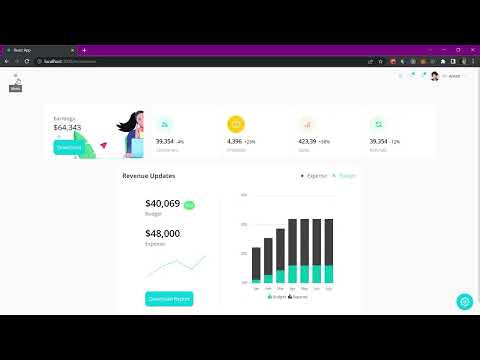
- Dynamic Components: Built with reusable and maintainable components using React.
- Data Visualization: Utilizes Syncfusion components like charts, grids, and maps.
- Responsive Design: Fully responsive design for various devices.
- Customization: User-friendly and customizable widgets.
- Performance Optimized: Efficient rendering and state management using React best practices.
Follow the steps below to get a local copy of the project up and running.
- Node.js (v16.x or above)
- npm or yarn
-
Clone the repository:
git clone https://github.com/AmanBhanse/dashboard-react-syncfusion.git cd dashboard-react-syncfusion -
Install dependencies:
npm install # Or if you use yarn yarn install -
Start the development server:
npm start # Or if you use yarn yarn start -
Open your browser and navigate to:
http://localhost:3000
- React.js: Frontend library for building the user interface.
- Syncfusion: Components library for high-performance UI.
- CSS/SCSS: For styling.
src/
├── components/        # Reusable components
├── pages/             # Individual pages
├── assets/            # Images and other static assets
├── utils/             # Utility functions
└── App.js             # Main application file
Contributions are welcome! Please fork the repository and submit a pull request.
- Fork the project.
- Create a new branch (
feature/your-feature-name). - Commit your changes (
git commit -m 'Add feature X'). - Push to the branch (
git push origin feature/your-feature-name). - Open a pull request.
Aman Bhanse - LinkedIn