
FSWiki (FreeStyleWiki) is a Wiki clone written in Perl (and JavaScript).
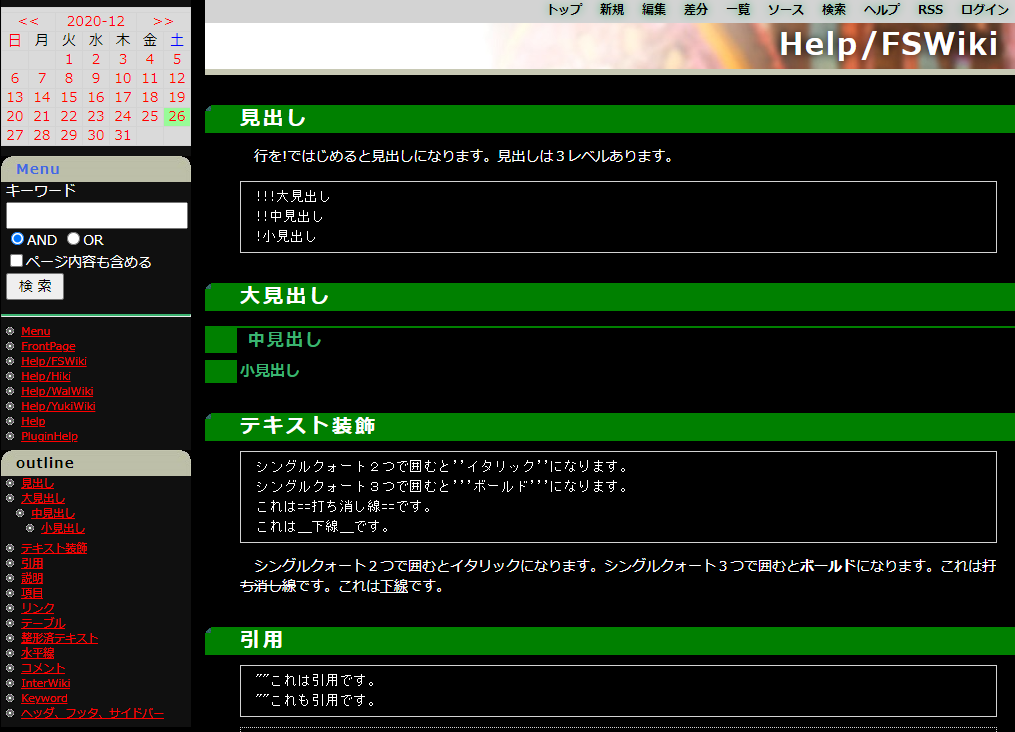
This Dockerfile is to launch FSWiki enabling:
- CSP (Content Security Policy) protected Markdown Plugin (available Markdown syntax (in Japanese)).
- LaTeX (and MathML) rendering using MathJax.
- Restriction of access only from localhost.
CAUTION: To expose it to the public network, additional security considerations would be necessary including https use, load-balancing, permissions and so on.
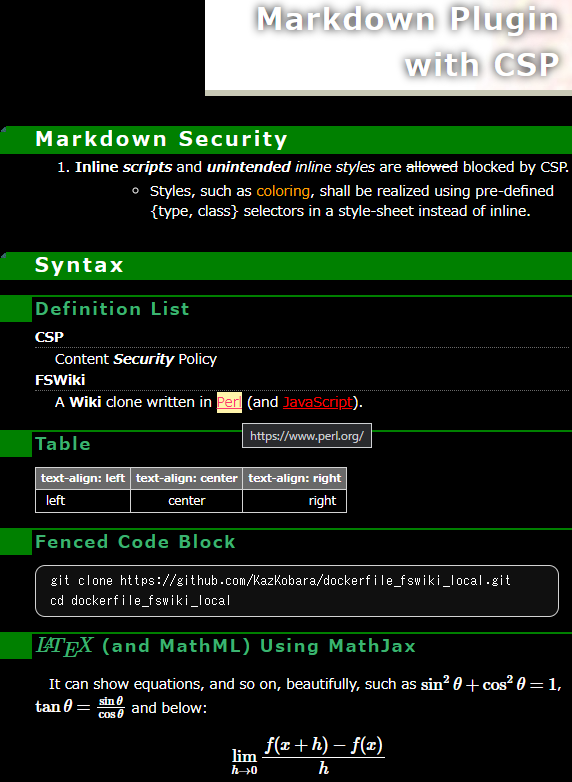
The above is the screenshot of the following markdown document (in a markdown block of FSWiki in the 'kati_dark' theme where other themes are available from here.
# Markdown Plugin with CSP

## Syntax

1. **Inline _scripts_** and _**unintended** inline styles_ are ~~allowed~~ blocked by CSP.
    - <span type="text/css" class="orange">Coloring</span> shall be realized using style-sheet defined {type, class} selectors.

### Definition List

CSP
: Content ___Security___ Policy

=FSWiki=
    A *Wiki* clone written in [Perl](https://www.perl.org/ "https://www.perl.org/") (and JavaScript).

### Table

<!-- Realizing 'text-align:' in a markdown table without using inline-style requires a tweak. -->

| text-align: left | text-align: center | text-align: right |
|:---------|:----------:|---------:|
| left     |   center   |    right |

### Fenced Code Block

```console
git clone https://github.com/KazKobara/dockerfile_fswiki_local.git
cd dockerfile_fswiki_local
```

### \\( \LaTeX \\) (and MathML) Using MathJax

<script id="MathJax-script" async src="https://cdn.jsdelivr.net/npm/mathjax@3/es5/tex-mml-chtml.js"></script>

It can show equations, and so on, beautifully, such as
\\( \sin^{2} \theta + \cos^{2} \theta = 1 \\),
\\( \tan \theta = \frac{\sin \theta}{\cos \theta} \\)  and below:
\\[ \lim_{h \to 0} \frac{f(x+h) - f(x)}{h} \\]
Run the following commands on a shell terminal.
git clone https://github.com/KazKobara/dockerfile_fswiki_local.gitcd dockerfile_fswiki_localvim .env| Variable | Explanation |
|---|---|
FSWIKI_DATA_ROOT |
Set the root folder that includes FSWiki's attach/ config/ data/ log/ to share them as the container's shared volumes.*1 |
CONTAINER_CLI |
Set your container CLI, such as docker or nerdctl. |
COMPOSE |
Set your container composer, such as docker-compose or nerdctl compose. |
- *1 Edit
docker-compose.ymlorrun_fswiki_local.shyou use to change the shared volumes.
./get_fswiki.shIn the following steps, you can choose either 2a. compose version (such as 'docker-compose', 'nerdctl compose') or 2b. shell script version depending on your environment.
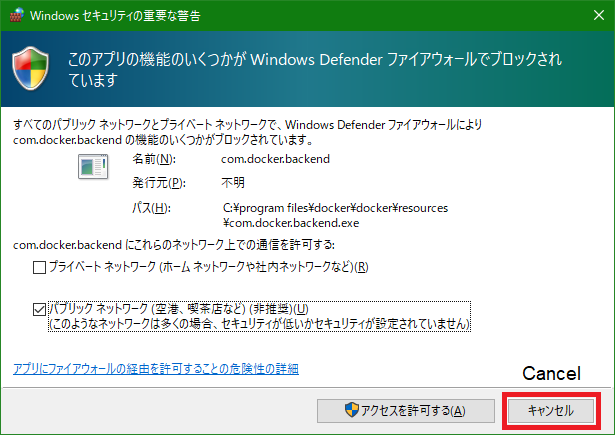
If they pop up the following window on Windows OS, click the "cancel" button to block the access from outside your PC.
CONTAINER_CLI=dockeror
CONTAINER_CLI=nerdctland so on.
"${CONTAINER_CLI}" compose build
- On Windows OS, add
.exeafter the command.
"${CONTAINER_CLI}" compose upTo run it in the background, add
-doption.
With your web browser, access http//localhost:<FSWIKI_PORT>/, such as http//localhost:8366/, where FSWIKI_PORT is specified in the .env file.
"${CONTAINER_CLI}" compose down./docker_build.sh./run_fswiki_local.shWith your web browser, access http//localhost:<FSWIKI_PORT>/, such as http//localhost:8366/, where FSWIKI_PORT is specified in the .env file.
"${CONTAINER_CLI}" stop <container_name> && "${CONTAINER_CLI}" rm <container_name>where <container_name> is fswiki_alpine_local for Alpine image or fswiki_ubuntu_local for Debian/Ubuntu image.
<container_name>of the compose version ends with_dc.
"${CONTAINER_CLI}" rmi <image_name>where <image_name> is <container_name>:<fswiki_version> and <fswiki_version> is latest, 3_8_5, and os on.
Depending on the base os of the docker container, run the following:
For Alpine image:
"${CONTAINER_CLI}" pull httpd:alpineFor Debian/Ubuntu image:
"${CONTAINER_CLI}" pull httpd:latestFor the latest FSWiki in the git repo:
(cd ./tmp/wikilatest/theme/kati_dark && git pull)For FSWiki 3.5.6:
(cd ./tmp/wiki3_6_5/theme/kati_dark && git pull)Run step 2, depending on your environment.
There are two ways to realize this, one creates a new folder, and the other utilizes an existing folder.
-
In step 1.1, git clone to another folder.
-
In the new folder, edit variables according to the following section in docker-compose.yml.
##### To launch multiple independent docker processes ##### -
Run step 1.2 and later.
Edit FSWIKI_DATA_ROOT_PRIVATE and FSWIKI_PORT_PRIVATE in .env, then
"${CONTAINER_CLI}" compose -f docker-compose-multiple.yml upor
./run_fswiki_private.sh- The differences are the network addresses to be assigned and IP addresses that can access the FSWiki server in the docker network.
- docker-compose uses 10.0.0.0/24 and httpd accepts access only from 10.0.0.1.
- shell version (docker build) uses 172.17.0.0/16 and httpd accepts access only from 172.17.0.1.
- See this page as well (after translation from Japanese).
The following commands show the sizes:
"${CONTAINER_CLI}" images | grep fswiki_and versions:
./check_ver_in_container.sh <container_name>or the following test can show them too.
Image sizes of tested versions are here.
-
Edit the following parameters in
./test.sh## Uncomment one of them. TEST_PLATFORM="alpine ubuntu" # TEST_PLATFORM="alpine" # TEST_PLATFORM="ubuntu" ## Comment out if not to test TEST_COMPOSE_VER="Do" TEST_SHELL_VER="Do"
-
Set
FSWIKI_DATA_ROOTin.env(as an absolute path to test shell version). -
Run
./test.sh
To allow access from other docker containers for web security check using OWASP ZAP, Nikto and so on, edit FSWIKI_PORT in .env and set their target IP addresses to any IP address assigned to the host OS.
Check and edit FSWIKI_DATA_ROOT in .env. Then in the same folder as .env, run
./change_permissions.shAlternatively, set manually permissions and group of folders (and their files), which are under FSWIKI_DATA_ROOT folder set in .env, and where docker-compose.yml or run_fswiki_local.sh specifies.
If the folders are attach/ config/ data/ log/, the commands are as follows:
chmod -R a-rwx,ug+rwX attach/ config/ data/ log/
chgrp -R <gid_of_httpd_sub-processes> attach/ config/ data/ log/
FSWiki, however, changes the files' permission to 644 (regardless umask) and their owners to uid of httpd_sub-processes.
where <gid_of_httpd_sub-processes> is
| <gid_of_httpd_sub-processes> | (uid_of_httpd_sub-processes) | group | base | httpd |
|---|---|---|---|---|
| 33 | (33) | www-data | Debian/Ubuntu | 2.4.52 |
| 82 | (82) | www-data | Alpine | 2.4.52 |
| 1 | (1) | daemon | Debian/Ubuntu | 2.4.46 |
| 2 | (2) | daemon | Alpine | 2.4.46 |
NOTE:
gidis needed sincegidmay differ between host and guest of the docker container. If you change it in the container, you can usegroupname instead ofgid.
On each container OS, add the username of the httpd_sub-process of the OS to the group corresponding to the other OS, e.g., to share Alpine folders on Debian/Ubuntu:
addgroup --gid 82 www-data-alpine
adduser www-data www-data-alpine
and vice versa on Alpine:
addgroup --gid 33 www-data-ubuntu
adduser www-data www-data-ubuntu
If Alpine has already used gid 33 for a group, say xfs group, add www-data, the user name of httpd_sub-process, to the xfs group:
adduser www-data xfsIf your web browser displays any of the following errors, check and change file permissions and group as above.
Permission denied at lib/Wiki/DefaultStorage.pm line 114.
Permission denied: ./log at lib/CGI2.pm line 34.
You don't have permission to access this resource.
Lock is busy. at plugin/core/ShowPage.pm line 69. at lib/Util.pm line 743.
If your web browser displays the following error, check or change FSWIKI_DATA_ROOT in .env file. Docker for Windows does not mount some folders to docker containers.
Software Error:
HTML::Template->new() : Cannot open included file ./tmpl/site//. tmpl : file not found. at lib/HTML/Template.pm
If the docker outputs the following log, install Perl CGI with apt-get install -y libcgi-session-perl for Debian/Ubuntu, apk add -y perl-cgi-fast for Alpine, and so on.
Can't locate CGI.pm in @INC (you may need to install the CGI module) (...) at lib/CGI2.pm line 7.
BEGIN failed--compilation aborted at lib/CGI2.pm line 7.