A free, open-source Tailwind CSS admin dashboard template built for modern web developers.
Use it to rapidly build dashboards, SaaS apps, admin panels, CRM systems, and internal tools.
✅ Built with Tailwind CSS
✅ Supports:
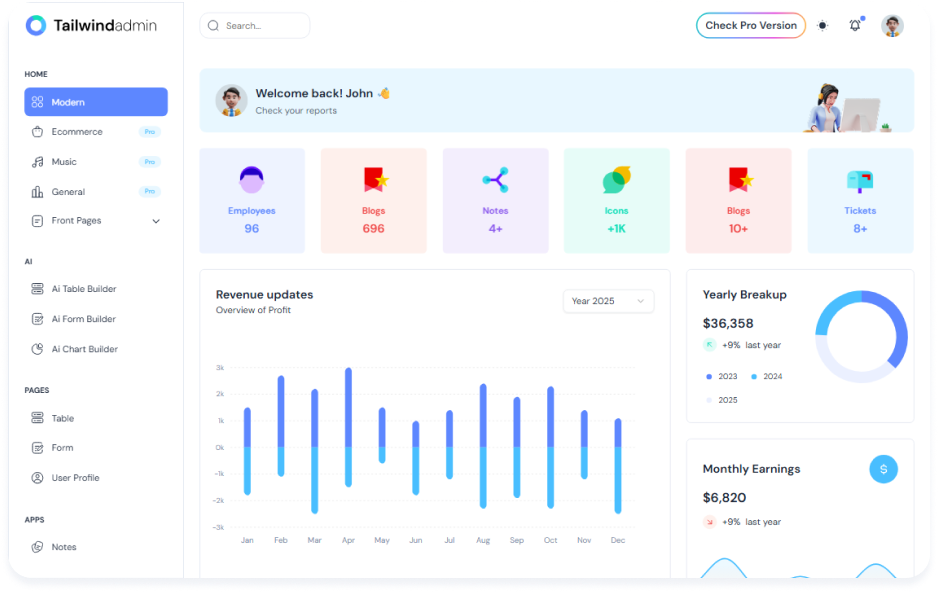
Tailwindadmin is a modern, responsive, and free admin dashboard template built with Tailwind CSS, available in both React and Next.js versions. Designed with a focus on clean design, utility-first styling, and modular components, it's a solid foundation for building powerful web apps quickly and efficiently.
Whether you're developing a SaaS dashboard, eCommerce back office, analytics interface, or internal admin tool, Tailwindadmin provides a flexible and developer-friendly starting point. It includes a variety of pre-designed pages, reusable UI components, and layout options to help you get up and running fast.
Built for speed, customization, and scalability, Tailwindadmin is fully responsive, easy to extend, and optimized for modern frontend development workflows.
-
Responsive Design
Built with Tailwind CSS’s mobile-first utility classes to deliver a seamless experience across desktop, tablet, and mobile devices. -
Customizable Components
Modular and reusable components styled with Tailwind — easy to customize and extend to fit your project’s needs. -
Tailwind CSS Integration
Uses Tailwind’s utility-first approach for faster UI development, consistent design, and easy theming. -
Pre-designed Pages
Includes essential pages like Dashboard, Login, Register, User Profile, Tables, Charts, and Error pages to jumpstart development. -
Dark Mode Support
Optional dark mode integration for improved accessibility and a modern user experience. -
Flexible Layouts
Built-in sidebar, topbar, and page layout structures to support complex dashboard designs out of the box. -
Performance Optimized
Fast loading times and minimal CSS bloat thanks to Tailwind’s tree-shaking and lightweight build process. -
Available in React & Next.js
Choose between React or server-rendered Next.js versions based on your project requirements. -
Shadcn UI Integration for React, Nextjs and Vue
Leverages Shadcn UI for beautifully crafted, accessible, and themeable UI components built on top of Radix and Tailwind CSS.
| Library / Tool | Description |
|---|---|
| Next.js | A powerful React framework that enables server-side rendering, static site generation, and optimized performance for modern web apps. |
| React | A flexible JavaScript library for building user interfaces using component-based architecture. |
| Tailwind CSS | A utility-first CSS framework for rapidly building modern and responsive user interfaces. |
| Shadcn UI | A set of beautifully designed, accessible components built with Tailwind CSS and Radix UI primitives. |
| ApexCharts | A Popular charting libraries used for visualizing data in dashboards. Replace or remove based on actual usage. |
| Iconify Icons | Lightweight and customizable SVG icons that fit seamlessly into modern UI designs. |
Welcome to the Tailwind Admin Dashboard Template! This guide will walk you through the installation and setup process, so you can get started with building your custom admin dashboard in no time.
The easiest way to get started is by cloning the repository or download the zip file. You can do this with the following command:
git clone https://github.com/Tailwind-Admin/free-tailwind-admin-dashboard-templateChoose the version you want to work with (you can even choose the React version). You can do this with the following command:
cd ./tailwind-admin-nextjs-free/packageInstall the relative Dependencies of the template. You can do this with the following command:
npm installOnce the dependencies are installed, you can start a local development server to preview the template:
For React / Next /Vue
npm run devFor Angular
ng serveWelcome to the Tailwind Admin Dashboard Template documentation! Whether you're just getting started or looking to explore advanced features, this guide will help you set up and customize your project with ease.
👉 Next.js :- Click here to read the full documentation
👉 React.js :- Click here to read the full documentation
We welcome contributions from the community to help improve the Tailwind Admin Dashboard Template Free Version. Whether it’s fixing bugs, adding new features, improving documentation, or sharing ideas — your input is appreciated!
Follow these simple steps to start contributing:
-
Fork the Repository
Click the Fork button on the top-right corner of this repo to create your own copy. -
Clone Your Fork
Use the command below to clone your forked repository:git clone https://github.com/Tailwind-Admin/Tailwind-admin-free.git
-
Create a New Branch
Create a new branch to work on your feature or fix. This keeps your changes separate from the main branch:git checkout -b feature/your-feature-name
-
Commit and Push Changes
After making your changes, commit them with a meaningful message and push your branch to your fork:git commit -am "Add: Description of changes made" git push origin feature/your-feature-name
🌟 Show Your Support
If this project helped you:
⭐ Star this repository 🍴 Fork it 🧠 Share it with other developers
Your support helps this project grow faster!


