
| layout | title | show_title | permalink |
|---|---|---|---|
default |
日常学习 |
false |
/ |
网易 科技 财经 国际 热榜 人人PD pmbaobao 36kr热榜
oschina 极客公园 少数派 凤凰网 蜻蜓 什么值得买 奇绩创坛 壹心理
时代周刊 纽约时报 华尔街日报 https://youtube.com https://instagram.com https://whatsapp.com https://www.nature.com https://www.science.org https://www.economist.com https://www.vogue.com https://cnn.com
科技周刊 hacknews中文 https://feedme.icu https://github.com/ccbikai/hacker-news
设计工具排名 Stack Overflow Developer Survey stateofjs | stateofcss stateofreact https://endoflife.date/nodejs https://risingstars.js.org https://www.react-next.com https://github.com/enaqx/awesome-react https://github.com/brillout/awesome-react-components
ua 检测 / 特性检测 https://prettier.io/playground/ https://experiments.withgoogle.com/collection/chrome https://www.chromestatus.com/features https://webkit.org GitHub登录 https://codesandbox.io https://codepen.io
- https://www.npmjs.com/~warmhug
- https://www.npmjs.com/org/huajs
- https://www.npmjs.com/org/warm_hug https://gitlab.com/warmhug/test
https://webkit.org/blog/16458/announcing-interop-2025/ https://antfu.me/posts/move-on-to-esm-only 2025-02 技术趋势
2023 年前端十大 Web 发展趋势 https://www.infoq.cn/article/pozloo8qef98godzv7nr 2023年前端技术盘点与2024年技术展望 https://mp.weixin.qq.com/s/LiygBJqMN8U_vSpAjxMibQ
gmtc https://gmtc.infoq.cn/2022/beijing/schedule 重庆前端交流会 https://zhuanlan.zhihu.com/p/581717444 前端领域的 “干净架构” 徐飞 业务中的前端组件化体系 2022
https://github.com/uber/react-view (https://baseweb.design/components/button) https://github.com/FormidableLabs/react-live https://github.com/benjamn/recast https://github.com/alangpierce/sucrase 2026-02
@loadable/component https://juejin.cn/post/7208188347864547365 2025-11
import { Ac } from './core/base'; export = Ac; ts 文件这样写合适吗? export 可以被直接覆盖吗? https://chatgpt.com/c/68f4e740-30cc-8321-a4c5-36fe5e4ef6ec 2025-10-19
这么写的 export type * from 'xxx'; 报错: error TS1383: Only named exports may use 'export type'. ts不允许这么写. 在 compilerOptions 里加上 "skipLibCheck": true, 忽略. 2025-07-01
@types/node @types/react 版本 需要和 typescript react 版本匹配. 2025-04
https://transform.tools/ https://github.com/airbnb/ts-migrate https://github.com/reactjs/react-codemod https://github.com/facebook/jscodeshift https://astexplorer.net/ react class to functional/hooks? https://www.reddit.com/r/reactjs/comments/o6djp7/is_there_any_automatic_tool_to_convert_react 2025-01 代码转换
- https://docusaurus.io/ 推荐
- https://www.gatsbyjs.com 比较复杂
- https://www.docz.site/ 基于 GatsbyJS
- https://storybook.js.org/ 比较复杂 较难定制
- https://github.com/hexojs/hexo 中国台北?不合规
- https://mkdocs.org 基于Python
- https://gohugo.io 基于 Go
- https://jekyllrb.com 基于 Ruby 适合个人博客
- gitbook (老旧) https://docsify.js.org / VuePress (vue技术栈)
- dumi gh-pages 2024-11 文档网站
- react hooks
- form/table
- pop弹窗: https://github.com/floating-ui/floating-ui https://popper.js.org/react-popper/v2/ 被 material-ui 和 shadcn 等多个库依赖.
- 独立功能: react-virtualized / 分步指引 tour shepherd / driver.js / form-builder FormRender.
- npm-check / depcheck 2024-11 UI 功能库
基于 tailwindcss 的 UI 库:
-
shadcn/ui(2023-05开源)
-
Chakra UI(2019-09开源)
-
Mantine(2021-03开源)
-
Adobe / 上海 geist-ui 自成一体:
-
- https://github.com/react-component / 字节 arco-design semi-design
- https://procomponents.ant.design/ 2024-11 UI 库
-
编辑器/IDE: awesome editors
- https://typist.doist.dev/
- IDE: coding.腾讯 / stackblitz / gitpod https://bi.cool/bi
- web-Excel / sheetjs Excel 解析 / moveable
- slate / trix / tui-editor / craft.js / stylojs
-
日历: react-big-calendar / fullcalendar / webix/scheduler / tui.calendar
-
文件管理器: file-manager / dhtmlxFileManager / syncfusion/file-manager / webix/filemanager https://github.com/filebrowser/filebrowser
-
营销/游戏/大屏多媒体
-
垂直: https://togetherjs.com wiki.js UA 检测 https://github.com/Lissy93/web-check https://github.com/beilunyang/moepush 2021 UI 功能库
-
研发平台: 阿里def / 蚂蚁雨燕 / DevOps平台-onedev / 大禹
-
内置含 BU 特色的组件,基于“开源脚手架”定制,既提升效率又有开放性,是较好的选择。
-
微前端: 微应用注册、路由管控(统一菜单/权限)、发布版本管控、发布灰度控制、多环境(日常/预发/线上)、预加载、应用组件。 子应用样式丢失。
-
request 组件: csrf-token 处理、gateway domain 网关域名、登录、返回异常、返回json结果格式化、上传/下载。
-
jwt https://www.zhihu.com/question/301253397/answer/547887208 http://blog.leapoahead.com/2015/09/07/user-authentication-with-jwt/
-
API 管理平台 生成工具, 提高前后端联调效率. google 的 API 设计指南 RESTful GraphQL.
-
API 数据mock/前后端: https://github.com/usebruno/bruno postman paw hoppscotch mockjs swagger / json-server miragejs.
-
BFF: 多端适配/聚合裁剪数据,额外的部署资源及运维成本,集合 GraphQL https://insights.thoughtworks.cn/use-graphql-build-bff-in-microservices
-
umi-ui https://umijs.org/guide/umi-ui.html / https://angularconsole.com
-
bit 介绍 2021 业务脚手架
-
WebAssembly(字节码标准/复杂计算): https://web.autocad.com / https://earth.google.com / https://madewithwebassembly.com
-
Web Authentication 在Web上使用Touch ID 和 Windows Hello 登录
-
PWA(progressive-web-apps) Service Worker / Web Worker(同源限制) 2020
- antd_custom_ui move from https://github.com/warmhug/__/tree/master/_react/antd_custom_ui to > https://github.com/ant-design/antd-mobile-samples/tree/master/web-custom-ui
- antd-mobile + TypeScript move from https://github.com/warmhug/__/tree/master/_react/antd-ts > to https://github.com/ant-design/antd-mobile-samples/tree/master/web-typescript
- antd-mobile demo move to https://github.com/ant-design/antd-mobile-samples/tree/master/web-webpack 2018 antd-mobile 旧 demo 备份
------ 构建工具 (2024)
https://github.com/web-infra-dev
package.json 中的 browser 字段 主要由打包器识别 (如 Webpack Rollup Browserify), 不是 Node.js 原生识别. Jest 运行在 Node.js 环境中, 它解析模块时, 会使用 main(CJS)指向的模块, 不会关心 browser 字段. 当 package.json 中同时存在 "exports" 和 "main" 字段时:优先使用 "exports" 字段。如果没有命中 "exports",才会回退到 "main" 字段。
-
webpack babel
- Babel 插件原理
- webpack chain 用法
- webpack sideEffect
- Webpack 5 module federationtion 联邦模块 https://juejin.cn/post/6844904187147321352
-
postcss: 处在 css 预处理器 less scss 等流程之后,解析 css 为 ast,并有 Autoprefixer 等知名插件。
-
lint & actions
- lint 工具: ESLint Prettier pretty-quick husky. 使用 ESLint 检查代码逻辑错误。使用 Prettier 格式化代码. eslint-config-prettier: 关闭 ESLint 中与 Prettier 冲突的格式规则。 eslint-plugin-prettier: 将 Prettier 的格式检查集成到 ESLint 中.
- https://github.com/ant-design/ant-design/blob/master/.github/PULL_REQUEST_TEMPLATE_CN.md
- https://github.com/react-component/rc-test/blob/main/.github/workflows/main.yml
- dependabot vercel coderabbitai(Summary by CodeRabbit) socket-security codecov github-actions cloudflare-workers-and-pages
-
changelog & compatible upgrade
-
工具
- 获取浏览器 cookie https://github.com/thewh1teagle/rookie
- 代理库
- 翻译api
- 各种 web-servers
- isomorphic-git
- jsfuck 代码混淆
- frNatural language detectionanc
- https://www.rspack.dev https://modernjs.dev/guides/get-started/tech-stack.html
- gulp 手册 http://p.tb.cn/rmsportal_127_gulp_E6_89_8B_E5_86_8C1.pdf http://p.tb.cn/rmsportal_127_gulp_E6_89_8B_E5_86_8C2.pdf
- https://github.com/ant-tool/atool-build
- 解读
-
- father 4 Bundle 模式使用 Webpack 作为构建核心,Bundless 模式支持 esbuild、Babel 及 SWC 三种构建核心。
- father 4 打包成 umd 产物时,lessLoader 设置
math: 'always'配置项 umijs/father#514 (comment)
-
father 2.x 基于 rollupjs 构建,采用 babel插件 编译 js/ts、采用 rollup-plugin-postcss 编译 less/css (不支持less配置项)。利用 docz 生成网站。
-
dumi 设置非根目录 publicPath father 和 dumi
-
Rollup 默认打包为 ES6 格式、依靠插件生成 CommonJS 和 AMD 代码,静态分析代码中的 import 并排除任何未实际使用的代码。 Rollup 构建速度明显快于 webpack,生成的代码量很小。
-
如果开发一个Web应用 webpack 因为其天然继承了devServer以及hmr,这使得开发者可以快速的对应用进行调试开发。 Rollup 更加适合插件开发,而webpack更加适合应用开发。
-
vite 构建速度比 webpack 提升很多倍,原因就在于基于 rollup 和 esbuild 两个基础构建工具上。利用浏览器对ESM模块的支持,通过babel解决兼容性。
- 将应用中的模块区分为 依赖 和 源码 两类,Vite使用esbuild预构建依赖。
- 在浏览器请求源码时、根据 router 按需以 原生 ESM方式提供 源码。源码模块的请求会根据 304 Not Modified 进行协商缓存,而依赖模块请求则会通过 Cache-Control 进行强缓存,因此一旦被缓存它们将不需要再次请求。
- vite 在生产环境打包也使用的 rollup,在预购建依赖的时候使用 esbuild。
-
esbuild 使用 go 编写,发挥多线程多核优势,不使用 AST。所以一些通过 AST 处理代码的 babel插件没有很好的方法过渡到 esbuild 中。 rollup,vite以及webpack比较与介绍
-
转译器: babel, tsc, esbuild (go语言 不使用 ast 兼容性差些), swc (rust 兼容 babel 插件)
-
转译器: 将一门高级语音转译为另一种高级语言,如 ts 转译为 js、es6 转译为 es5 等等。 用js/ts实现的 babel、tsc 其他语言实现的 esbuild(go)、swc(rust)。
- esbuild 不提供 AST 操作能力,一些需要操作 AST 的 babel 插件无法与之兼容。有两大功能,分别是 bundler 与 minifier,其中 bundler 用于代码编译,类似 babel-loader、ts-loader;minifier 用于代码压缩,类似 terser。
- SWC 设计为与 babel 插件体系相兼容,因此可以在许多现有的 babel 配置下无缝替换,提升构建速度。
-
打包器: webpack(应用打包) parcel (零配置) rollup (组件打包) vite( bundleless) snowpack (bundleless)
-
打包器: 将项目中的各种文件如 png、sass、json 等等打包成想要的结果。
- 一类是通过监听源代码变化然后重新构建项目将打包后的代码推送到浏览器的传统模式 如 Webpack、 rollup、 parcel 。
- 另一类是通过浏览器的原生 module 来实现动态打包的 bundleless 模式 如 vite 、 snowpack 他们都依赖 esbuild 。
- Bundle vs Bundleless(代表就是webpack VS vite)。 webpack 等工具会把代码打包成 Bundle 文件,而 vite 则是依赖原生的 ESM 来实现,虽然在生产环境仍然要打包。 在生产环境中发布未打包的 ESM 仍然效率低下(即使使用 HTTP/2)。为了在生产环境中获得最佳的加载性能,最好还是将代码进行 tree-shaking、懒加载和 chunk 分割(以获得更好的缓存)。
-
gulp 强调的是前端开发的工作流程,通过配置一系列的task,定义执行顺序,来让gulp执行。对于 gulp 来说模块化不是他强调的东西,而 webpack 更强调模块化开发,而文件压缩合并、预处理等功能,不过是他附带的功能。
-
webpack 侧重模块打包,我们可以把开发中的所有资源(图片、js文件、css文件等)都看成模块,通过loader(加载器)和plugins(插件)对资源进行处理,打包成符合生产环境部署的前端资源。
https://ui-kit.co/ https://framer.com/ 2026-02
Zeplin 设计交付与开发协作平台 即时设计 https://js.design/ 设计稿转 vue 代码 https://code.fun/ 腾讯 codesign https://codesign.qq.com/ https://www.antforfigma.com 2025-12
https://github.com/plait-board/drawnix https://github.com/pages-cms/pages-cms
rust 图片编辑器 https://editor.graphite.rs 2024
Notion 编辑器原理 https://zhuanlan.zhihu.com/p/359122473 腾讯在线 Excel 技术 https://mp.weixin.qq.com/s/f1vwzuPryc8ag6nd5Ngr5A 有道云笔记富文本编辑器技术演进 https://mp.weixin.qq.com/s/9gDI1r9aAu6dHJhXg34eIg 语雀后端技术 https://mp.weixin.qq.com/s/VM61gkZuYYqE4pVhpba3nQ 飞书在线文档协同 https://mp.weixin.qq.com/s?__biz=MzkzNTIwNTAwOA==&mid=2247496795&idx=1&sn=5edf65ebf8609ada7981a9a804b072d3
实时协作技术 https://www.tiny.cloud/blog/real-time-collaboration-ot-vs-crdt https://blog.kevinjahns.de/are-crdts-suitable-for-shared-editing xi-editor-CRDTs https://xi-editor.io/docs/rope_science_08.html https://github.com/automerge/automerge https://ckeditor.com/collaborative-editing
简历生成 https://github.com/visiky/resume 阿里云office文件嵌入服务 https://help.aliyun.com/document_detail/63273.html
https://gsuite.google.com https://docs.google.com 腾讯文档 https://docs.qq.com 字节 https://www.larksuite.com https://www.onlyoffice.com (基于 OnlyOffice 的本地网页文档编辑器 https://github.com/ranuts/document)
https://airtable.com https://github.com/handsontable/handsontable
笔记: https://www.notion.com https://coda.io https://evernote.com https://affine.pro (2024字节刘义) https://roamresearch.com https://www.craft.do https://imubu.com https://xiezuocat.com https://github.com/batnoter/batnoter https://github.com/foambubble/foam
https://github.com/mermaid-js/mermaid https://github.com/excalidraw/excalidraw https://github.com/jgraph/drawio (https://github.com/jgraph/mxgraph) https://modao.cc https://www.processon.com https://www.mindnode.com https://www.photopea.com https://www.cloudskew.com https://plantuml.com/zh https://github.com/mingrammer/diagrams https://github.com/bpmn-io/diagram-js https://github.com/xyflow/xyflow https://github.com/visjs https://github.com/tldraw/tldraw https://slides.com https://github.com/pipipi-pikachu/PPTist https://github.com/gitbrent/PptxGenJS 原型 https://www.xiaopiu.com https://www.justinmind.com 白板 https://mural.co https://miro.com 收费: Microsoft Visio , visual-paradigm , gliffy , terrastruct , isoflow , gojs , jointjs , jsplumbtoolkit , yworks , mindfusion-diagram , visme , sheetui 其他: edrawsoft , freedgo, websequencediagrams , chartmage , thebrain , omnigraffle , flowchart 2020
国内有哪些靠谱的 Javascript 库 CDN可用 https://unpkg.com https://cdnjs.com https://jshub.com https://cdnjs.cloudflare.com https://www.bootcdn.cn https://www.staticfile.org https://upcdn.b0.upaiyun.com https://cdn.bytedance.com https://www.webcache.cn
[![NPM version][npm-image]][npm-url]
[![Downloads][downloads-image]][downloads-url]
[![Build Status][travis-image]][travis-url]

[npm-url]: https://npmjs.org/package/@huajs/demo
[npm-image]: http://img.shields.io/npm/v/@huajs/demo.svg

[downloads-url]: https://npmjs.org/package/@huajs/demo
[downloads-image]: http://img.shields.io/npm/dm/@huajs/demo.svg?style=flat-square

[travis-url]: https://travis-ci.org/react-component/m-steps
[travis-image]: http://img.shields.io/travis/react-component/m-steps.svg
https://gw.alipayobjects.com/os/lib/react/16.13.0/umd/react.production.min.js https://gw.alipayobjects.com/os/lib/react-dom/16.13.0/umd/react-dom.production.min.js https://gw.alipayobjects.com/zos/rmsportal/gIYqpRZVWejUBzkRRZMl.png https://img.alicdn.com/bao/uploaded/i1/32785103/TB2UQQOsFXXXXaDXXXXXXXXXXXX_!!32785103.jpg_300x300q90.jpg https://gw.alipayobjects.com/zos/rmsportal/PnjNniBkexOKzoehotzl.jpg@100h.src https://gw.alipayobjects.com/zos/rmsportal/RxMbdtGwmMUIVsXRiLyJ.jpg https://os.alipayobjects.com/rmsportal/EylTaSCtqXQRiTK.jpg http://images.cnblogs.com/cnblogs_com/bluedream2009/201609/o_mm.jpg



http://cdn.staticfile.org/angular.js/1.2.16/angular.js http://cdn.bootcss.com/placeholder.js/3.1.0/placeholder.js https://maxcdn.bootstrapcdn.com/bootstrap/3.3.5/js/bootstrap.min.js https://maxcdn.bootstrapcdn.com/bootstrap/3.3.5/css/bootstrap.css http://ajax.googleapis.com/ajax/libs/jquery/2.1.1/jquery.js https://code.jquery.com/ui/1.13.0/jquery-ui.js jQuery v1.12.4 https://gw.alipayobjects.com/os/rmsportal/YbGjMuYEbXdIGJRsqOSA.js https://a.alipayobjects.com/jquery/jquery/1.11.1/jquery-debug.js https://gw.alipayobjects.com/os/lib/jquery/3.6.0/dist/jquery.min.js qrcode.js https://gw.alipayobjects.com/os/rmsportal/lRHmUpUMSTHDNMnENjeD.js less.js https://gw.alipayobjects.com/os/rmsportal/OKOpSSqWebCoOQQXdLVG.js bootstrap.css v3.3.7 https://gw.alipayobjects.com/os/rmsportal/SaEqgaEyUazqSndgTxGj.css bootstrap.js v3.3.7 https://gw.alipayobjects.com/os/rmsportal/MoeUXzBfoEONHwCbBvXl.js 2019
------ TypeScript
# pnpm tsc 当存在多个版本 typescript 查看当前使用的是哪个
pnpm exec tsc -v  # pnpx tsc -v 会报错
pnpm exec which tsc  # 查看
ls -l ./node_modules/.bin/tsc

pnpm exec tsc --build --traceResolution > a.log

# 查看当前项目 typescript 版本
npx tsc -v
npx tsc --showConfig
# 输出 resolution 日志
npx tsc --traceResolution
# 如果遇到 react 问题, 搜 Resolving module 'react' from
npx tsc -p tsconfig.json --traceResolution

# 遇到ts类型报错 Cannot find module '@xx' or its corresponding type declarations.
# 打开报错的 ts 文件, 按 Cmd+Shift+P 输入 TypeScript: Go to Project Configuration 它会跳转到当前文件生效的 tsconfig
TypeScript 的模块解析机制, 查找类型声明的顺序是:
- 当前包的 node_modules/@types
- 往上级目录递归找 node_modules/@types
- global 的类型(如果 tsconfig 配置了) 如果只限制在当前包查找, 在 tsconfig.json compilerOptions 配置 paths.
https://www.typescriptlang.org/tsconfig/ tsconfig.json 配置
// 比如是 monorepo 根目录的 tsconfig.json
{
  "compilerOptions": {
    // baseUrl 的 . 和 ./ 一样 ,
    "baseUrl": "./",
    "target": "es5",
    "module": "esnext",
    "moduleResolution": "Node",
    "strict": true,
    "skipLibCheck": true,
    "esModuleInterop": true,
    "declaration": true,
    "strictBindCallApply": false,
    "importHelpers": true,
    // debug
    "explainFiles": true,
    "traceResolution": true,
    //
    "typeRoots": ["./typings", "./vendor/types"],
    "types": ["node", "jest", "express"],
    //
    "paths": {
      "tslib": ["node_modules/tslib/tslib.d.ts"],
      "*": ["./node_modules/*", "*"],
      "@/*": ["src/*"],
      "@@/*": ["src/.space/*"],
      "@xx/yy": ["src/index.ts"]
    }
  },
  "include": ["src/**/*", "tests/**/*"]
}

// monorepo 子目录 ./packages/_demo/tsconfig.json 内容如下,
{
  "extends": "../../tsconfig.json",
  "compilerOptions": {
    "noEmit": true,
    "paths": {
        // 注意 虽然是在 packages/_demo 子目录里, 但这里 compilerOptions - paths 路径写法是相对 项目根目录 .
        // 如果再设了 baseUrl: "./" 才是相对 packages/_demo 解析
        // 即 compilerOptions.baseUrl 和 paths 的解析是以:最终(合并后的) tsconfig.json 中的 baseUrl 为准。 https://chatgpt.com/c/6846814a-2dd0-8008-b63c-d61d4825318f
      "myswr": ["./packages/swr/index.tsx"],
    }
  },
  // 如果是自建的 以 点 开头的目录, 在 unix 系统里会被当做 配置文件 而默认不被 vscode 等解析.
  // 比如 .xx 在 include 里不能只写 ".xx" 而是 ".xx/**/*"
  "include": ["./src", "./.i18n/**/*"]
}
------ lerna 总结
https://nx.dev/concepts/decisions/why-monorepos 依赖管理 https://nx.dev/extending-nx/recipes/project-graph-plugins
Turborepo (类似nx) 解决了 Monorepo 的问题。我们的远程缓存存储您所有任务的结果,这意味着您的 CI 永远不需要做同样的工作两次。 任务调度可能是困难的,想象 yarn build 需要运行前 yarn test ,在所有的工作空间。Turborepo 可以调度您的任务,以最大的速度,在所有可用的核心。
在 2022/05 的时候 Next.js 在这个 PR#37259 从yarn 转移到了pnpm,原因是使用pnpm 帮助他们降低了下载套件的大小,而且找到了一些幽灵依赖,并在 CI 上安装套件的速度从 4 分钟降低到了 2 分钟。 ... 将 50 万个文件放在一个 Git 存储库中 2024-10
https://jamiemason.github.io/syncpack/
- monorepo.tools
- monorepo-vs-polyrepo
- Awesome-monorepo
- advantages of monorepo
- Misconceptions about Monorepos https://github.com/changesets/changesets Monorepos 工具 https://www.51cto.com/article/759432.html https://medium.com/ekino-france/monorepo-insights-nx-turborepo-and-pnpm-4-4-96a3fb363cf4 采用的知名项目: https://github.com/facebook/react/ https://github.com/vuejs/core/ https://github.com/jestjs/jest https://github.com/angular/angular https://github.com/nrwl/nx-examples 2023 ~ 2025 monorepo(one code base) 工具
Monorepo 的核心优势之一是根目录下的单一锁文件(pnpm-lock.yaml, yarn.lock, package-lock.json),它保证了所有子项目依赖版本的一致性。在子目录中单独安装会创建独立的锁文件,破坏了这一优势。
在 lerna@8.0.2 里的 lerna.json 的 ignoreChanges 不支持 "!commons/xx/lib/**" 这样的 否定匹配, 但 git 的 .gitignore 文件支持.
lerna 项目存在 相同的 pkgName 不同的大版本 1x 2x 3x 怎么管理
- 加入 project.json 文件, 内容为 { "name": "pkgName@1.x" } 或 { "name": "pkgName@2.x" } 利用了 nx 的特性.
- nx 报错: lerna ERR! lerna To fix this, set a unique name for each project in a project.json inside the project's root. If the project does not currently have a project.json, you can create one that contains only a name.
lerna changed 和 list 行为不一致:
lerna tag(仅支持 annotated tags) 与 commit
- lerna changed 会根据 annotated tag 判断是否升级版本.
- 如果最近的 annotated tag 之后 "有代码变更,并且没有被之前的某个 annotated tag 记录", 这些变更的代码版本 对应的组件 就被认为需要升级版本. 解法: 比如最新的 commit 对应的 tag V1 不是 annotated 的, 运行
git tag -a -m 'V1' V1 -f做修复. - 参考: https://lerna.js.org/docs/troubleshooting#publish-command lerna/lerna#1357 (comment) https://juejin.cn/post/7114538970339344420
- 原理是
git describe --first-parent --always --dirty(搜源码 describeRefSync) 和 git diff --name-only lastTagName pkg_path (搜源码 diffSinceIn)
- 如果最近的 annotated tag 之后 "有代码变更,并且没有被之前的某个 annotated tag 记录", 这些变更的代码版本 对应的组件 就被认为需要升级版本. 解法: 比如最新的 commit 对应的 tag V1 不是 annotated 的, 运行
- 如果 lerna tag 对应的 commit_id 被 squash/rebase 而不在 git 历史里. lerna version 就不会基于这个 tag 的版本号 来升级版本. 解法: 修改 tag 对应到新的 commit_id, 强推覆盖远程的已有 tag.
- 如果你的项目使用了规范化的提交信息(例如,使用 commitizen 和 cz-lerna-changelog),Lerna 可以更准确地检测变更,因为它会根据提交信息中的标签来识别影响的包. lerna/lerna#2437 lerna/lerna#1569 lerna 发包原理浅析
lerna publish 参数 from-git from-package
- 如果 lerna publish 失败,使用 lerna publish from-git 重新发布,不用改版本号。
- 设置 from-git 或 from-package 后不会运行 lerna version 也不检测文件变更.
- 设置 --ignore-changes 只对 lerna version 或默认的 lerna publish(包含版本生成阶段)有效.
Lerna always uses npm to publish packages. https://lerna.js.org/docs/features/version-and-publish
uncommitted changes 阻止发布
- lerna/lerna#2329
- lerna/lerna#1591
- lerna ERR! EUNCOMMIT M pnpm-lock.yaml 确保开发阶段使用的 pnpm 版本一致.
lerna.json 配置项
https://github.com/lerna/lerna/blob/main/libs/core/src/lib/project/index.ts#L28
使用 lerna@8.0.2 在 /usr/local/lib/node_modules/lerna/dist/index.js 文件的 10480 行, 调试:
console.log('log concurrency: ', this.concurrency, Object.keys(this)); this 对象的 keys 为:
[
'options', 'concurrency', 'toposort', 'execOpts', 'argv', 'name',
'composed','runner', 'script', 'projectsWithScript', '_project','logger',
'projectGraph', 'projectFileMap', 'args', 'npmClient', 'bail', 'prefix',
'count', 'packagePlural', 'joinedCommand'
]
------ p/npm
https://jpospisil.com/2017/06/02/understanding-lock-files-in-npm-5
lockfile 出现合并冲突,主流的包管理工具都支持运行依赖安装命令(npm install/yarn/pnpm install)来自动解决冲突。 在 主分支 上合入 开发分支(git merge feat-branch),theirs 指的就是开发分支,ours 指的是主分支,如果两个分支同时更新同一模块的版本号、对 lockfile 进行合并的策略:
- npm: 深合并,并以当前分支( ours )的为准
- yarn: 浅合并,并以目标分支(theirs)的为准
- pnpm: 深合并,以版本号大的为准 (认为 新版本出现的问题会比旧版本更少)
- 关注直接依赖 搜素 specifiers 的版本变更,对于直接依赖引入的间接依赖,自动升级出错的概率较小(一旦出错影响的不只一个项目),且 review 成本太高,选择信任社区。
- 支持在每个分支中生成锁文件 pnpm/pnpm#4475 。
- @types/react 18.3.5 bug 在 package.json 设置 resolutions 锁定版本。
--- 版本号
确保依赖版本始终同步的一种常用方法是,在 package.json 中为工作区包的依赖项指定严格的版本号,而不是 ^ 或 ~ 这样的语义版本号范围。这样做可以避免依赖更新时出现的意外问题。
对于应用项目来说,可以直接使用固定版本;但是对于类库项目,不推荐固定版本,有以下原因:
- 依赖该类库的应用项目无法充分复用依赖: 比如 ^1.0.0 和 ^1.1.0 可以合并成 ^1.1.0)
- 类库项目的间接依赖出现安全漏洞时,无法通过重新安装依赖直接修复
- 锁定直接依赖的版本也不完全有效,丢失 lock 后,直接依赖的间接依赖还是会进行升级,进而导致 BREAKING CHANGE
- 锁版本 就得信任其他依赖不会出现问题(听天由命)
- 尽量由开发流程保证,有冲突就复测,并做好充足的人工 review
在开发一个 npm包 时,你的 npm包 是需要被其他仓库依赖的,由于扁平安装机制,如果你锁定了依赖包版本,你的依赖包就不能和其他依赖包共享同一 semver 范围内的依赖包,这样会造成不必要的冗余。所以我们不应该把package-lock.json 文件发布出去( npm 默认也不会把 package-lock.json 文件发布出去)。
npm 包的主版本号为 0 时,会被认为是一个不稳定版本,主版本号和次版本号都为 0: ^0.0.z、~0.0.z 都被当作固定版本,主版本号为 0: ^0.y.z 表现和 ~0.y.z 相同,只保持修订号为最新版本。 1.0.0 的版本号用于界定公共 API,对外部发布一个正式版本的npm包时,把它的版本标为1.0.0。
pre-release 预发布版本号的排序规则是: 不同预发布版本类型之间 alpha < beta < rc < release(即稳定版本,没有预发布标识符)。 同一预发布版本类型下,数字越大,版本越新,例如 1.0.0-alpha.1 < 1.0.0-alpha.2。 比如 rc-0..n > beta-0..n > alpha-2.. 2024-07~12
--- pnpm
http://pnpm.io 注意: 从 pnpm/CHANGELOG 里查看 API 的变更. https://github.com/pnpm/pnpm/blob/main/pnpm/CHANGELOG.md https://github.com/pnpm/pnpm.io/blob/v7/docs/npmrc.md https://github.com/pnpm/pnpm.io/blob/v7/versioned_docs_archived/version-4.x/npmrc.md 注意: pnpm v7 文档 不全, 有些在 version-4.x 里
package.json 里设置 "packageManager": "pnpm@7.33.7" 会使得 在当前目录运行 pnpm -v 始终是 7.33.7 而忽略系统安装的 不同 pnpm 版本.
原因是 https://github.com/nodejs/corepack
https://pnpm.io/symlinked-node-modules-structure
分析 /node_modules/.modules.yaml 文件
pnpm(v7+) 的 Isolated 即通过 node-linker=hoisted 设置
每个子包的 node_modules 只存自己依赖的软链接 没有 hoist 到顶层
场景: 当同一个包 pkga@1.1.1 "分别"发到不同的 registry a/b/c 时, 会生成不同的 integrity a/b/c.
- 先在 registry a 下, 进行 pnpm install 会缓存 pkga@1.1.1 在 pnpm store path 目录下, 并生成 pnpm-lock.yaml 文件.
- 再拷贝此 lock 文件到 registry b 下. lock 文件中 pkga@1.1.1 仍是 integrity-a (实际应该修改为 integrity-b ). 但 pnpm install 仍能成功, 为什么?
因为 直接读了 pnpm store path 目录下的 pkga 的缓存.
注意: 但在 服务器上, a/b 属于不同容器, b 读不了 a 的缓存, b 在安装时候 就会报错.
在 registry b 里 运行
rm -rf "$(pnpm store path)" && pnpm install --frozen-lockfile即可复现错误.
https://pnpm.io/workspaces monorepo 场景: 比如 package.json 文件的 "dependencies": { "demo0": "npm:demo1@^2.0.1", "demo": "workspace:demo2@*" } 这类 npm alias 依赖. 内部存在 demo2 这个包, 但 pnpm ls demo2 无结果, 而 pnpm ls demo 有结果.
https://github.com/facebook/docusaurus/blob/main/packages/docusaurus-module-type-aliases/package.json
https://github.com/facebook/docusaurus/blob/main/packages/docusaurus-types/package.json
注意如上 @docusaurus/module-type-aliases 和 @docusaurus/types 里 package.json 的 "@types/react": "*" 这种 * 的写法, 会依赖 monorepo 根目录的 @types/react 版本.
场景:
在 pnpm 下, 因为 不同子包 依赖的 @types/react 大版本不一致, 不能在 根目录下 设置统一的 @types/react 版本.
子包 a/b/c 依赖了 @types/react@16^ 子包 d/e/f 及其下层依赖 因为声明了 @types/react: * 就也实际使用了 @types/react@16^ 版本, 但他们实际需要的是 @types/react@18^ 版本, 这样导致错误.
通过 pnpm why -r @types/react 查看实际使用版本.
https://www.npmjs.com/package/@types/react-dom/v/18.3.1?activeTab=code 比如 @types/react-dom 18 的 "dependencies": { "@types/react": "*" } 版本号是 * 在 monorepo 中 存在 @types/react 16 17 18 多个版本, pnpm 使用 最低版本 16. 而除了 "古老" 的包外 其他包实际需要的是 @types/react 18 版本, 使用 pnpm overrides 功能统一覆盖解决.
phantom dependencies
项目里存在 幽灵依赖 时 pnpm 会自动抛错. monorepo 子包存在幽灵依赖 但安装没报错.
pnpm dlx depcheck Missing dependencies 即为幽灵依赖
pnpm 的设计哲学不鼓励“幽灵依赖”(phantom dependencies)。即使你在根目录安装了 @types/react,如果某个子包的代码里 import 了 React,最佳实践依然是在该子包的 package.json 中也声明 devDependencies。版本号可以宽松一些(例如 * 或 workspace:*),pnpm 会自动解析到根目录安装的那个唯一版本。 pnpm 会将所有 workspace 包的公共依赖提升(hoist) 到根目录的 node_modules 中。 依赖隔离:每个包的 node_modules 目录只包含其直接依赖。间接依赖通过符号链接从全局存储或依赖的 node_modules 中获取。关键点是:一个包无法访问其兄弟依赖或祖父依赖,除非它们被明确声明为直接依赖或通过依赖链传递。
https://npmx.dev/ https://www.npmjs.com http://yarnpkg.com
npm源 http://registry.npmjs.org/esbuild/0.21.4 ali源 https://registry.npmmirror.com/esbuild/0.21.4 腾讯源 https://mirrors.cloud.tencent.com/npm/esbuild/0.21.4 https://npmtrends.com/lint-staged-vs-pre-commit-vs-pretty-quick
https://docs.npmjs.com/cli/v10/commands/npm https://docs.npmjs.com/cli/v9/using-npm/config
node/npm 各个大版本 发布时间: https://nodejs.org/en/about/previous-releases https://www.npmjs.com/package/npm?activeTab=versions https://github.com/npm/cli/releases
rm -rf node_modules **/node_modules

ls -l $(which npm)
npm whoami
npm profile get
npm access list packages --registry https://registry.npmjs.org

# node env 优先级: 命令行 env > `/project/.npmrc` > `~/.npmrc` > `/etc/npmrc`
npm config list -l  # 按 env 优先级显示 所有值
npm config list --json  # 只显示 最终实际生效 的值
npm config get registry  # 获取 最终实际生效 的某个值
npm config set -g registry https://registry.npmmirror.com
npm config get cache  # 一般为 ~/.npm 查看 _npx 目录
npm cache clean --force

# install 时除了 可选依赖 (optionalDependencies) 其他遇到 404 会报错退出.
npm install --verbose > install.log
# 安装 npm alias 别名依赖
npm install --registry=https://registry.npmmirror.com axios4@npm:axios@1.4.0 axios5@npm:axios@1.5.0
npm install --prefix ./dir
npm run build --prefix ./dir

# 从 git 安装, 验证 ssh -T git@github.com   ssh -v git@github.com
npm install git+ssh://git@github.com:warmhug/demo.git#develop
npm install git+https://github.com/warmhug/demo.git
npm install https://warmhug:glpat-xx@github.com/warmhug/my-private-lib.git  # Personal Access Token
# 默认情况下, /usr/local 目录属于 root,普通用户没有权限修改
# 修改 /usr/local/lib/node_modules 的权限(不推荐) 推荐使用 nvm
sudo chown -R $(whoami) /usr/local/lib/node_modules
sudo chown -R $(whoami) /usr/local/bin

# 设置 dist-tag
npm dist-tag add @huajs/demo latest
npm root -g
npm ls -g node-sass
npm ls --long node-sass
npm ls --all --json --loglevel silent

npm view npm@10.8.2 engines  # 查看 npm 兼容的 node 版本范围
npm view monoaid@0.11.0 main
npm view monoaid@0.11.0 exports --json
node -p process.env
node -e "console.log(module.paths)"

# link
npm link  # cd my-lib , 会创建 globally-installed my-lib
npm link my-lib  # cd my-app
# 使用 file: 协议替代 link , 不会创建 globally-installed my-lib
npm install ../path/to/my-lib
ln -s /abs/path/to/my-cli ./node_modules/my-cli  # 手动软链接 node_modules

# npm monorepo 在根目录运行 npm v7(2020-10发布) 支持 Workspaces
npm version 0.1.5 --workspaces --no-git-tag-version --allow-same-version=true
npm version patch --workspace=packages/button --workspace=packages/card --no-git-tag-version --allow-same-version=true -f
# 如果只改某个子包版本号,进入到子包 设置 --workspaces=false
npm version patch --workspaces=false --no-git-tag-version
npm version prerelease --preid rc --no-git-tag-version

npm pack --dry-run --json

# 发包 登录账号
# npm publish 时使用的 registry 与 npmrc 里的 registry 和 @scope/registry 哪个起作用?
# 命令行 --registry > @scope:registry > 全局/项目级 registry > npm 官方 registry
npm publish
npm publish ./dir/subdir  # 必须是相对路径
npm publish --dry-run
npm publish --no-git-checks --tag beta
npm search @ant-design --searchlimit=100 --json  # 搜索组织下的包

# corepack (Node.js >=16.9 自带)
corepack -h  # -v
# 安装并启用指定版本  会把 全局默认 npm 版本 切换到 9.6.7
corepack prepare npm@9.6.7 --activate

# https://docs.npmjs.com/cli/v10/commands/npx
npx mocha --version  # 在项目的 node_modules/.bin 目录中查找可执行文件
npx http-server --ignore-existing # 忽略本地的同名模块
# -p 会临时安装包到 缓存目录 ~/.npm/_npx 使用 npm config get cache 查看.
npx -p typescript tsc --version
npx --verbose -p typescript tsc --version
npx -p npm@9.6.7 npm publish --dry-run
# https://code.visualstudio.com/api/get-started/your-first-extension
npx --package yo --package generator-code -- yo code
npm_config_registry=https://registry.npmmirror.com/ npx pkg  # 可在 ~/.zshrc 里设置别名 alias

# 调试 npx 安装的包, 打开 chrome://inspect
npm_config_registry=https://xx npx --node-options="--inspect-brk" @xx/yy@alpha
# 调试普通 全局 安装包, 包命令是 xx, node --inspect-brk $(which xx)
node --inspect-brk /Users/hua/.nvm/versions/node/v20.19.5/bin/aaid


# === pnpm

ls -la node_modules/react  # node_modules/react -> ../../.pnpm/react@18.2.0/node_modules/react

pnpm install --dir ./dir  # 自动进去指定目录安装. 同 npm install --prefix ./dir
pnpm install --frozen-lockfile  # 流水线里安装
# 只安装某个子包的依赖. 不推荐 cd 进入子目录安装 无法链接内部依赖, 破坏单一锁文件, 依赖版本冲突
pnpm install --filter <package_name>
pnpm --filter "@huajs/demo..." build
pnpm --filter "@xx/quick-*..." build  # 运行 筛选出的包 scripts 里比如 test build 等

# monorepo 依赖关系
pnpx nx graph
pnpm ls -r
pnpm ls -r demo1
pnpm ls -r --only-projects --parseable --filter "@xx/yy"
pnpm ls  # 列出 package.json 中声明的直接依赖
pnpm ls react  # 只列出 react 依赖
pnpm ls --json --long
pnpm ls --depth 2 ts-jest
pnpm ls --depth Infinity fast-glob  # 等效于 pnpm why -r fast-glob

# pnpm add pkg 和 pnpm install pkg 的区别?
pnpm add express@2 react@">=0.1.0 <0.2.0"
pnpm add ./package.tar.gz
pnpm add ./some-directory  # same as running pnpm link

rm -rf "$(pnpm store path)"
pnpm store prune
pnpm import package‑lock.json  # 导入 npm lock 或 npm-shrinkwrap.json 文件
pnpx create-react-app@next ./my-app  # npm 的 npx 等效于 pnpm 的 pnpx = pnpm dlx

pnpm outdated -r # 只检测 lock文件(不是package.json) 里的依赖版本号 是否过时
pnpm outdated "@ant-design/pro-*"
# 升级到 npm latest 指定的版本 如果 workspace 内部包 版本号大于npm最新版 则使用内部包版本号
pnpm up "@ant-design/pro-*" -r --latest
pnpm up "@ant-design/pro-*" -r  # 加 --workspace 作用一样
.npmrc 文件
ignore-scripts=true
legacy-peer-deps=true
omit-lockfile-registry-resolved=true  # npm 特有
#
# configs for npm/pnpm/yarn
#
# node-options=--max_old_space_size=8192
; loglevel=verbose
package-lock=false
update-notifier=false
engine-strict=true  # 对 package.json 里的 "engines": { "node": ">=18" } 起作用

registry=https://registry.npmmirror.com
#
# pnpm 特有配置
#
verify-store-integrity=false  # 7.7.0 开始默认 false. npm 没有相匹配的配置
verify-deps-before-run=install
link-workspace-packages=deep
workspace-concurrency=1  # default: Infinity

# pnpm@7 public-hoist-pattern 默认是 ['*types*', '*eslint*', '@prettier/plugin-*', '*prettier-plugin-*']
public-hoist-pattern[]  # 设置为空 覆盖默认值, 任何包 都不能被提升到根 node_modules
# 向 默认值 追加新值
# public-hoist-pattern[]=@types*  # 所有子包 types 当能统一版本时, 提升依赖
# public-hoist-pattern[]=!@types*  # 所有子包 types 禁止 提升依赖
# public-hoist-pattern[]=!@types/react
# hoist-pattern[]=!@types/react
# hoist-pattern[]=!@types/react-dom

auto-install-peers=false
strict-peer-dependencies=false  # pnpm@7 默认是 true

# enable-pre-post-scripts=true
# package-manager-strict=true  # since v9 默认 true , v10 packageManagerStrict
# resolution-mode=lowest-direct
lockfile=false
# lockfile-include-tarball-url=false  # 实际不起作用
recursive-install=false
reporter=append-only
pnpmfile=node_modules/.pnpm-config/@pnpm/types-fixer/pnpmfile.cjs
------ git
# -f 强制运行  -d 同时考虑子目录  -x 清理忽略文件  -n 模拟删除操作.
git clean -fdxn  # git 删除 Untracked files

git ls-files -m  # 列出所有已跟踪且内容已修改的文件
git ls-files -o --exclude-standard  # 列出所有未跟踪且不在 .gitignore 中的文件
git ls-files -m -o --exclude-standard -z  # 一起列出来
git ls-files -m -o --exclude-standard | tr '\n' ' '  # 替换换行为空格
# 修改 git status --porcelain 的输出内容
git status --porcelain | awk '$1 == "M" || $1 == "??" {print $2}' | tr '\n' ' '
# 不检测更新
git update-index --skip-worktree -- .npmrc  # 比 assume-unchanged 更好
git update-index --no-skip-worktree -- .npmrc
git update-index --assume-unchanged file1 file2
git update-index --no-assume-unchanged file1 file2  # 恢复检测
# https://stackoverflow.com/questions/12288212/git-update-index-assume-unchanged-on-directory
# 对于 untracked files 不支持使用 assume-unchanged 先加入到 .git/info/exclude 排除
git ls-files -o --exclude-standard >> .git/info/exclude
git update-index --assume-unchanged $(git ls-files -m | tr '\n' ' ')
git ls-files -v | grep '^[a-z]'  # 获取已经被 assume-unchanged 的文件

git config -l  # --list
git config remote.origin.tagOpt  # 默认拉取 commit附带的tag 信息, 其他选项 --tags --no-tags

git remote [-v add | set-url] origin git@xxx.git
git ls-remote --heads origin

git commit --amend  # 修改提交信息
git commit --no-edit  # 使用上一次的提交信息进行提交 (未进行过提交会失败)
# 压缩 commit 保留压缩前的所有commit信息 其中的 hash 修改记录 也会被保留
git merge --squash feature-branch
git add . && git commit --no-verify

git pull --rebase
git pull   # 仅拉取与当前分支相关的标签 只有当标签指向的提交是由于拉取特定分支而下载到本地时,这些标签才会被自动下载。
git pull --prune	# 更新所有远程分支引用,并删除本地已失效的远程分支引用
git fetch   # 获取 当前origin 远程所有分支 信息, 及其 自动关联标签 (Auto-following tags)
git fetch --all  # 获取 当前origin和其他origin的 远程所有分支 信息
git fetch origin master
git branch -m newBranchName  # 重命名分支
git checkout HEAD~1 -- file1 dir1
git reset HEAD~1 file1 dir1

git log master..feat-xx --oneline
git log -n 10
git log origin/master -- .npmrc package.json
git log --name-status # 显示文件增删状态
git log --graph
git log --oneline --decorate
git log --oneline --first-parent --reverse | tail -1
git log --graph --pretty="%Cred%h%Creset -%C(auto)%d%Creset %s %Cgreen(%ar) %C(bold blue)<%an>%Creset" --all
git log --graph --pretty="%Cred%h%Creset -%C(auto)%d%Creset %s %Cgreen(%ar) %C(bold blue)<%an>%Creset"

# HEAD = HEAD~0 = HEAD^0 当前提交
# HEAD~1 = HEAD^ 主线的上一次提交  HEAD~3 = HEAD^^^ 主线的上三次提交
# HEAD^1 主线提交(第一个父提交) HEAD^2 第2个并入的分支的最近一次的提交
# HEAD^2~3 第2个并入的分支 的最近第 4 次的提交
git diff HEAD^  # 比较 最新提交 和 其父提交 的差异
git diff master..feat-xx
git diff origin/master..origin/master -- .npmrc
git diff --name-only version1/branch1 version2/branch2
# 比较当前分支和 master 分支的实际不同的内容
git diff --name-only master..HEAD
git diff master..HEAD -b -w --ignore-blank-lines --ignore-space-change --ignore-all-space -p --stat [file/dir]
git diff master..HEAD -b -w --ignore-blank-lines --ignore-space-change --ignore-all-space --name-only
git diff @{upstream}
# 创建和 apply 补丁
# 当前为 branch-a 分支,想应用 branch-b 相对于 branch-a 的更改
git diff branch-a..branch-b > changes.patch
git diff branch-a..branch-b -- path/to/file > changes.patch
git apply changes.patch

git merge -X ours master  # 在 feature 分支执行
git checkout --ours .  # 恢复被 master 分支删除的文件
# 此时 -X ours 含义:
# 当某个文件 被双方同时修改 时,以当前分支(feature)的版本为准.
# 如果 master 删除了文件,而 feature 没有修改这个文件,那 Git 会直接认为:
# master 删除生效(文件被删) 因为 feature 没有冲突性修改  文件就显示成 deleted: xx/yy/file

git merge feature  # git merge 默认行为是“如果可能就快进,否则就三方合并”。 不能快进 则会产生 Merge pull request pull_id from xx_branch 或者 Merge branch “branch_name” 信息
git merge --no-ff  # 强制进行三方合并,即使可以进行快进合并
git merge --ff-only  # 只允许进行快进合并。如果不能快进合并,它会中止合并操作并报错

# git rebase 需要经常 reapply 其他提交的改动,commit 的时间顺序也会乱掉。只对自己的分支 commit 做 rebase,公共的分支不要 rebase. 其后续的 commit hash 将全部改变
git rebase -i [commit_id] # hash 换成 master
git rebase -i --root # 删除第一个提交
git rebase origin/master
git push --force-with-lease  # 强制提交 比 -f 安全

# cherry-pick 和 rebase 最终都会在操作完之后、修改同样提交的 commit hash 值
# 场景: 比如要 pick 的 来源分支的 commit 只是 HADE~1, 但 来源分支的 HEAD~5 和 目标分支的 HEAD~1 有相同的 commit_hash (即来源分支同步了最新的 master commit 但目标分支没有同步), 此时来源分支的 HADE~1到4 (而不是预期的只是HADE~1) 的 commit 都会 apply 到 目标分支, 并且在目标分支 同步过来的 HADE~1到4 的 commit hash 都会被重新修改。
git cherry-pick src_branch_commit_hash  # 切换到 目标分支
# 从另一个仓库的分支 pick 先 git fetch <other-repo-url> <other-branch>
git cherry-pick commit_hash # commit_hash 可以是其他仓库的hash

# --soft 不修改本地文件 --hard 本地的文件修改都被丢弃
git reset --[soft | hard] [origin/master | file | 057d]
git reset --hard && git clean --force -dfx # pristine
git reset --hard && git clean --force -df # wipe
git revert commit_id # 回滚代码 不抹掉 提交记录 产生新纪录
# git reflog 的记录只会保存在本地,不会推送到远程仓库。
git reflog  # 撤销 reset 时 找到撤销前的 commit_id 再 git reset 即可


# Git 标签是与特定的提交关联的,而不是直接与分支关联 。
# 标签是提交的别名,只要标签存在,它所指向的提交(以及该提交的历史)就会被保留 。 删除标签只会移除这个标签的“标签”本身,而不会影响代码或提交 。同样地,删除分支也不会删除其指向的提交 。
# tag 只附在一个 commit 上、如果这个 commit 被 squash,但 tag 仍然存在。
# https://stackoverflow.com/questions/54281360/what-happens-to-tags-of-squashed-commits
# 在 git rebase 之后,标签可能会指向新的历史中任何分支都无法访问的提交。在 rebase 后的历史中,这些标签有时被称为“悬空的”或“孤立的”。然而,标签本身仍然存在于仓库中。
git tag v1.0  # 给当前分支最新 commit 打 tag
git tag v1.0 commit_id  # 给当前分支 某个 commit_id 打 tag
# 打 annotated tags  使用 git show tag_name 会看到包含 tagger 标记
git tag -a -m '@pkg/xx@0.1.16' @pkg/xx@0.1.16
git tag -a xx@0.0.1 -m 'Release version 0.0.1' -f
# 获取 tags
git pull --tags   # 拉取所有分支的更新 + 所有 tags .  注意: 远程仓库可能包含大量历史 tags(如版本发布标签),全量拉取会占用额外存储和网络资源.
git fetch --prune-tags --prune -f # 删除本地已被远程删除的标签 Git 2.20 及以上版本
git fetch --tags -f  # 强制覆盖本地 tags
git fetch --tags --all  # 额外获取所有 tags 信息
# 推送 tags
git push --tags -f   # 推送所有标签到服务器
git push --follow-tags --no-verify origin f-i18n-xx
git push origin tag_name
git push origin --delete tag_name
git push origin :refs/tags/tag_name
# 删除 tags
git tag -d tag_name
git tag -d $(git tag -l)  # 删除 本地所有 tags
# 搜索本地的某个 tag_name
git tag -l '*tag_name*'
git tag | grep tag_name

# 按时间排序的最近 5 个 tag (再转为 json 数组)
git tag --sort=-creatordate | head -n 5
git tag --sort=-creatordate | head -n 5 | awk 'BEGIN{printf "["} {printf "%s\"%s\"", sep, $0; sep=", "} END{print "]"}'
git for-each-ref --sort=-creatordate --count=5 --format='%(refname:short) %(objectname)' refs/tags
git for-each-ref refs/tags/ --format='%(refname:short) %(objectname)'

# 查看 tag 信息
git tag -v xx@0.1.1  # 非 annotated tags 会报错 error: cannot verify a non-tag object
git show-ref --tags
git describe --tags
git describe --tags HEAD
git describe --tags --match "xx"  # 仅匹配名称包含 "xx" 的标签
git describe --tags --abbrev=0  # 当前分支最近的一个 tag

# 查看当前分支上有哪些 tags (在 Git 里,tag 本身是“仓库级对象”,不隶属于某一个分支)
git tag --merged HEAD / branch_name # 所有直接打在该分支的 commit 上的 tag (无论新旧)
git tag --no-merged branch_name  # 查看「某分支没有的 tags」
git tag --no-contains master  # 获取那些不包含在 master 中的标签
git tag --contains HEAD  # 查看直接指向当前分支 最新 commit 的 tag
git tag --points-at HEAD  # 查看直接指向当前分支 最新 commit 的 tag
git tag --points-at 6627f6  # 查看直接指向 某个 commit_id 的 tag
git ls-remote --tags  # 查看远程仓库所有 tags

# https://cli.github.com/manual/gh
# 在创建完 tag 后, 使用 gh cli 创建 release note
gh release create v1.0.0 --title "First Release" --notes "这是我们的第一个版本说明。"

# 操作 https://stackoverflow.com/a/930495/2190503
# 在 .gitattributes 文件里配置 当 pnpm-lock.yaml 出现冲突时,将以当前分支为准
pnpm-lock.yaml merge=ours

# dangling object
git fsck --full --no-reflog | grep "dangling commit"
# dangling commit abc12345 本地没了, 远程存在. 怎么把 远程的加载到本地?
# https://chatgpt.com/c/68a5daa6-ff5c-8328-818c-fd3d7f1cabeb
git fetch origin abc12345
git checkout -b recovered-branch abc12345

# 其他
git rev-list --left-right --count origin/branch1..branch1
git reflog show branch1 -n5 | grep 'rebase'

# 每个 commit 都包含两个时间戳 作者时间(AuthorDate) 提交时间(CommitterDate)
# Git rebase、amend、cherry-pick 等操作会保留旧的 AuthorDate,但会更新 CommitDate
git show --no-patch --pretty=fuller commit_id

git lfs pull  # 拉取大文件
git lfs ls-files  # 检查文件完整性

# --show-toplevel | --short
git rev-parse --symbolic-full-name --abbrev-ref HEAD
git symbolic-ref --quiet HEAD

# GitHub stars topics/javascript
# https://www.star-history.com/#google-gemini/gemini-cli
# https://github.com/search?q=stars:%3E1&s=stars&type=Repositories
# https://github.com/topics/javascript

# 搜索 issues
# https://help.github.com/articles/searching-issues/
# https://github.com/search?type=Issues&q=xx+in:body+author:warmhug
# https://github.com/search?type=Issues&q=xx+commenter:warmhug+user:ant-design
# https://github.com/search?type=Issues&q=xx+commenter:warmhug+repo:ant-design/ant-design-mobile

# GitHub commit 或合并 MR 时,可以自动修改 issue 状态、关闭关联的 issue。
# 业内成熟的 GIT 分支模型 https://cloud.githubusercontent.com/assets/36899/7315642/015f534c-eaa2-11e4-9882-b7cc7535fb72.png
# GitHub Issues blog https://gitblog.io/
------ lerna
# https://lerna.js.org/docs/api-reference/commands

# --loglevel silly --yes --no-commit-hooks
# --include-merged-tags --no-push --no-git-tag-version
lerna ls --graph # 等效 pnpm ls -r --json
lerna ls --long # 等效 pnpm ls -r --depth -1 --json 换成 npm 不行
lerna ls --since master
lerna ls --since="master" --loglevel=verbose
lerna ls --since --include-merged-tags
lerna list --scope=my --include-dependencies --ndjson
lerna list --since=origin/master -include-dependents --loglevel=verbose
lerna list --scope=package-A --include-dependencies --since=main

# changed 比较当前工作树与最近的标签之间的差异 不支持 since scope 参数
lerna changed
lerna changed --include-merged-tags
lerna changed --include-merged-tags --loglevel debug

# 比较自上次发布以来的所有包或单个包的差异。依赖 Git 标签来确定上次发布的版本。
lerna diff
lerna diff package-name

# lerna version / publish 不支持 --scope 参数
lerna version patch --exact
lerna version patch --include-merged-tags --no-push --no-git-tag-version --no-commit-hooks --exact
lerna version patch --exact --message '🎨 chore(release): Publish' --conventional-commits
lerna version prerelease --preid beta
lerna publish prerelease --preid rc --dist-tag rc
lerna publish from-git --preid rc --dist-tag rc
lerna publish from-package

# 构建时需包含依赖  使用 concurrency 不要使用 parallel 参数
lerna run build --include-dependencies --concurrency 4

lerna watch -- echo \$LERNA_PACKAGE_NAME \$LERNA_FILE_CHANGES
lerna watch -- lerna run build --scope=\$LERNA_PACKAGE_NAME

lerna exec --since --include-merged-tags -- ls -la
lerna exec --include-merged-tags --concurrency 1 -- "pwd && ls -la"
lerna exec --scope @ant-design/pro-form -- pnpm version 0.1.5-alpha.0 --no-git-tag-version
# 可以使用 pnpm up 命令,但升级后的 包的版本号为类似这样 "xxx": "workspace:0.1.3" 需要 lerna/npm publish 命令再次处理.
lernaCli, 'exec', '--scope', name, '--', `pnpm version ${newVersion}` --workspaces=false --no-git-tag-version --allow-same-version=true`macOS 硬盘不够用了, 使用外接硬盘 能把 App 安装到外接硬盘里吗 https://chatgpt.com/c/6931458d-6da4-832d-82df-3eb50827a6cb 2025-12-04
vpn 软件的 tun 模式和全局模式, 有什么区别? 详细说下. 公司软件一旦检测到打开 tun 模式,或者更换为手机热点网络, 就会自动打开遮罩层 避免信息泄露. 这是怎么实现的? 2025-11-20
苹果 iPhone x 手机热点一直开着, 但电脑有时候连不上. 需要重启手机网络才行, 比如打开飞行模式再关闭, 电脑才能连上. 这是为什么? 2025-11-17
macOS 里的 /var/folders/xk 和 /var/folders/zz 的区别? 2025-11-11
vscode里的 AI 插件, 在聊天时 怎么查看给远程模型服务发送的网络请求? 通过 dev tools 里的 network 没看到请求. 2025-11-06
vscode 代理设置 http.proxy 有说明 If not set, will be inherited from the http_proxy and https_proxy environment variables. 具体是指哪些地方用到了 proxy 设置? 比如 账号登录 同步 等内置功能才会用到吗? 那么 extensions 里安装的 第三方插件 自己的功能, 是否会自动使用 proxy 设置? https://gemini.google.com/app/2096be3093614129 2025-10-22
macOS system data 怎么清理? 写个bash 脚本, 列出 Library/Caches 等可清理的目录里 前 20 项占用空间最大的目录或文件, 并经过允许后 执行删除操作. https://chatgpt.com/c/68f36d92-17c4-8320-b68b-b5437237c2cd 2025-10-18
markdown 文本变成了一行, 有 \n 等字符, 推荐一些在线工具美化或格式化 2025-09-26
https://frame.work/ro/en/laptop16?tab=whats-new 2025-09 组装电脑
macOS 系统的 storage 里 System Data 占用了 60G 多, 这个很不正常, 怎么处理? 2025-08-10
网页版微信 https://wx.qq.com/ 能收到的表情包拖到电脑桌面保存. 2025-05
需求是想在 mac 电脑上 同时连接不同的 WiFi , 解决 公司网络 阻止访问某些网站的问题. 有哪些解决办法? 比如 macos 能做双系统吗? 或者 macbook pro 使用自己网络, 搭配自己的 mac mini 使用公司网络, 但需要 macbook 能方便的控制 mac mini, 这样可行吗? 希望在mac上使用两个网络, 不同app 链接不同的网络. 还有什么办法吗? 2025-05-12
我这个 macrodroid 设置有什么问题,应该怎么修改? gpt最好,dp疑似抄gpt,豆包一般,百度用dp,通义宕机 2025-04-11
vscode 有个内置插件, 能检测 typescript 的语法, 不小心关掉了怎么重开? 2025-04-07
有办法绕过 chrome extension manifest v3 禁止内联 script 的限制吗? https://chat.deepseek.com/a/chat/s/edb9092f-5c97-461c-a2e9-0d362a2c3180 2025-04-01
crontab 脚本里能使用 环境变量 吗, 怎么使用? 在 .gitconfig 里能使用环境变量吗? 在 .gitconfig 里 怎么写注释? 在 .zshrc 里 的变量 需要 export 导出吗? 把 环境变量 设置在 .zshrc 里, 怎么根据目录自动使用 git 账号? 在 ~/.zshrc 里 export 了 git_user 但在 .gitconfig 里 使用不了, 怎么了? 2025-03-31
macOS 使用 快捷指令 制作一个功能, 能触发 ctrl+. 快捷键. 2024-12
在 macOS 系统上、使用 bash 写一个函数,自动地每天上午 11点50分 拷贝文件 a.md 的内容到一个新文件 _backup/datetime_a.md 中,每隔三天的 上午11点49分、清空 b.log 和 c.log 文件的内容。运行前后需要发出通知。 把 备份的文件, 只保留 5 个最新的, 其余旧的删除. https://chatgpt.com/share/674539a5-4d50-8008-9cce-a950f4a2354b 2024-11
在macOS用户目录下的 .zshrc 里写一个函数,判断是否已运行命令 ttyd -W -a zsh >> "$z_log" 2>&1 & 如果未运行过、则运行一次,如果已运行、则进一步判断:如果调用者是 ttyd 、则根据 http://localhost:7681/?arg=/Users/hua/.zshrc&arg='echo "aa"' 这个 URL 运行 arg 参数里的 echo 等任意自定义命令。 https://chatgpt.com/share/6742e267-f3a0-8008-bda3-6b1b6bbce601 2024-11
谷歌账号在注册的时候就确定了关联的国家与地区,属于哪个国家地区和当时注册ip手机环境有关系。以下是查看当前 Google 账号的归属地方法:登录 Google 账号,打开 Google 搜索首页 点击 首页右下角 条款 在新页面显示出 国家/地区版本:香港 2024-11-14
clash 配置指定域名用指定 dns 解析 https://chatgpt.com/share/671762b0-e55c-8008-bf27-b762cf930059 2024-08
2023-11 尝试 百度/腾讯/中国移动 网盘,广告多 文件格式支持少,最终使用 微软云盘。
2022-05 惠普z27k显示器 typec 100w 输出功率 能给电脑充电
https://github.com/PasteBar/PasteBarApp https://github.com/hkdobrev/cleanmac
shortcuts run 获取时间Run shortcuts from the command line- https://apps.apple.com https://music.apple.com
------ 设置
- 点击和手势: 触控板。1 勾选 “轻点来点按” 2 启用词典:查询与数据检测器 - 选择三指轻点 3 更多手势 - 应用Expose。
- 三指拖移窗口: 辅助功能 -> 鼠标与触控板 -> 触控板选项 -> 启用拖移 -> 三指拖移。
- 触发角: 调度中心 -> 触发角 (左上角:启动台, 左下角:显示器睡眠, 右上角:调度中心, 右下角:桌面)。
- 键盘 -> 键盘快捷键:
- 输入法(input source) 选择
cmd + 空格,在 “服务” 里勾选或不选。 - 打开文件夹下的 terminal: 选择 服务(Services), 展开 "文件和文件夹", 勾选 "新建位于文件夹位置的终端窗口", 选择一个文件夹 "右键" 即可看到.
- 添加快捷键
- 输入法(input source) 选择
- launchpad 里的图标 不能一次性拖动 多个 进行移动. (macOS 15.3)
- Desktop & dock: 程序坞 -> 不勾选 “在程序坞中显示最近使用的应用程序”(最后一项) 显示隐藏
cmd + alt + d。- Windows - 首选标签页 (Prefer tabs when opening documents): 选择 always
- 通知: 通知中心 -> 勾选 “当显示器进入睡眠状态时/当屏幕锁定时”
- 文本替换: 键盘 -> 文本,「command + A」全选、拖拽到 Finder 会生成 “用户词典.plist” 的文件。
- 系统顶部菜单栏: 按住
Command再拖动图标,改变右边图标顺序。 - Finder 设置
- 列表视图
cmd + 2展开所有子文件夹alt + 左边箭头。 - 按
cmd + alt,拖动 app 到工具栏。
- 列表视图
- QuickLook: 搜索下载 QLMarkdown / QLStephen / QuickLookJSON 并放到
~/Library/QuickLook或/Library/QuickLook目录。如果不生效、killall Finder重启 Finder。 - 查看ip地址: 设置 - wifi - 详细信息。
- m1 外接显示器分辨率低: 显示器 -> 按住 Option 键的同时点击“缩放”。
- 关闭 sip 关机、按住电源键(非m1按下
Cmd R) 选择实用工具->终端csrutil disable查看状态csrutil status
# 查看计算机名称: 设置 - General - About - name
# 查看本地主机名: 设置 - General - Sharing - Local hostname
scutil --get ComputerName  # 电脑名修改后, Local hostname 也会跟随自动修改
scutil --get LocalHostName # 用于本地网络上的服务发现 http://hostname.local:7890

# 允许安装”任何来源“的软件
# System Settings – Privacy & Security (隐私和安全性) - Allow applications from: anywhere
sudo spctl --master-disable # 系统升级后 需要重新执行 执行完成"关掉"系统设置再打开,才能看到选项

xcode-select --install  # 安装 git gcc
pmset noidle # 阻止电脑睡眠 同时按住 shift、control、电源键,关闭显示器

# Intel版 Mac 软件标识为 darwin-x64 或 x86_64 或 amd64 (Intel 和 AMD 公司的处理器)
# Apple Silicon 属于ARM架构,软件标识为 darwin-arm64 或 aarch64 (ARM公司 被软银收购)
uname -a  # 查看处理器架构 -m -s
system_profiler SPHardwareDataType  # 硬件信息

# defaults read 查看系统设置
defaults write com.apple.screencapture type jpg
defaults write com.apple.screencapture location ~/Downloads/
defaults write com.apple.Music autoPlay -bool false
# Enable tap-to-click for the trackpad and show the correct state in System Preferences
defaults write com.apple.AppleMultitouchTrackpad Clicking -bool true
defaults -currentHost write -g com.apple.mouse.tapBehavior -int 1
# Show the path bar in the Finder
defaults write com.apple.finder "ShowPathbar" -bool "true" && killall Finder
# Disable the .DS file creation
defaults write com.apple.desktopservices DSDontWriteNetworkStores -bool true
defaults write com.apple.desktopservices DSDontWriteUSBStores -bool true
# Apply the settings
/System/Library/PrivateFrameworks/SystemAdministration.framework/Resources/activateSettings -u
--- cron 定时任务
系统任务在 /etc/crontab 或 /etc/cron.d/ 目录,需要管理员权限.
crontab 文件一般位于 /var/at/tabs/<username> 或 /var/cron/tabs/<username> 不建议直接改.
# 通过 vi 编辑器修改, 使用 :wq 保存.
# 注意: crontab 里的默认 env 为 SHELL=/bin/sh 等.
crontab -l  # 查看当前的 crontab 内容
crontab -e  # 编辑 cron 配置 保存后 cron 会自动加载和应用
sudo launchctl list | grep cron  # 检查 cron 服务是否正常运行
sudo launchctl load -w /System/Library/LaunchDaemons/com.vix.cron.plist # 如果未启动
crontab -e 脚本内容示例
# 接下来的 每1分钟 每2分钟 每10分钟 执行. 后面的四个 * 分别表示小时、日期、月份和星期几
* * * * * env > /tmp/cron_log
* * * * * zsh -ic 'echo "time: $(date)" >> /tmp/cron_log; env >> /tmp/cron_log'
*/2 * * * * env > /tmp/cron_log
*/10 * * * * env > /tmp/cron_log
# 每天 11:50 14:30 执行备份  /bin/bash -c 'source ~/.zshrc; fn_name fn_arg'
50 11 * * * zsh -ic 'scheduled_tasks backup >> "$hl_ext_log"' 2>&1
30 14 * * * zsh -ic 'scheduled_tasks backup >> "$hl_ext_log"' 2>&1
# 每隔三天 14:29 清空日志文件
29 14 */3 * * zsh -ic 'scheduled_tasks clear_logs >> "$hl_ext_log"' 2>&1
------ 软件
- 屏幕共享 https://github.com/tonghohin/screen-sharing
- AppCleaner / Unarchiver / Clipy / https://github.com/Stengo/DeskPad / ngrok inlets(GitHub) / https://github.com/CrossPaste/crosspaste-desktop / https://www.hammerspoon.org / https://archive.org/web 下载器 https://github.com/imputnet/cobalt https://www.fastdownload.io webtorrent-desktop / NeatDownloadManager
图像视频
- 截图: command + shift + 4 (3全屏) 录屏: command + shift + 5
- xnip snipaste lightshot (snip) / licecap (kap gifify) / UPDF(pdf编辑) / any-video-converter(online-audio-converter.com) / XnConvert(图像处理) / Movist (IINA) / ExifRenamer(重命名图片) / ExifTool exifr / HandBrake / MKVToolnix(mkv字幕抽取) / perian(QuickTime 插件) / aria2
- 图片批量修改 宽或高 最大值 保持宽高比
sips -Z 1600 *.jpg或指定宽高sips -z height width [file]
brew install ffmpeg
ffmpeg -i input.mp4  # 查看分辨率 Stream #0:0: Video: h264 (High), **1920x1080**, ...
ffmpeg -i input.mp4 -filter:v "crop=宽度:高度:x偏移:y偏移" output.mp4  # 裁剪视频
ffplay input.mp4 -vf "crop=1280:720:320:180"  # 裁剪视频 预览
# 2x 倍速压缩, 没有音频
ffmpeg -i input.mov -filter:v "setpts=0.5*PTS" -crf 28 -preset fast 2x_compressed.mp4
文件传输 https://github.com/WCY-dt/EasyTransfer https://snapdrop.net/ (速度快 最方便, mac 上 edge 浏览器不可用、使用 chrome 浏览器) https://easychuan.cn/ https://www.wenshushu.cn/ https://github.com/schollz/croc Mac smb 文件共享(速度约1M/s较慢): 在需要共享文件的 Mac 上打开「系统偏好设置-共享-文件共享」会显示类似 smb://192.168.1.9 的共享地址。在另一台 Mac 上打开访达,在菜单栏选择「前往-连接服务器」。在 iPhone 或 iPad 打开「文件」App,点击右上角选项图标,选择「连接服务器」。
拼字幕 https://quotemaker.cc/zh/ 视频字幕类型有三种:内嵌字幕、外挂字幕、封装软字幕。可以视频转为音频、再提取字幕。
- 字幕下载 https://subhd.tv 剪映 / 钉钉闪记 / B站必剪 / 迅捷文字转语音。
- Subtitle Edit / Aegisub / Subtitle Workshop / HandBrake / FFmpeg
- 大模型 openai/whisper 为视频生成字幕文件 https://github.com/buxuku/VideoSubtitleGenerator
欧路词典: 修改 ~/Library/Preferences/ com.eusoft.eudic.plist 修改 MAIN_TimesLeft:允许使用次数(任意改) 10000000 重启 (更新 notion、百度网盘下载 再升级)
web shell ttyd 基于 xtermjs
brew install ttyd
ttyd vim/login/bash/zsh
ttyd -W top  # 自动运行 top 命令、 加 --once 网页关闭时 命令也自动停止运行
ttyd -W -t fontSize=20 zsh  # http://localhost:7681
ttyd -W -a -t disableLeaveAlert=true zsh # http://localhost:7681/?&arg=aa&arg=bb
ttyd -p 9999 -W -a ./test.sh  # http://localhost:9999/?arg=./test.sh&arg=aa
# 命令不能被 ttyd 直接运行 https://github.com/tsl0922/ttyd/issues/1031
LaunchAgents
launchctl load/unload ~/Library/LaunchAgents/com.hua.autorun.plist  # 加载卸载 plist 文件
launchctl list | grep com.hua.autorun  # 验证是否运行
进程守护工具 supervisor
- https://soulteary.com/2023/03/12/stable-web-terminal-services-using-docker-nginx-and-ttyd.html
- https://gist.github.com/fadhlirahim/78fefdfdf4b96d9ea9b8
- https://gist.github.com/Pezhvak/297b058d9c449b39d321409cd041899c
- Supervisor/supervisor#1514
测网速 https://fast.com vpn检测 https://proxy.incolumitas.com/proxy_detect.html 查看本机公网 ip: http://cip.cc https://ipinfo.io/json https://ifconfig.me
curl cip.cc
traceroute baidu.com  # 查看域名路由 或 `ping baidu.com`
ifconfig | grep inet
#
# 2025-08 在 macOS 上 `ifconfig` 结果解释 https://www.tongyi.com/?sessionId=77c9f2e4fb574fd49f1de408bd118c63
#
# 127.x.x.x 都是本地回环范围
inet 127.0.0.1 netmask 0xff000000
# 当前连接网络的实际 IPv4 地址(比如公司或家庭网络) 连接路由器/Wi-Fi 后获得的局域网地址
en0: ...
    inet 10.140.30.244 netmask 0xfffffc00 broadcast 10.140.31.255
# 虚拟化技术(如 Docker Desktop、虚拟机)创建的虚拟网络网关
# js 的 WebRTC 的 ICE 候选地址中,真实 IP(如 10.140.30.244)被替换为 .local 域名. WebRTC 在 chrome extension 里 也只能看到 192.168.64.1 这个地址. 在 ChromeOS 设备 使用 chrome.networking.config API 才能获取到 真实 IP 地址.
bridge100: ...
    inet 192.168.64.1 netmask 0xffffff00 broadcast 192.168.64.255
# 其他状态为 inactive,说明未激活或未连接
------ chrome extensions
https://peekfoc.us/ Mobile simulator - responsive testing tool Interactive Git Log uicloner
Tab Position Options / 一键切换(Jomic) 搜索拐杖 下一页(空格键自动翻到下一页) Tamper Tampermonkey / Disable Content-Security-Policy / Talend API Tester / Web Developer / Neat URL / Copy Tab Info / Open Multiple URLs / User JavaScript and CSS / Wayback Machine / Memex / 一叶 / grammarly.com / gitpod npmhub / screenity / Language Reactor / Side Browser / Sidebar Tab / Porter Plug / Video Speed Controller /
Immersive Translate / ImTranslator / DeepTranslate / Tencent Translator(2020-02已不可用)
click-to-react-component https://github.com/ericclemmons/click-to-component
代理: Proxy SwitchyOmega 3 / ModHeader / XSwitch
------ git
https://github.com/git/git https://github.com/paulirish/git-open https://github.com/sinclairtarget/git-who
git 设置 全局默认设置 code ~/.gitconfig 内部 name email
[alias]
  st = status
  co = checkout
  ci = commit
  br = branch
  cp = cherry-pick
  r = rebase -i origin/main
  acp = !git add -A && git commit -m \"auto commit\" && git push
[push]
  autoSetupRemote = true
[user]
  name = 然则
  email = hualei.hl@xx-inc.com
[includeIf "gitdir:~/inner/-/"]
    path = .gitconfig-github
code ~/.gitconfig-github 文件 给特定目录 设置个人 name email
[user]
  name = warmhug
email = hualei5280@gmail.com这个 vscode theme 是 GitHub Dark , 但背景黑色有点深, 有办法把黑色变浅一点吗? 或者有符合需求的其他皮肤推荐吗 https://chatgpt.com/c/698ad4f1-7cb8-83a7-ab87-fadcacc949bc 2026-02-10
使用 vscode 打开 inner 目录, 这个目录中包含 pro 项目. pro 项目中有个 build.js 的构建脚本, 怎么使用 vscode 的 debug 调试这个构建脚本? 2025-12-02
vscode 等编辑器的 代码自动补全是怎么实现的? lsp 是什么? 2025-11-11
vscode 查看 pnpm node_modules 里的 符号链接 等内容 很不方便, 对其背后的实际文件 有什么定位和搜索的好办法吗? https://chatgpt.com/c/68af0425-82dc-8327-b2df-11c547f14b7a 2025-08-27
有什么 vscode 内置的 api 能临时禁用启用所有插件? workbench.extensions.action.disableAllInstalledExtensions workbench.extensions.action.enableAllInstalledExtensions 2025-05
------ vscode
工作空间 /Users/hua/Downloads /Users/hua/.aaid /Users/hua/.nvm/versions/node /tmp /Users/var/folders/xk/tpmztqjx0gldhvryd_mh60_80000gn/T
设置
- 使用 macOS native tabs https://stackoverflow.com/a/55470186/2190503
- 使用 insiders 版本, 同步设置: Settings Sync: config 取消勾选 Settings / UI State / Extensions
- tab group 建议
- 日志文件
~/Library/Application Support/Code/logs - vscode 不支持在 插件内 代理? 文档 https://code.visualstudio.com/docs/setup/network
- 不设置 git.autofetch
用法
- 按
cmd shift p输入- fold level 折叠各层缩进
- code zoom reload(未知错误) diplay(修改语言).
- 显示内置插件: Show Built-in Extensions
- 在查找(替换)框里按 ctrl + enter 支持多行,或者 复制多行文本 粘贴。
- 查找中文,启用正则表达式 搜索 [\u4e00-\u9fa5]+
--- 扩展
- 在用: Live Preview / Image preview / Commands(usernamehw) / Excalidraw / Diff Folders / Auto Rename Tag / marp / markdown-pdf
- 备用: Google Translate / Code Runner / plantuml(设置指定server) / GitLens(simple logs)
https://github.com/viatsko/awesome-vscode https://github.com/coder/code-server https://github.com/jackiotyu/git-worktree-manager https://github.com/jianbingfang/vscode-dup-checker
--- 设置
// 快捷键
[
  { "key": "cmd+d", "command": "editor.action.copyLinesDownAction" },
  { "key": "alt+`", "command": "terminal.open" }
]
// markdown-pdf 扩展
{
  "markdown-pdf.displayHeaderFooter": false,
  "markdown-pdf.margin.top": "0.01cm", // bottom
  "markdown-pdf.margin.left": "0.5cm", // right
}
// xxProj/.vscode/settings.json
{
  "editor.tabSize": 2,
  "prettier.singleQuote": true,
  "typescript.tsdk": "node_modules/typescript/lib",
  "search.exclude": {
    "**/dist": true,
  }
}
tasks xxProj/.vscode/tasks.json
代码片段 xxProj/.vscode/my.code-snippets、
tasks.json
- See https://code.visualstudio.com/docs/editor/tasks
- 变量 https://code.visualstudio.com/docs/editor/variables-reference#_input-variables
settings.json 插件 Commands(usernamehw)
{
  "commands.commands": {
    // 运行内置的 task 命令
    "Run task": {
      "command": "workbench.action.tasks.runTask",
      "args": "run-my-shell",
    },
    "reloadWindow": {
      "command": "workbench.action.reloadWindow",
      // "command": "workbench.action.toggleAuxiliaryBar",
      // "command": "workbench.action.togglePanel",
      "statusBar": {
        "text": "reloadWindow",
        "color": "yellow",
        "alignment": "left",
        "priority": -99,
      },
    },
    "array of themes to cycle through": {
      "command": "commands.toggleSetting",
      "args": {
        "setting": "workbench.colorTheme",
        "value": ["Quiet Light", "Solarized Light", "Monokai Dimmed"],
      },
      "icon": "symbol-color",
      "statusBar": {
        "text": "colorTheme",
        "color": "yellow",
        "alignment": "left",
      },
    },
    "SecondarySideBar": {
      "command": "workbench.action.toggleAuxiliaryBar",
      // "command": "workbench.action.togglePanel",
    },
    "Search for selected text": {
      "command": "commands.openExternal",
      "args": "https://www.google.com/search?q=${selectedText}",
      // "args": "https://duckduckgo.com/?q=%21+${selectedText}",
      // "args": {
      //   "target": "https://x.com",
      //   "target": "file:///Users/hua/.zsh_history",
      //   "app": "google chrome", // Or absolute path
      // },
      "statusBar": {
        "text": "google",
      },
    },
    // "Workspace folder": {
    //   "command": "workbench.action.openRecent",
    //   "statusBar": {
    //     "text": "${workspaceFolderBasename}",
    //   },
    // },
    // "Terminal: Run start": {
    //   "command": "workbench.action.terminal.sendSequence",
    //   "args": {
    //     "text": "npm start\r",
    //   },
    // },
    // "Organize imports": {
    //     "command": "editor.action.codeAction",
    //     "args": {
    //       "kind": "source.organizeImports",
    //     },
    // },
    // "Insert snippet": {
    //   "command": "editor.action.insertSnippet",
    //   "args": {
    //     "snippet": "$BLOCK_COMMENT_START ${0:?} $BLOCK_COMMENT_END",
    //   },
    // },
  },
}
my.code-workspace
// [可选]创建 配置 Multi-root Workspaces
// 或者在 Multi-root Workspaces 的 .vscode/settings.json
// 修改 typescript 编译器, 工作区修改 lint 配置
{
  "folders": [
    { "name": "ROOT", "path": "./" },
    { "name": "slardar", "path": "./slardar" },
  ],
  "settings": {
    "typescript.tsdk": "slardar/node_modules/typescript/lib"
    "eslint.workingDirectories": [{"mode": "auto"}]
  }
}
my.code-snippets
{
	// 自动生成 https://snippet-generator.app/?description=&tabtrigger=&snippet=&mode=vscode
	// $1, $2 for tab stops, $0 for the final cursor position, and ${1:label}, ${2:another} for placeholders. Placeholders with the same ids are connected.
	"Print to console": {
		"prefix": "log",
		"body": [
			"console.log('$1');",
			"$2"
		],
		"description": "Log output to console"
	},
  // from slarda snippets
  "useState snippet": {
    "prefix": "ust",
    "body": "const [${1}, set${1/(^[a-zA-Z])(.*)/${1:/upcase}${2}/}] = useState(${2:default${1/(^[a-zA-Z])(.*)/${1:/upcase}${2}/}});",
    "description": "use state but it camel cases"
  },
  "React unit test basic render": {
    "scope": "typescriptreact",
    "prefix": "reacttest",
    "body": [
      "import React from 'react';",
      "import { render, screen } from '@slarda/common-utils';",
      "import ${TM_DIRECTORY/^.+\\/(.*)$/$1/} from './${TM_DIRECTORY/^.+\\/(.*)$/$1/}';",
      "",
      "describe('${TM_DIRECTORY/^.+\\/(.*)$/$1/}', () => {",
      "  test('should be able to render', () => {",
      "    render(<${TM_DIRECTORY/^.+\\/(.*)$/$1/} />, { testId: 'node' });",
      "    expect(screen.getByTestId('node')).toBeDefined();",
      "  });",
      "});",
      ""
    ],
    "description": "React unit test skeleton basic component rendering"
  },
  "byted form生成": {
  },
  "react组件模版": {
    "scope": "typescriptreact",
    "prefix": "rcfc",
    "body": [
      "import React from 'react';",
      "import styled from 'styled-components';",
      "",
      "interface I$1Props {}",
      "",
      "const $1: React.FC<I$1Props> = () => {",
      "  return (",
      "    <>$0</>",
      "  );",
      "};",
      "",
      "export default $1"
    ],
    "description": "react组件模版"
  },
}
------ zsh(rc)
https://github.com/MichaelAquilina/zsh-you-should-use
- zsh模版 https://github.com/robbyrussell/oh-my-zsh/blob/master/templates/zshrc.zsh-template
- 参考 git 插件 https://github.com/ohmyzsh/ohmyzsh/blob/master/plugins/git/git.plugin.zsh
- 覆盖内部命令 https://github.com/ohmyzsh/ohmyzsh/wiki/Customization#overriding-internals
- 比如 lib/directories.zsh 里的 alias 1='cd -1' 不需要
- 命令使用状态
zsh_stats
生成 ssh key 推拉代码
ssh-keygen -t ed25519 -C hualei.hl@xx-inc.com
ssh-add ~/.ssh/id_ed25519
# 再把 ~/.ssh/id_ed25519.pub 文件内容添加到 gitlab
# 配置 ssh 走 clash 代理, code ~/.ssh/config
Host github.com
  ProxyCommand nc -X connect -x 127.0.0.1:7890 %h %p
code ~/.zshrc
#export PS1="\u \w$"
ZSH_DISABLE_COMPFIX="true"
export ZSH=$HOME/.oh-my-zsh
ZSH_THEME="ys"  # Look ~/.oh-my-zsh/themes/
# plugins=(git)  # Look ~/.oh-my-zsh/plugins/*
source $ZSH/oh-my-zsh.sh

export EDITOR='vim'
# export EDITOR=nano
# export EDITOR='code'  # 修改为 vscode 编辑器有问题

# 使用 brew install.sh 安装脚本时, git 设置为 git config --global http.version HTTP/1.1
# brew 国内源 https://www.jianshu.com/p/bea984d27cd2
# cd "$(brew --repo)" && git remote -v
# cd "$(brew --repo homebrew/core)" && git remote -v
# cd "$(brew --repo homebrew/cask)" && git remote -v
# 恢复官方源
# git -C "$(brew --repo)" remote set-url origin https://github.com/Homebrew/brew.git
# git -C "$(brew --repo homebrew/core)" remote set-url origin https://github.com/Homebrew/homebrew-core.git
# git -C "$(brew --repo homebrew/cask)" remote set-url origin https://github.com/Homebrew/homebrew-cask.git
# 更换 home-bottles
# export HOMEBREW_BOTTLE_DOMAIN=http://mirrors.aliyun.com/homebrew/homebrew-bottles
# export HOMEBREW_BOTTLE_DOMAIN=http://7xkcej.dl1.z0.glb.clouddn.com
# env | grep HOMEBREW
# brew config
# brew ls

export NVM_DIR="$HOME/.nvm"
[ -s "$NVM_DIR/nvm.sh" ] && \. "$NVM_DIR/nvm.sh"  # This loads nvm
[ -s "$NVM_DIR/bash_completion" ] && \. "$NVM_DIR/bash_completion"  # This loads nvm bash_completion

# 不建议用 source https://github.com/ohmyzsh/ohmyzsh/wiki/FAQ
# alias sz='source ~/.zshrc'
alias sz='exec zsh'
alias cz='code ~/.zshrc'
------ iterm2
- macOS-Dock → iTerm2 (右键) → Options → Assign To → ✔ All Desktops
- 设置 - Keys - HotKey - HotKey Window / App HotKey - 设置 cmd+` 快捷键
- 设置默认 Profile: Profiles → Other Actions → Set as Default
- 设置 - General - Selection - 取消勾选 Clicking on a command selects it to
- 设置 - Profiles - Default
- General: Title 勾选 PWD 取消勾选 Session Name / Job Name
- Window: 设置透明度/附在屏幕顶部/screen/space
- 设置 - Profiles - Default - Keys - Key Bindings - 设置 alt+左右键/删除键
- Keyboard Shortcut: Option + Left , Action: Send Escape Sequence , Esc+: b
- Keyboard Shortcut: Option + Right , Action: Send Escape Sequence , Esc+: f
- Keyboard Shortcut: Option + Delete , Action: Send Hex Code , 输入框: 0x1b 0x08
------ clash
2015 ~ 2025
https://clash-meta.gitbook.io/clash.meta-wiki-older https://github.com/MetaCubeX/ClashX.Meta 支持 tun 模式, 能让“所有程序”都能通过 Clash 代理, 通过虚拟网卡 修改系统路由表, 作用在 网络层, 几乎等同 VPN 效果. 不开启 tun 是作用在 应用层.
验证 终端代理 是否成功: curl -v x.com
- 不能用 ping, ping 使用的是ICMP协议,ICMP处于网络层(第三层),而SOCKS5是传输层代理协议(第四层),HTTP和HTTPS是应用层协议(第五层或者第七层),协议层不同是无法代理的。
- 可选: 终端代理
brew install proxychains-ng修改 /usr/local/etc/proxychains.conf 配置文件“末尾”部分内容#socks4 127.0.0.1 9050改为socks5 127.0.0.1 1080。 使用proxychains4 -q curl https://www.google.com看是否成功,不成功则需要关闭 sip
多设备共享vpn网络:
- 设备 - 设置 - 网络, 获取 路由器 ip 地址 再输入到 代理http/https 里, 端口一般是 7890.
- 手机当网关路由 https://www.youtube.com/watch?v=H4g1y3ZMWaw 手机充当软路由 https://www.youtube.com/watch?v=r6nXCgYkXTQ
获取 DNS服务器 设置:
scutil --dns
cat /etc/resolv.conf
networksetup -getdnsservers Wi-Fi
networksetup -getdnsservers Ethernet远程控制:菜单 -> 控制台 -> 右键 -> 检查元素 -> 查看网络 -> 端口和秘钥 (或者 设置 -> Api端口/秘钥) 在浏览器打开
http://127.0.0.1:58147/ui/#/proxies
绕过微信客户端网络限制/相关域名ip走proxy:
- 先设为“全局模式”,点击Clash“控制台”,查看“日志”。
- 在微信客户端里 发送文字和图片,查看抓包的相关域名和ip,用 https://db-ip.com 验证微信ip网段
- 登录和收发文字: qq.com / wechat.com / tenpay.com
- 收发图片: 43.153.165.235:80 / 43.175.127.21:443
- 搜索"xx.0到xx.255怎么配置IP-CIDR",或者ip网段计算器
- 最终规则类似
SRC-IP-CIDR,43.175.127.0/24,Proxy
- 在Clash配置文件"rules"添加规则。
https://chatgpt.com/c/67c5650c-6668-8008-be68-e4a7e4237d78
code ~/.config/clash/config.yaml 备份 configs/clash.yaml
mac 自动设置全局代理 https://gist.github.com/rmcdongit/f66ff91e0dad78d4d6346a75ded4b751 https://gist.github.com/dvessel/2b6ad97b2da16d445671b39618221aab https://community.jamf.com/t5/jamf-pro/scripting-quot-exclude-simple-hostnames-quot/m-p/64445
open /System/Library/PreferencePanes/Network.prefPane  # 打开网络偏好设置面板
open "x-apple.systempreferences:com.apple.Network-Settings.extension?Proxies"
networksetup
# 打开 WiFi 里 自动发现代理 开关
networksetup -setproxyautodiscovery Wi-Fi on
# 获取 WiFi 或 以太网 代理配置
networksetup -getsecurewebproxy Wi-Fi/Ethernet
networksetup -getproxybypassdomains Wi-Fi
networksetup -listallnetworkservices

# 设置别名
# alias pset='networksetup -setwebproxy Wi-Fi 127.0.0.1 7890 && networksetup -setsecurewebproxy Wi-Fi 127.0.0.1 7890 && networksetup -setsocksfirewallproxy Wi-Fi 127.0.0.1 7890 && networksetup -setproxybypassdomains Wi-Fi 192.168.0.0/16,10.0.0.0/8,172.16.0.0/12,127.0.0.1,localhost,*.local,timestamp.apple.com,sequoia.apple.com,seed-sequoia.siri.apple.com'
# alias psystem='networksetup -setwebproxystate Wi-Fi on && networksetup -setsecurewebproxystate Wi-Fi on && networksetup -setsocksfirewallproxystate Wi-Fi on'
# alias upsystem='networksetup -setwebproxystate Wi-Fi off && networksetup -setsecurewebproxystate Wi-Fi off && networksetup -setsocksfirewallproxystate Wi-Fi off'
------ Charles whistle
2019 2024
whistle 规则配置:
https://aa.bb.xx 127.0.0.1:28064 excludeFilter://^/service
https://aa.bb.xx/govern 127.0.0.1:3025
https://local.tedev.ltt:27187  127.0.0.1:27187
Charles
- 注意
- 公司里默认安装的vpn软件、公司wifi的代理选项默认会打开“自动发现代理”的配置,需要关闭后、才能使用Charles代理。
- 使用没有 被设置代理的 浏览器(比如 Chrome 翻墙代理需要关掉)
- HTTPs 支持:
- Help -> SSL Proxying -> Install Charles Root Certificate (挨着的 模拟器 / **手机 **证书都装)
- 注意:手机上安装的 证书 和 连接的 mac 电脑要匹配。使用新电脑需要重新给手机安装证书。
- 在 macOS 钥匙串访问 里信任证书,iOS 设置里信任证书。
- 菜单 Proxy -> Proxy Setting -> Port: 8888 /
- 菜单 Proxy -> SSL Proxying Settings -> SSL Proxying -> add -> Host: * Port: 443
- 在 iOS (不用连数据线) WiFi 设置 HTTP 代理,服务器输入 电脑 ip、端口 8888
- Help -> SSL Proxying -> Install Charles Root Certificate (挨着的 模拟器 / **手机 **证书都装)
- 其他:
- 关闭 mac 端包的抓取:菜单 Proxy 将 maxOS Proxy 取消选中 (这样 iOS 模拟器里也抓不了)
- 抓取支付宝 RPC 请求:支付宝 可切换环境包 设置关闭 mmtp 开关
- 映射本地 js 文件、调试代码:菜单 Tools -> Map Remote / Map Local…
- 拦截请求:菜单 Tools -> Rewrite -> 勾选 Enable Rewrite -> Add -> Add -> Rewrite Rule -> Type 选 URL, Where 勾选 Request, Match Value 填
http(s?):\/\/aa.bb.xx\/(?!(service)\/)勾选Regex , Replace value 填https://127.0.0.1:28064/勾选 Replace all - (点击配置框的问号、发现是使用的 Perl-style regular expressions)
------ Apache
出现 403 You dont have permission to access 错误, 修改 路径下 各级目录 权限 everyone 为 “只读”,再重启。 默认设置,不能浏览目录、只能访问目录下的文件,比较安全。 如果目录中存在 .htaccess 文件,检查其中是否有配置禁止访问。比如有 Deny from all
# 2024-08 mac系统的 Apache 怎么配置 localhost 同时支持 https http https://chatgpt.com/share/674ab45e-27a8-8008-b1bb-04c8bf5e444e
# 生成自签名证书
sudo mkdir /etc/apache2/ssl
cd /etc/apache2/ssl
sudo openssl req -x509 -nodes -days 365 -newkey rsa:2048 -keyout localhost.key -out localhost.crt

httpd -v # 查看版本号
sudo apachectl restart / start / stop   # 开关重启
code /etc/apache2/httpd.conf  # 编辑 Apche 的配置文件
# http://localhost  https://localhost
httpd.conf 文件配置
# Apache 通过 <Directory> 指令控制特定目录的访问权限。
# 在 index template 里插入自定义 meta. http://httpd.apache.org/docs/2.4/mod/mod_autoindex.html
IndexHeadInsert "<meta name=\"viewport\" content=\"width=device-width, initial-scale=1\" />"
DocumentRoot "/Users/hua/inner"
<Directory "/Users/hua/inner">
    Options Indexes FollowSymLinks MultiViews
    MultiviewsMatch Any
    AllowOverride None
    Require all granted
    Header set Access-Control-Allow-Origin "*"
    Header set Access-Control-Allow-Headers "Origin, X-Requested-With, Content-Type, Accept"
    Header set Access-Control-Allow-Methods "GET, POST, OPTIONS, PUT, DELETE"
    Header set Access-Control-Allow-Credentials: true
</Directory>
<VirtualHost *:80>
  ServerName localhost
  DocumentRoot "/Users/hua/inner"
  # 使用 http://localhost/od 访问其他目录, 注意 Library 目录设置权限 everyone read
  Alias /od /Users/hua/Library/xx
  <Directory "/Users/hua/Library/xx">
    Require all granted
  </Directory>
</VirtualHost>

# 打开 https://localhost 支持
# 取消注释 LoadModule ssl_module libexec/apache2/mod_ssl.so
Listen 443
<VirtualHost *:443>
    ServerName localhost
    DocumentRoot "/Users/hua/inner"
    SSLEngine on
    SSLCertificateFile "/etc/apache2/ssl/localhost.crt"
    SSLCertificateKeyFile "/etc/apache2/ssl/localhost.key"
    ErrorLog "/private/var/log/apache2/error_log"
    CustomLog "/private/var/log/apache2/access_log" common
</VirtualHost>

Listen 9999
<VirtualHost *:9999>
  ServerName me.com
  DocumentRoot "/Users/hua/Downloads"
  <Directory "/Users/hua/Downloads">
      Options Indexes FollowSymLinks MultiViews
      MultiviewsMatch Any
      AllowOverride None
      Require all granted
  </Directory>
</VirtualHost>------ shell
env / w / who / whoami / tty / last / mtr -r
echo "system: $HOME $PATH $SHELL"
printenv HOME  # 打印环境变量
printenv | grep npm_config  # 查看所有 npm 设置的 env
type/which/whereis npm  # fn_name  type -a node / pwd

say hello
open -a Activity\ Monitor # 打开活动监视器 或者 "Activity Monitor"
zip -e output.zip ~/xx.txt  # zip加解密

mount | grep /  # 查看系统挂载状态
sudo mount -uw /  # 挂载系统分区为可写  /sbin/mount
history 10 # 列出10条
timeout 3600 some-command

top #  man top
top -l 1 -o cpu | head -n 20
top -l 1 -stats pid,cpu | head -n 20

lsof -i :8087   # 占用某个 端口 的程序的 PID 进程id
kill 3747  # 杀掉 进程id
kill -9 *pid*  # 强制杀掉进程
pkill -P $$  # 杀掉当前 shell 启动的所有子进程
# 用 tmux 或 screen 可以让你在一个 shell 中开多个会话

# Process status (进程状态, 非线程thread)
ps     # 等价于 ps -p $$  # 只显示当前 shell 的进程
ps -ax
ps -ww -p 94979
ps aux | grep python
ps aux | grep xx.sh  # 列出正在运行的脚本进程
ps aux | grep "xx" | grep -v grep  # 排除 grep 本身的进程
ps -ef | grep adb  # 有时候 adb devices 没反应 需要杀掉进程重启
ps -ef | grep ttyd

sudo du -hxd1 / | sort -hr | head -n 20  # 查看占用最多的文件夹
du -h -d 1 ~ | sort -hr
du -sh ~/Library/Application\ Support/* | sort -h
df -h /

# 查看 符号链接 的真实地址
realpath node_modules/react
ls -l node_modules/react

# ls 命令默认只显示文件名
ls /usr/bin  # 有 env
ls /usr/local/bin  # 有 node npm npx
ls -d $PWD/*
ls -la
ls -l "$z_log"  # 查看文件是否有 读写权限,如无 运行 chmod u+rw "$z_log"
ls /Volumes/Macintosh\ HD/Applications
ls -lhR ./  # 递归列出目录内容
ls -R /mnt | head -40

cat -n fname
mv fname rename
more filename # 一页一页的显示档案内容.
head/tail -n 20 ~/.zsh_history  # 只看 头/尾 几行(默认10行)

mkdir -p ~/inner/aa && touch $_/file.txt  # 创建目录并能生成文件

rm -rf xx # rm 删除不存在的文件或目录 加上 -f 不会报错
# 删除 ai 目录下的指定后缀文件
rm -rf ai/**/*.d.ts ai/**/*.test.js ai/**/*.js.map

# 同步文件和目录
# 报错 cp: --exclude=a.txt is not a directory
cp -r test/* test1 --exclude=a --exclude='a.txt'
# 加引号 避免路径中间有空格 报错 cp: illegal option -- -
cp -r --exclude=a --exclude='a.txt' test/* test1

# 会排除掉 所有子目录 含有的同名 a.txt 文件
rsync -av --exclude='a.txt' --exclude='a/' test/ test1
# 在目标端删除源端不存在的文件
rsync -av --exclude='a.txt' --delete --dry-run test/ test1
rsync --version  # v2 不支持通配符
# 使用 .rsync-filter 文件配置
rsync -avF .rsync-filter test/ test1

diff -r . /tmp/other  # 创建一个临时目录用于存储 other-branch 的文件
diff -rq . /tmp/other  # -q 只报告哪些文件不同
diff -r --exclude=".git" . /tmp/other
# 使用 --exclude="{.git,.svn}" 好像不正确
diff -r --exclude=".git" --exclude=".svn" dir1 dir2
diff -r --exclude=".git" dir1 dir2 dir3 > diff_output.txt
diff -r --exclude=".git" --exclude="node_modules" pro-components pro-componentsk > diff_output.txt

grep -rn 'grep' *  # 以 字符串 grep 来搜索 当前目录及子目录 的所有文件内容
grep grep$ she*.md  # 以 正则表达式 grep$ 来搜索 当前目录下 文件名匹配 she*.md 的内容
grep -r --include=\*.{cpp,h} pattern ./
grep -r --exclude-dir=node_modules pattern ~/

find . -name '*bash*'
find . -type f | wc -l  # 当前目录及子目录文件数量
find . -maxdepth 1 -type f | wc -l  # 当前目录文件数量
find . -type f -not -path './.git/*' | wc -l  # 所有子目录文件数量, 不含 .git 目录
find . -name "*.js" -not -path "*node_modules*" -not -path "*js-css-html*"
find . -name '*.DS_Store' -type f -delete   # 删除某目录及子目录下的 .DS_Store 文件
# find / -mmin -5   # 查找在系统中最后5分钟里修改过的文件(modify time)
--- curl jq
# 浏览器 同源策略 await fetch('https://www.baidu.com/') 会 blocked by CORS policy
# 浏览器 fetch 不会 自动使用 http_proxy 环境变量, 但 curl 可以.
# curl 默认使用 http 协议, 可以省略 http:// 前缀
curl -v baidu.com
# 在 mac 上 xx.sh 里的代码不会执行 因为默认没权限. 先下载,再 chmod +x xx.sh 再执行
curl -O "http://xx.com/xx.sh"
curl -v -H "Content-Type: application/json" -H "X-App-Id: xx-cli" -H "X-App-Key: xx" https://xx.com/chat -d '{
  "jsonKey": "jsonVal",
  "jsonKey1": {}
}' | jq
curl -H "Content-Type: application/json" -H "X-App-Id: xx-cli" -H "X-App-Key: xx" https://xx.com/chat -d "@aa.json" | jq


SUB_JSON='{"timeout": 30, "retries": 3}'
# 使用 jq 将子 JSON 作为字符串值注入到外层 JSON
PAYLOAD=$(jq -n --argjson id 123 --arg config_str "$SUB_JSON" --arg metadata "some info" \
  '{id: $id, config: $config_str, metadata: $metadata}')
payload=$(jq -n --arg data_str "$SUB_JSON" '{"data": $data_str}')
echo "$PAYLOAD"
echo "$payload"


npm view react@19.0.0 --json  | jq '{(.name): .["dist-tags"].latest}'
echo '[{ "name": 1 }]' | jq -r '.[].name'
echo '{message:"aa", content: "www.cont"}' | yq '.message'

# 使用 yq 操作 yaml
clash_file="./configs/clash.yaml"
new_str="DOMAIN-SUFFIX,xx.com,DIRECT"
echo $(yq '.rules' $clash_file)
yq e '.rules |= [ "'"$new_str"'" ] +.' $clash_file -i
------ Python
https://docs.python.org/3.13/index.html
brew install python python3  # 一起安装 2.7.x 和 3.x
python -m SimpleHTTPServer 3435  # python@2
python3 -m http.server 3000

python3 --version  # python3 -V
python3 your_script.py
pip3 --version
pip3 list | grep vllm  # 查看安装的模块

# https://pypi.tuna.tsinghua.edu.cn/simple
# https://mirrors.aliyun.com/pypi/simple/
pip3 install requests -i https://pypi.tuna.tsinghua.edu.cn/simple
pip3 uninstall requests
pip index versions vllm
pip show vllm
pip show transformers torch sentencepiece

# venv 是 Python 标准库 创建虚拟环境 隔离项目依赖 避免依赖冲突
python3 -m venv myenv
source myenv/bin/activate
pip install xx
deactivate

# 在 ~/.zshrc 加上
export PYTHON_BUILD_MIRROR_URL="https://mirrors.tuna.tsinghua.edu.cn/python"
export PYTHON_BUILD_MIRROR_URL_SKIP_CHECKSUM=1
# 手动指定下载地址
pyenv install --url https://mirrors.tuna.tsinghua.edu.cn/python/3.10.12/Python-3.10.12.tgz 3.10.12
brew install pyenv
pyenv install 3.10.12
# ~/.pyenv/versions
pyenv versions           # 查看所有已安装版本
pyenv version            # 查看当前使用的版本
pyenv global 3.10.12     # 设置全局默认版本
pyenv local 3.10.12      # 设置当前目录使用版本
pyenv shell 3.10.12      # 仅当前 shell 会话使用该版本
------ docker
docker inspect harbor.xx/xx
docker inspect harbor.xx/xx | grep -A 5 -B 5 "Cmd\|Entrypoint"
docker history harbor.xx/xx
docker history --no-trunc harbor.xx/xx
docker build -t node-build-with-sh .
docker run -it node-build-with-sh
# 挂载工作目录
docker run -it -v /Users/hua/inner/xx:/workspace -w /workspace node-build-with-sh

docker run -it harbor./test/group/rd-efficacy/node-build:node18.16_npm9.5_lerna8.0.2_python3 sh

docker run -d --name node-build-dev \
  -v /Users/hua/inner/xx:/workspace \
  -w /workspace \
  harbor./test/group/rd-efficacy/node-build:node18.16_npm9.5_lerna8.0.2_python3 \
  tail -f /dev/null

# Docker 客户端与 Docker 守护进程(Docker daemon)进行通信.
docker stop # 会向 PID 1 进程 发送 SIGTERM,等待 10 秒,若未退出则发送 SIGKILLRed Hat / QEMU 和 Ubuntu 是什么关系? QEMU 开源虚拟化引擎. Ubuntu 系统默认安装并支持 KVM/QEMU 虚拟化。 Ubuntu 是 QEMU 的“下游使用者”,它利用 QEMU 的能力为用户提供虚拟化功能。 2025-09-05
mac 上的虚拟机 UTM / VMware Fusion Player / Parallels Desktop 哪个比较好? 需要免费使用. https://chat.deepseek.com/a/chat/s/68b857de-7b1c-41a6-8013-490dbf25f899 2025-08-09
cat /etc/os-release  # 查看发行版
lscpu | grep -i avx2
free -h

# 通过 apt 或 dpkg 列出所有软件包
dpkg --get-selections | grep -v deinstall
dpkg -l | grep 软件包名称
apt list --installed

# 安装 Python
sudo apt install python3  # sudo apt install python3.11
sudo apt install python3-pip
pip3 --version
# 可选
sudo apt install python3-venv  # 安装 venv(用于创建虚拟环境)
sudo apt install python3-dev # 安装开发工具包- Unix 遵循的原则是 KISS (Keep it simple, stupid) do one thing and do it well。
- Linux 严格区分大小写。所有内容以文件形式保存,包括硬件。如:键盘 /dev/stdin 显示器 /dev/stdout
- Linux 不靠扩展名区分文件类型,靠权限区分。( .gz .tgz .sh 等文件扩展名只是为了方便管理员查看 )
- bash 文件 想在 mac 上双击可执行(调用系统terminal),需要去掉文件后缀名。
- shell 是一个命令行解释器。shell 是壳,kernel 是内核。shell 把用户敲进去的命令、翻译为 linux 内核能识别的语言。
- sh: Bourne Shell 的缩写,可以说是目前所有 Shell 的祖先。 bash : Bourne Again Shell 的缩写,是 sh 的一个进阶版本。
- vi编辑器使用 color-scheme
:colo desert或者 配置~/.vimrc为colo desert+syntax on - 在 Windows 上 哪些流行的 terminal 能和 macOS Linux 的 terminal 兼容?
- Windows Terminal / WSL(Windows Subsystem for Linux)/ Git Bash
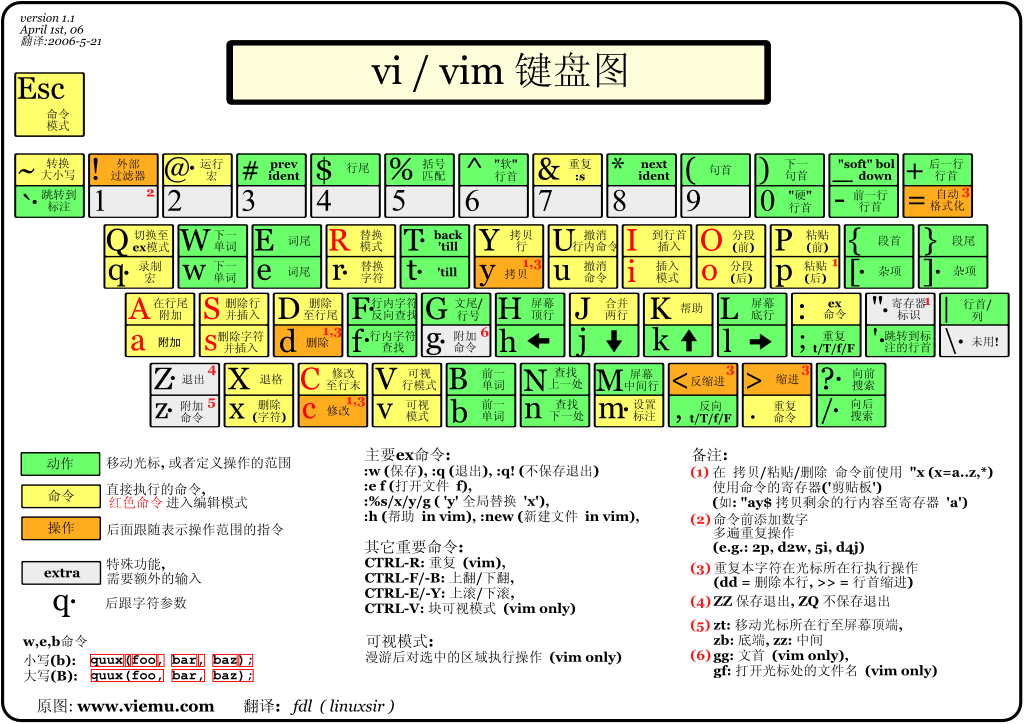
------ UTM 虚拟机
2025-08
MacBook Pro 2018 (Intel + AMD GPU) x86_64
- 在 UTM 安装 Linux 虚拟机
参考 https://www.tongyi.com/qianwen/?sessionId=e4e3643aac5f497096256d70a4432775 下载 https://www.releases.ubuntu.com/22.04/ ubuntu-22.04.5-live-server-amd64.iso . 使用 server 版本 没有图形界面 占资源少.
- Create a New Virtual Machine -> Virtualize -> Linux -> 加载下载的 Ubuntu ISO 镜像
- 分配: 内存 8G, 存储(Storage) 64G . 设置 Shared Directory, 取名 Ubuntu22 .
- 点击 Play 图标, 运行 Ubuntu ISO 镜像. 选择 Try or Install Ubuntu Server .
- 安装 Ubuntu 操作系统
复选框 括号里的 x 表示选中, 使用 空格 来取消选中.
- 如果你的网络可能不顺畅,选择 "Ubuntu Server (minimized)" 并且不勾选 "Search for third-party drivers" 选项.
- 在 Proxy address 里留空.
- 在 Storage configuration 步骤的 “Confirm destructive action” 提示框, 选择“Continue”.
- 在 SSH configuration 里, 可以先不选 Install OpenSSH server .
- 在 "Featured server snaps" 界面, 都不选择.
- 在 “Installation complete!” 界面, 选择 [Reboot Now] 来重启计算机
- 遇到 “Failed unmounting /cdrom” 错误, 进入 UTM - Ubuntu22 界面 末尾的 CD/DVD 取消选择 Ubuntu ISO 镜像. 确认安装介质已经移除后,按照屏幕上的提示按 Enter 键。系统会尝试再次卸载 /cdrom 并继续启动过程。
- 到 Ubuntu 22.04.5 LTS hua tty1 界面, 表示安装完成, 主机名为 "hua".
- 在 hua login: 提示符后 输入你的用户名. 如果创建了一个名为 "hua" 的用户,那么你应该输入 hua 以及后续的密码.
utm 虚拟机 设置了 shared directory , 怎么在 虚拟机 里实际访问这个目录的内容?
剪贴板共享, 这样设置 不可行: 关掉虚拟机 在 UTM 里 右键 → Sharing → 勾选 Enable Clipboard Sharing 或者 右键 → Edit → Display → Spice(qxl). 需要改用 SSH 连接.
操作虚拟机:
# 安装 ssh
sudo apt update
sudo apt install openssh-server
sudo systemctl enable ssh
sudo systemctl start ssh
# 在 mac 电脑终端里 登录 Ubuntu 虚拟机
# 通过 ip addr show 查看虚拟机的 IP 地址, 显示为 inet 192.168.64.3/24 metric...
ssh hua@192.168.64.3
# 虚拟机里 翻墙:
# 在 clashx 里 copy shell command 获取的 export https_proxy=http://127.0.0.1...
# 使用 ifconfig 获取 ip 比如 192.168.64.1 替换 127.0.0.1 如下:
export https_proxy=http://192.168.64.1:7890 http_proxy=http://192.168.64.1:7890 all_proxy=socks5://192.168.64.1:7890usb 充电线 输入为 5v1a 时, 末尾分叉为多个头 每个头的输出是多少? 2025-08-08
有两个表情图片 没有删除的地方, 但在 微信和 QQ 的表情选择里 都能看到. 是存放在哪里的? 怎么能删除掉? 2025-06-13
最新发布的 iPad OS 26 能用来写代码? 能安装 vscode terminal 等软件吗? 2025-06-11
2025-05-15 手机控制电脑ppt https://github.com/Rico00121/decktap
Win系统安装盘、系统下载地址,电脑开机(按F12)设置U盘优先启动。 2024-04
小米多看电纸书一代、安装app方法 iPhone 恢复出厂设置后,系统软件版本是 iOS 最新版 不是出厂时旧版本。 连接数据线恢复备份的文件后,各个第三方app仍然需要重新下载、如有卡死状态 用手机网络 先下载重要app 其他暂停. 2022-09
2019 支持 Mac + Win 读写的U盘格式: exFAT FAT32 NTFS(软件 ntfstool / ParagonNTFS )
Android 软件: MX播放器(VLC不能播放加密文件) AirDroid 微动手势(允许后台弹出界面和显示悬浮窗), automate,, kwgt, popup widget, macrodroid, tasker(收费), easytouch, anywhere . 反编译apk: apktool/dex2jar/jd-gui/javadecompilers
iOS 快捷指令
- 同步: Apple ID -> iCloud -> 使用iCloud的APP -> 显示全部 找到 快捷指令 勾选同步。
- 朗读的 声音大小和siri一样,不受设置里声音大小的控制,通过设置 Siri 的声音来控制。
2021 ~ 2025
https://github.com/modstart-lib/linkandroid
------ scrcpy adb
电脑控制手机 https://www.zhihu.com/question/46795475 、 anydesk 体验不错、但不能远程操作iPhone,国产抄袭版 todesk 会卡死,Wormhole虫洞 利用 iPhone 的辅助功能-触控 能被三方控制功能实现远程操作、但体验很差。
- https://github.com/Genymobile/scrcpy/blob/master/doc/shortcuts.md
- https://github.com/Genymobile/scrcpy/blob/master/doc/connection.md#tcpip-wireless
- 第一次电脑和手机需要usb线链接,手机打开“开发者选项和usb调试”。
- 手机开发者选项: 建议打开 停用adb授权超时功能(disable ADB authorization timeout)。
# scrcpy --tcpip  # 插入usb线时、先设置无线连接,之后不用插入usb线、通过具体ip地址链接。
# scrcpy --tcpip=10.94.62.181  # 如果ip正确但也连不上 删掉ip 插上线。
scrcpy --shortcut-mod=lctrl --stay-awake --turn-screen-off -m1024 -b2M --tcpip=10.94.62.181- 其他选项 --select-usb --max-fps 15 --max-size 960
- 快捷键: ctrl p(开电源) o(关屏幕) h(主屏幕) ↑(音量) nn(通知/设置)
- 其他 https://github.com/Uj947nXmRqV2nRaWshKtHzTvckUUpD/ethernally
adb 自动化: https://blog.ferstar.org/post/use-tasker-do-some-funny-things/
adb -s emulator-5554 shell input text 'my%stext'
# 如果有空格、特殊字符等, 会报错: Error: Invalid arguments for command: text usage: input ...
# 对这些字符 ( ) < > | ; & * \ ~ " ' 加上反斜杠 \ 转义, 空格用 %s 转义

# adb 解锁 android 手机
# https://stackoverflow.com/questions/30402582/how-to-verify-android-device-screen-on-or-off-using-adb-shell-command

screenState=$(adb shell dumpsys nfc | grep -e 'mScreenState=' -e 'Screen State:' | tr : = | cut -d '=' -f2)
if [ "$screenState" == "OFF_LOCKED" ] ; then
  echo "Screen is off. Turning on."
  adb shell input keyevent 26 # wakeup
  sleep 0.8
  adb shell input touchscreen swipe 540 1000 540 500 # unlock bottom->top
  sleep 0.8
  adb shell input text 0000 # pin
  echo "OK, should be on now."
else
  echo "Screen is already on. Locking."
  adb shell input keyevent 26
fi
------ AppleScript
2024
- call-another-programs-functions: Accessibility APIs NSWorkspace
- 键盘码 https://eastmanreference.com/complete-list-of-applescript-key-codes
- 菜单处理
在 bash 文件里调用 osascript
#!/bin/bash

# 显示系统通知
osascript -e 'display notification "Test message" with title "Test Notification"'

osascript -e 'tell application "Safari" to activate'
osascript -e 'activate app "Safari"'
osascript -e 'quit app "Safari"'

osascript -e 'tell application "System Events" to tell process "ClashX"
  tell menu bar item 1 of menu bar 2
    click
    key code 15 using command down
  end tell
end tell
'

# https://apple.stackexchange.com/questions/103621/run-applescript-from-bash-script
osascript <<EOD
  tell application "Google Chrome"
    activate
  end tell
EOD
------ Android kwgt
2025
KWGT 默认刷新间隔为每分钟一次,可在 全局设置 中,将 更新间隔 调整为 1秒, 但会导致 手机耗电 过度. 所以 小组件的 秒数 不能直接显示出来, 能怎么做? https://chat.deepseek.com/a/chat/s/fc16fdf3-c934-4446-9e30-91f821899648 https://www.douban.com/group/topic/243177384 2025-03
kwgt kustom 能用 JavaScript 编程的方式做小组件吗? 哪里有比较丰富的 widgets 市场或集合, 可以直接下载使用? 2025-03-04
------ Android automate
2023 2024
https://llamalab.com/automate/
权限设置:开启无障碍 允许后台弹出界面 显示悬浮窗 桌面快捷方式。 添加桌面图标:在flow beginning里 install home screen shortcut
语法:
拼接变量 "my string" ++ myVar 或 mystring{myVar}。
正则表达式(java版本): matches(txt, "(?s)\\s*+(?:https?://)?+(?:www\\.)?+(?:m\\.)?+(.+?)/?+\\s*+")[1]。
函数: contains(txt, "https://") 等。
Content view 组件的 Content MIME type: video/mp4 等类型。
一些 APP 的 Package 和 Activity class:
com.android.chrome / com.google.android.apps.chrome.Main
社区优秀应用:Search Engine 、 Tab Browser 、 Text to Speech 、Web dialogs (inspect layout, better support) 、 Microsoft Rewards Auto-Search
- 直接打开 天猫精灵-我的设备 页面: 使用 App start 组件,package 选择
com.alibaba.ailabs.tgActivity class 选择com.alibaba.ailabs.tg.home.MyIotHomeActivity - 亮度升高: set screen brightness 为 0.4,因为 小米改动了系统默认亮度、这里0.5是最亮的。
- 复制日期时间: 设置变量 dt "{Now;dateFormat;yyyy-MM-dd_HH-mm}" 设置 clipboard 为 dt。
--- 通过分享使用 百度/Google 搜索:
情况分析:
- 从普通软件分享的文字是
你好这样的纯文本。 - 从 edge 浏览器bing网站菜单栏的“分享按钮”直接点击分享的文字是
https://cn.bing.com/search?q=test&qs=HS这种纯粹的url。 - 从 edge 浏览器bing搜索结果网页内选中文字后、弹出的分享按钮点击是
"你好" https://cn.bing.com/search?q=test&qs=HS这种 纯文本+URL,需要去掉其中的链接。
实现:
- 使用 Content shared 组件,设置 Content MIME type 为 Any / Text,Content text 为 txt。
- 上一步 txt 值可能是
纯文本、纯文本+URL、纯URL三者中的某一种,使用 Expression true 组件来做 if 判断。- 先判断是否为http开头的纯URL、if语句为
#txt < 4 ? 0 : slice(txt, 0, 4) = "http"如果值为真、这时只是bing(或者你自己的默认)搜索引擎链接,用表达式matches(txt, ".*([?&])q=(.*?)&.*")[1]提取 url 后边的 q 参数值。 - 否则再判断是否是
纯文本+URL(注意文本和URL之间有换行符),设置中间变量 txt1 为matches(txt, "\"(.*)\"([\\s\\S]*)http.*")[1]这个正则能匹配换行符、并提取出了其中的纯文本文字。 - 再使用 Expression true 组件判断
txt1 != ""值为真、则使用 Variable set 组件、设置 txt 为 txt1。不为真、则是纯文本的情况、直接返回 txt 即可。
- 先判断是否为http开头的纯URL、if语句为
- 最终打开的链接:
"https://www.google.com/search?q=" ++ txt和"https://www.baidu.com/s?wd=" ++ txt
--- 处理 onedriver 里 txt 文件:
使用 Dialog choice 组件,在 Choices 输入框输入
{
  "content://com.microsoft.skydrive.content.external/Drive/ID/1/Item/RID/4B2D0681F143BB23%216901/Stream/1/Property/_life.txt": "life",
  "content://com.microsoft.skydrive.content.external/Drive/ID/1/Item/RID/4B2D0681F143BB23%216902/Stream/1/Property/_misc.txt": "misc"
}
勾选 Show window 选项、才能弹出弹窗。
其中 json 里的 URL 来自 小米默认浏览器 打开 onedriver txt 文件时的路径,使用这个路径、也可以在 automate 这里打开。 再使用 App start 组件,package 选择
cn.wps.moffice_eng.xiaomi.liteActivity class 选择cn.wps.moffice.plugin.app.entrance.WriterEntranceActivity
------ iOS Scriptable
2022 ~ 2023
mac scriptable scriptable docs reddit 社区 automators 社区 https://github.com/dersvenhesse/awesome-scriptable https://github.com/evilbutcher/Scriptables https://routinehub.co/
捷径汇总 https://ifttt.com/ 通过获取“智能开关、iOS提醒事项日历”等各类服务的API、再设置 if.then 逻辑、在手机上打开才能运行。注意:没有像“iOS快捷指令”app的系统权限、不能调用其他app。
iOS<=16 版本,小组件里列表内容 没有click等点击事件、只可以通过url打开Safari或其他app。
icon_themer & Fancy Icon Maker 新版 iOS 已失效。
iOS内容限制:转到“设置” > “屏幕时间” > “内容和隐私限制” > 选择“内容限制”-”网页内容“。
想要在 DevOps无限环 这个图的各个环节, 补充一些 公司内部对应的工具. 有什么可编辑的图片工具? 还能支持多次修改编辑. Figma / Canva / Excalidraw 2025-09-30
devops 中 dev 环节英语应该叫什么 https://chatgpt.com/c/689082d1-4d54-8008-b28b-6668d4e733f6 2025-08-04
代码项目的目录命名 common 和 commons 哪个更好? https://gemini.google.com/app/fd0ec4b35523c91f https://chat.deepseek.com/a/chat/s/f32465b1-6753-4abf-be2b-1edb5ea56f26 https://chatgpt.com/share/67bdc47e-88b4-8008-9094-399b0a78b555 2025-02-25
http://json-schema.org/draft-07/schema 2025-04
|- packages/ │ |─ demo/ │ |─ demo1/ |- shared/ │ |─ utils.ts |- tests/ │ |─ setupTests.ts |- typings/ │ |─ css-modules.d.ts │ |─ scss.d.ts |- .gitignore |- .npmrc |- tsconfig.json |- typings.d.ts |- vitest.config.ts 2024-lerna
bash 英语术语: Redirection Pipes
aids / facilities / Misc / Vendor / base / core data-commons / data-utils / http-utils / json-helper integration / integrate / legacy
lib - Library(库):通常包含一系列可重用的代码模块或函数集合。 common - Common(公共):存放项目中多个部分都会用到的通用函数或组件。 commons - 公共组件/方法:项目中多个部分都会用到的通用逻辑和功能。 aux 或 auxiliary - 辅助,与 helper 类似,指辅助性代码模块。 Assistants - 辅助类,帮助主程序执行操作。 helper - Helper(助手):这类文件或模块提供一些辅助性的功能函数。 Helpers - 帮助函数或模块,用于简化代码。 extensions / ext - 扩展方法:扩展已有对象或类型的额外功能函数。 tools - 工具集:各种杂项但实用的功能函数合集。 utility utilities (完整形式) - 同样指代工具函数,与 utils 含义一致 support - 支持模块:为其它主要模块提供支持性功能的代码块。 tasks / jobs - 任务/作业:用于定时任务或其他异步工作流程的模块。
logger / logging - 日志记录:用于处理日志生成和管理的模块。 core_utils - 核心工具:专用于项目核心模块的一组工具方法。 funcs / functions - 函数集:用来存储独立、非特定业务逻辑的函数。 Components - 组件类,用于构建更大的系统。 Modules - 模块类,包含一组相关的功能。 Libraries - 库,提供预定义的功能集合。 Frameworks - 框架,提供应用程序的基本结构。 Addons - 插件或附加组件,扩展主程序的功能。 Plugins - 插件,用于扩展软件的功能。 Scripts - 脚本,一系列自动化命令或程序。 Snippets - 代码片段,用于快速插入常用代码。 services - 服务层:在某些架构中,这一层封装了应用程序的核心业务逻辑和数据处理操作。 services_utils - 服务层工具:在服务层内部使用的通用功能模块。 models - 模型:在 MVC(Model-View-Controller)架构中,模型代表数据结构及相关的业务逻辑。 middlewares - 中间件:在像Express.js这样的Node框架中,中间件是指处理HTTP请求的函数序列。 io - Input/Output(输入/输出):与数据读取、写入等I/O操作相关的模块。 config - 配置:存放应用程序配置信息的模块或文件夹。 cache - 缓存:提供缓存功能,如数据缓存、HTTP请求缓存等的模块。 validators / validation - 校验器/验证:包含数据校验逻辑的模块。 exceptions - 异常处理:用来定义和处理自定义异常的模块。 consts / constants - 常量:存放程序中不会改变的值。 enums - 枚举:存储枚举类型的模块。 templates / views - 模板/视图:在Web开发中,存放HTML模板或其他类型视图文件的目录。 primitives - 基础工具:包含一些基础且常用的处理数据、字符串等的基础方法。 2024
https://evercoder.github.io/clipboard-inspector/ https://time.is https://datetime.app
like jq for markdown https://github.com/yshavit/mdq https://www.devtoolsdaily.com/jq_playground/ https://url-decode.com/all-tools
文字图 https://emojis.click/zh https://asciiflow.com/ https://ascii-tree-generator.com/
markdown 表情 👍 😄 😃 😆
艺术字
占位图
国外图片站点 https://www.pexels.com/zh-cn/ https://pixabay.com/
pdf转markdown https://github.com/MarkPDFdown/markpdfdown pdf转word: 夸克浏览器-工具 / https://www.tongyi.com/discover/convert 语音转文字 https://www.zaixianai.cn/voiceToText 拼图 https://img.ops-coffee.com/ https://nextbconvert.com/en https://tinyurl.com/
https://path-motion.yysuni.com/canvas https://www.svgshow.cn/ https://github.com/liujuntao123/new-svg-viewer
https://clipso.agilestudio.cn/
独立开发者工具 https://github.com/yaolifeng0629/Awesome-independent-tools 新闻订阅 https://github.com/sansan0/TrendRadar https://github.com/glidea/zenfeed https://github.com/w4n9hu1/hot-hub-web 白噪音 https://soundbox.fun/
- https://make-bookmarklets.com/
- 需要保存为书签
javascript:(function(){var baseUrl="https://web.archive.org/web/*/",urlmod=document.URL;window.location.href=baseUrl+urlmod;}());
PRD有三种状态:Draft、 Review、Ready, 其中起草人为产品或研发团队,相关人 review 通过。
修订记录/更新日志 修改日期 修改版本 修改内容 备注
前后端测试负责人、工作量评估。
一、需求背景 1.1 需求来源 1.2 需求描述 概念对齐/名词定义/关键术语 目标对齐 竞品调研/同类产品调研 使用场景/主要用户/试点用户
二、需求目标 产品定位 产品目标 产品能力 业务问题(业务需求)现存问题 功能一览表格 业务流程
三、结构/流程图 3.1 功能结构图 3.2 需求流程图 业务流程 -> 功能流程/任务流程 -> 页面流程 3.3 交互设计图
四、需求范围 模块 功能 优先级
五、功能性需求 详细需求 详细方案
六、非功能性需求 上线/灰度/回滚方案、兼容性、AB实验、高可用、性能、监控、权限、运维 等。
七、附录 数据分析报告、用户调研报告
------ 系分 模版
2019-11
系分(系统设计+业务分析)的本质其实就是将技术推演的过程前置,所带来的好处就是:问题可以在第一时间发现,第一时间解决,从而最大化的降低了需求变更、方案变更 所带来的沉没成本。
--- 修订历史
| 版本号 | 作者 | 内容提要 | 发布日期 |
|---|---|---|---|
| V1.0 | XX | 初稿 | 2020-10-24 |
--- 需求背景 xxxx
--- 需求目标 xxxx
--- 相关资源
- prd(@xx): XXX 交互稿(@xx): XXX 视觉稿(@xx): XXX
- 后端系分: XXX、API 列表
--- 功能分析
1.模块交互截图 2.展示要素分析 3.时序图(包含系统交互、用户行为交互)
模块A xxxx 模块B xxxx
特殊模块分析(可选) 1.特殊功能描述 2.实现思路流程图?依赖的框架、类库? 3.性能表现,是否需要降级?降级的维度:钱包版本、系统版本、小程序版本? 4.兼容性,稳定性方案
--- 监控设计 核心业务数据监控。异常监控告警。
--- 灰度方案 服务端、客户端、配置项灰度方案。
--- 应急方案 写操作熔断方案、核心模块熔断、应急提示(小黄条)
--- 埋点方案 1.页面访问埋点 2.链路行动点曝光+点击 3.特殊业务埋点
--- 技术沉淀 1.沉淀一个组件? 2.沉淀一个模板? 3.沉淀一套解决方案?
--- 项目管理
工作量评估
| 功能点 | 工作量 | 需求优先级 | 责任人 |
|---|---|---|---|
| 模块A | X天 | P0 | 小马 |
| 模块B | X天 | P0 | 小马 |
| 模块C | X天 | P1 | 小马 |
项目风险点
项目详细计划表
发布checkList
2022
@startuml
:sss;
split
   :A;
   kill
split again
   :B;
   detach
split again
   :C;
   kill
end split
@enduml
@startuml
title 无分支条件
[*] --> active
active -right-> inactive : disable
inactive -left-> active : enable
inactive --> closed : close
active --> closed : close
closed --> [*]
@enduml@startuml
left to right direction
'top to bottom direction
rectangle Arrows
rectangle C
rectangle D
rectangle E
Arrows --> C
Arrows --> D
Arrows --[hidden]> E
@enduml@startuml
left to right direction
'top to bottom direction
rectangle Arrows
note top : aaa\nbbb
rectangle A
rectangle B
rectangle C
rectangle D
rectangle E
Arrows --> A
A --> B
A --> C
Arrows -u-> D
Arrows -u-> E
Arrows -u-> F
@enduml@startuml
left to right direction
rectangle ima as "Issues Management" #lightgreen
rectangle qac as "Quick Access"
rectangle jse as "JS Overview \n [[https://baidu.com JS Error List]]"
rectangle req as "Request Overview \n [[https://baidu.com Error Request List]]"
rectangle res as "Resource Overview \n [[https://baidu.com Error Resource List]]"
rectangle per as "Performance Overview \n [[https://baidu.com Worst Performing Pages]]"
qac --> ima : direct link to
jse --> ima : manage issues
req --> ima : manage issues
res --> ima : manage issues
per --> ima : manage issues
@enduml@startuml
!$rfcs = "进入 apm_web_rfcs 空间"
!$coll = "收集需求"
!$new = "新建需求\n添加基本描述"
!$rc = "选择 slard/apmplus 空间,同步创建新需求 或关联已有需求"
!$entr = "进入 slard/apmplus 空间"
!$main = '在 slard/apmplus 空间做需求管理 \n 会 <u>自动同步</u> 部分状态变更 到 rfcs 空间的相应需求'
!$fm = "在 slard/apmplus 空间完成 线上验收"
!$fr = "rfcs 空间相应需求 手动再确认"
!$stop = "终止"
rectangle $coll #A9DCDF
rectangle frr as "$fr" #lightgreen
rectangle $stop #ddd
:Actor: -u-> $coll : bp/oncall
$coll -r-> ($new) : $rfcs
($new) -r-> ($rc) : 转为正式需求
($new) -d-> ($stop) : 伪需求
($rc) -d-> ($main) : $entr
($main) -d-> frr : $fm
@enduml' a 不能变成 :a:
a -> b
if "a" then
-->[true] "Some Action"
else
->[false] "Something else"
endif'甘特图
@startgantt
/'
单行注释、放在 单引号之间,多行注释前后加斜杠
[正式上线] lasts 1 day and starts at 2020/03/20
'/
'skinparam classFontSize 10'
scale 2
project starts the 2019/12/16
saturday are closed
sunday are closed
2020/01/01 is closed
2020/01/22 to 2020/02/02 is closed
2019/12/16 to 2019/12/30 are named [十二月]
2020/01/01 to 2020/01/31 are named [一月]
'2020/02/01 to 2020/02/30 are named [二月]'
-- 开发阶段(灰色背景是节假日、不计入总时间) --
[环境准备] as [hj] lasts 2 days and is colored in Lavender/LightBlue
then [首页 3d] lasts 3 days
[流程管理 4d] as [lc] lasts 4 days
[hj] -> [lc]
[<size:13><b>交付中心 <color:red>11d] as [jf] lasts 11 days
[jf] starts at [lc]'s end and is colored in Yellow/Green
[列表 3d] lasts 3 days and starts at [jf]'s start
[大图 3d] lasts 3 days and starts at [jf]'s start
[明细 3d] lasts 3 days and starts at [jf]'s start
[大图 3d] lasts 3 days and starts at [jf]'s start
[任务 3d] lasts 3 days and starts at [jf]'s start
[权限 5d] as [qx] lasts 5 days and starts at [jf]'s end
-- 测试阶段 --
[集成测试 5d] as [jc] lasts 5 days and is colored in Fuchsia/FireBrick
[qx] -> [jc]
@endgantt